Optimizing MoonBit

· 7 min read
mizchi

Original author: mizchi

Published on 2026/07/09

It's great when a programming language gets faster. That's why I'm optimizing MoonBit.

By the way, what is the boundary between AI Slop and something that's not? In my opinion, when there is a clear specification, complying with it, or improving performance and security without changing the API contract, is something that doesn't hurt anyone, so it's relatively easy to do.

When crossing boundaries in human communities, sending something you don't understand is out of the question. You need to provide observed measurement values as persuasive material. Anyway, the important thing is to measure.

That's why, recently, I've been submitting PRs to MoonBit's standard library, moonbitlang/core.

Pull requests · moonbitlang/core

moonbitlang/core

At first, I was tuning my own libraries, but midway through, I decided that tuning the core library would be faster, and since it's OSS, it has public benefit and is more worthwhile.

Here, I'll explain how I'm measuring. By the way, everyone, please join in the tuning too.

Don't Guess, Measure

I write code while periodically inserting phases of refactoring and tuning. I usually tune after about 3000 lines have accumulated since the previous tuning. (I want to quantify it more...)

Leaving slow code as is makes unit tests slower and CI longer. So I think it's worth doing. There's no reason not to.

When writing MoonBit, I'll introduce the tools I'm using.

moon bench

MoonBit has moon bench built-in, which is equivalent to Rust's criterion. Since it's integrated into the language standard, it's easy to make benchmarking a habit.

ベンチマークの書き方 — MoonBit v0.10.1 ドキュメント

moon run --profile and moon test --profile

A recently added feature.

It allows taking execution profiles. On macOS, it generates profiles from xcrun xctrace ... results, so note that Xcode settings are required.

https://github.com/mizchi/moon-pprof

My own memory profiler, built on top of https://github.com/mstange/samply.

After I released this, MoonBit's --profile was released, so the roles overlap, but the data you can get is slightly different, so I'm still using it.

(I made this, then made a bunch of PRs, and then --profile appeared, so I kind of feel the core team's gaze.)

hyperfine

sharkdp / hyperfine

A language-independent CLI benchmarking tool. Since it can be applied to any language, it's convenient to learn how to use it anyway.

MoonBit's Measurement Axes

  • Operations per second (ops)
  • Memory consumption, peak memory
  • Build size

When using caches, there can be trade-offs between memory and speed, but in many cases, it's just unoptimized code mixed in. Let's squash them while profiling.

PR examples

I'll explain what I actually did from the PRs I submitted.

Example https://github.com/moonbitlang/core/pull/3620

In MoonBit (and Go language), the Karatsuba method is used for BigInt multiplication.

(I didn't know about the Karatsuba method beforehand either. I studied it as a side effect.)

This optimizes multiplication between BigInts, but it can become slower in patterns like BigInt * small integer. For example, in cases like Fibonacci functions, or in reality, it frequently appears in hash algorithms.

backendbaselinepatcheddelta
wasm255.1 ms80.2 ms-68.6%
wasm-gc93.5 ms25.2 ms-73.0%
native48.9 ms20.0 ms-59.1%
js21.2 ms22.3 msnoise

This is a problem I actually encountered while porting Git and trying to optimize sha1 calculation.

Example https://github.com/moonbitlang/core/pull/3632

JSON optimization. In lex_skip_whitespace, the control character check was allocating to a heap StringView; by changing it to a simple character code check, it sped up and reduced memory allocations.

metricbeforeafterdelta
Total alloc bytes145.13 MB107.37 MB−26.0 %
Total #allocations13.15 M9.85 M−25.1 %
StringView::view32.62 MB7.44 MB−77.2 %
String::view12.59 MB0gone

Example https://github.com/moonbitlang/core/pull/3711

Speed up Array::sort by skipping index bounds checks.

casebeforeafter
sort n=100052.8 µs8.6 µs6.1x
sort n=1000008.65 ms3.88 ms2.2x
sort_by n=10000801 µs280 µs2.9x

Currently Hot: Around SIMD

With MoonBit v0.10, V128 type support was added. This enables so-called SIMD operations.

20260608 MoonBit v0.10.0 Release | MoonBit

With this, you can perform SIMD operations on 128-bit wide SIMD vectors.

i8x16   ;; 8bit integer × 16 lane
i16x8   ;; 16bit integer × 8 lane
i32x4   ;; 32bit integer × 4 lane
i64x2   ;; 64bit integer × 2 lane
f32x4   ;; 32bit float × 4 lane
f64x2   ;; 64bit float × 2 lane

It can be used as Arm's NEON extension or x86's SSE extension in native environments, and MoonBit's V128 type uses these.

SIMD is something that clearly differentiates from JS in WebAssembly environments. TC39 has decided that JS does not support SIMD, so in JS, it can only fall back to equivalent slow processing.

Just using this doesn't speed up everything, but in applicable cases, it dramatically speeds things up. From experience, applicable cases speed up by about 5 to 25 times.

The V128 type is a feature I requested, and as soon as v128 was added to the nightly build, I was making libraries on my own.

Request: wasm SIMD (v128) support in Dwarfsm inline WAT parser · Issue #3228 · moonbitlang/core mizchi / simd

The reason I'm introducing this is that since it's a newly added experimental feature, there is still a lot of room to rewrite the moonbitlang/core implementation itself with V128.

I also tuned some small parts.

perf(v128): optimize packed loads and truth checks by mizchi · Pull Request #3764 · moonbitlang/core

How to Find Bugs

Basically, I profile my own MoonBit code on hand.

I was taking benchmarks with this zlib port. (It's probably the library with the most downloads among libraries other than the official team.)

mizchi / zlib.mbt

If the problem originates from moonbitlang/core, I include that in the scope and look for tuning opportunities.

If I tell AI to read the profiler and propose fixes, it proposes implementation candidates, so I implement them myself or have it do it. (Honestly, I often have AI do it and then work hard to catch up on the results.)

Anyway, if you provide overwhelming evidence, clear numerical evidence, it's easier to get it merged. Parts like API naming have preferences, but speed doesn't lie (as long as caching isn't involved).

Also, it's good to add edge case test cases as a bonus.

Today's AI can usually find something even with rough commands like /goal make it 10x faster than now.

From experience, in MoonBit, there is room for improvement in code like this:

  • O(n^2) double loops usually have alternative solutions
  • When the array length is known in advance, it's good to use fixed-length FixedArray(n)
  • When fine-grained structs are lined up on the heap in series, #valtype can be used
  • https://www.moonbitlang.com/blog/moonbit-value-type
  • When using immutable references to array slices, it's better to use ArrayView instead of Array, and StringView instead of String.

Let's find hotspots following the principle of "Don't guess, measure."

End

Everyone, please create MoonBit libraries and tune them. It's a great experience to see the language you use getting visibly faster.

moonbitlang/core still has a reasonable amount of room for tuning left (language spec changes haven't caught up yet), so it's rewarding.

If AI proposes an algorithm you don't know, study it while tuning.

MoonXi-net: A Deep Learning Training Framework Built with MoonBit

· 10 min read
Li Kaiwei

Original author: Li Kaiwei, Ph.D. in Computer Science and Technology, Tsinghua University.

Based on good system architecture design, MoonBit + domestic large language models + an open-source harness can implement a PyTorch-like deep learning training framework, with performance twice as fast as PyTorch. The development time was less than one month, and all of it was done in spare time.

Origin

About a month ago, a colleague complained that writing Torch training code in Python was not type-safe for all kinds of things, and that code quality could not be guaranteed. As an old-school systems programmer who has worked on systems for many years, I keenly realized: is this not another good opportunity to reinvent the wheel? Seeing that the Rust wheel-reinventing project I had pushed hard for a year had already attracted a few colleagues to join, it was time to bring out MoonBit, which I had been thinking about for a long time. As expected, my colleagues were cautious and wanted to wait and see with the new language, so I took the opportunity to propose first putting something together at home in my spare time.

First Try

It is already 2026. Even if MoonBit has the fastest compilation speed in the universe and the fastest IDE navigation, one still cannot hand-write everything line by line in the old-fashioned way. Since this was an experiment anyway, I decided to use the leading domestic large model GLM-5.1 (DeepSeek V4 and Kimi K2.6 had not been released at the time), plus the blindly chosen oh-my-opencode, and got started directly.

Here I omit ten thousand words of complaints about wrestling with the CUDA environment in WSL.

With absolutely zero personal experience in PyTorch, the large model quickly put together the first version of MNIST, which made me very excited. So I told it to continue directly with CUDA. As expected, something unexpected happened: MoonBit did not support linking CUDA, or at least I did not figure it out. No big deal, I forked a version of the open-source moon toolchain, added my epic CMakeLists.txt experience, and got it done before long. After that it was mindless vibe coding. After waiting one night, the ResNet model actually ran, using the CIFAR-10 dataset. Do not ask why I chose that; it was only because I asked DeepSeek.

The turning point also came quickly. I asked it to put together PyTorch code for the same algorithm for comparison. Not only was it one hundred times slower, but the accuracy also did not match at all. Test accuracy was only 10%, no better than random guessing. Fine, I then realized I hadn’t included the evaluation harness. So I gave it another night to optimize efficiency and accuracy. The results were much better: it ended up only about 2× slower than native Python, with acceptable accuracy.

Iteration

Once the prototype ran, it was worth bragging about to colleagues. But no one could accept code that looked like noodles. So I had an in-depth architecture discussion with DeepSeek about whether a framework written in MoonBit should use a JAX style or a Torch style. After several rounds of dialogue, I, with zero PyTorch experience, gained quite a bit of understanding of basic concepts such as model, loss, grad, optimizer, and loader. Feeling pretty confident, I waved my hand and asked the AI to go ahead and build a JAX-style framework.

While writing MoonBit, AI produced many Rust syntax hallucinations. For example, for traits with generics, it tried to add them next to the name and near interface functions, all of which were mercilessly rejected by the compiler. It even tried to write a higher-kinded lambda function, and all attempts failed. After I do not know how many obstacles, the thing it finally wrote could run, but it was still far from my expectations.

If AI were a junior colleague I was mentoring, and after so much effort it still looked like this, would you blame it or start wondering whether your expectations were too high? Taking the attitude that whoever proposes an idea should take responsibility for it, I gave up all my illusions about AI and decided to go head-to-head with the compiler myself.

Plan

I organized my thoughts. First, it could not be written as purely dynamic types like PyTorch. Instead, CPU and GPU tensors needed to be defined as different types. At the same time, the model's forward function had to be written only once and be able to generalize. Also, computing backward gradients had to be done in one sentence, like PyTorch.

Tensor Trait

Define the Tensor trait, with various computational interfaces:

trait 
trait Tensor : Add + Sub + Mul {
  fn dims(Self) -> FixedArray[Int]
  fn zeros(dims : FixedArray[Int]) -> Self
  fn scale(Self, Float) -> Self
  fn square(Self) -> Self
  fn mean(Self) -> Self
  fn scalar(Float) -> Self
  fn size(Self) -> Int
}
Tensor
:
trait Add {
  fn add(Self, Self) -> Self
}

types implementing this trait can use the + operator

Add
+
trait Sub {
  fn sub(Self, Self) -> Self
}

types implementing this trait can use the - operator

Sub
+
trait Mul {
  fn mul(Self, Self) -> Self
}

types implementing this trait can use the * operator

Mul
{
(Self) -> FixedArray[Int]
dims
(

type parameter Self

Self
) ->
type FixedArray[A]
FixedArray
[
Int
Int
]
(FixedArray[Int]) -> Self
zeros
(dims :
type FixedArray[A]
FixedArray
[
Int
Int
]) ->

type parameter Self

Self
(Self, Float) -> Self
scale
(

type parameter Self

Self
,
Float
Float
) ->

type parameter Self

Self
(Self) -> Self
square
(

type parameter Self

Self
) ->

type parameter Self

Self
(Self) -> Self
mean
(

type parameter Self

Self
) ->

type parameter Self

Self
(Float) -> Self
scalar
(
Float
Float
) ->

type parameter Self

Self
(Self) -> Int
size
(

type parameter Self

Self
) ->
Int
Int
}

Define an implementation of Tensor, such as NpArray, and implement its computational functions. Dimension checks and other functions are omitted here.

struct NpArray {
  
FixedArray[Int]
dims
:
type FixedArray[A]
FixedArray
[
Int
Int
]
FixedArray[Float]
data
:
type FixedArray[A]
FixedArray
[
Float
Float
]
} derive(
trait @debug.Debug {
  fn to_repr(Self) -> @debug.Repr
}

Trait for types that can be converted to human-readable debugging info.

Debug
)
impl
trait Add {
  fn add(Self, Self) -> Self
}

types implementing this trait can use the + operator

Add
for
struct NpArray {
  dims: FixedArray[Int]
  data: FixedArray[Float]
} derive(@debug.Debug)
NpArray
with
fn Add::add(x : NpArray, y : NpArray) -> NpArray
add
(
NpArray
x
:
struct NpArray {
  dims: FixedArray[Int]
  data: FixedArray[Float]
} derive(@debug.Debug)
NpArray
,
NpArray
y
:
struct NpArray {
  dims: FixedArray[Int]
  data: FixedArray[Float]
} derive(@debug.Debug)
NpArray
) ->
struct NpArray {
  dims: FixedArray[Int]
  data: FixedArray[Float]
} derive(@debug.Debug)
NpArray
{
let
Int
n
=
NpArray
x
.
FixedArray[Float]
data
.
fn[T] FixedArray::length(self : FixedArray[T]) -> Int

Returns the number of elements in a fixed-size array.

Parameters:

  • array : The fixed-size array whose length is to be determined.

Returns an integer representing the number of elements in the array.

Example:

test {
  let arr = FixedArray::make(3, 42)
  inspect(arr.length(), content="3")
}
length
()
{
FixedArray[Int]
dims
:
NpArray
x
.
FixedArray[Int]
dims
,
FixedArray[Float]
data
:
type FixedArray[A]
FixedArray
::
fn[T] FixedArray::makei(length : Int, value : (Int) -> T raise?) -> FixedArray[T] raise?

Creates a new fixed-size array of the specified length, where each element is initialized using a function that maps indices to values.

Parameters:

  • length : The length of the array to create. If length is less than or equal to 0, returns an empty array.
  • initializer : A function that takes an index (from 0 to length - 1) and returns a value of type T for that position.

Returns a new fixed array containing the values produced by applying the initializer function to each index.

Example:

test {
  let arr = FixedArray::makei(3, i => i * 2)
  debug_inspect(
    arr,
    content=(
      #|<FixedArray: [0, 2, 4]>
    ),
  )
}
makei
(
Int
n
, fn(
Int
i
) {
NpArray
x
.
FixedArray[Float]
data
fn[T] FixedArray::op_get(self : FixedArray[T], idx : Int) -> T

Retrieves an element at the specified index from a fixed-size array. This function implements the array indexing operator [].

Parameters:

  • array : The fixed-size array to access.
  • index : The position in the array from which to retrieve the element.

Returns the element at the specified index.

Panics if the index is out of bounds.

Example:

test {
  let arr = FixedArray::make(3, 42)
  inspect(arr[1], content="42")
}
[
i]
fn Add::add(self : Float, other : Float) -> Float

Performs addition between two single-precision floating-point numbers.

Parameters:

  • self : The first floating-point operand.
  • other : The second floating-point operand to be added to the first operand.

Returns a single-precision floating-point number representing the sum of the two operands.

Example:

test {
  let a = Float::from_double(3.14)
  let b = Float::from_double(2.86)
  let sum = a + b
  inspect(sum.to_double(), content="6")
}
+
NpArray
y
.
FixedArray[Float]
data
fn[T] FixedArray::op_get(self : FixedArray[T], idx : Int) -> T

Retrieves an element at the specified index from a fixed-size array. This function implements the array indexing operator [].

Parameters:

  • array : The fixed-size array to access.
  • index : The position in the array from which to retrieve the element.

Returns the element at the specified index.

Panics if the index is out of bounds.

Example:

test {
  let arr = FixedArray::make(3, 42)
  inspect(arr[1], content="42")
}
[
i] }) }
}

Note: broadcast computation for adding tensors of different dimensions is omitted here.

Model Forward

Define the model and implement its forward function:

struct Linear[T] {
  
T
w
:

type parameter T

T
T
b
:

type parameter T

T
} fn[T :
trait Tensor : Add + Sub + Mul {
  fn dims(Self) -> FixedArray[Int]
  fn zeros(dims : FixedArray[Int]) -> Self
  fn scale(Self, Float) -> Self
  fn square(Self) -> Self
  fn mean(Self) -> Self
  fn scalar(Float) -> Self
  fn size(Self) -> Int
}
Tensor
]
struct Linear[T] {
  w: T
  b: T
}
Linear
::
fn[T : Tensor + Add + Sub + Mul] Linear::forward(self : Linear[T], x : T) -> T
forward
(
Linear[T]
self
:
struct Linear[T] {
  w: T
  b: T
}
Self
[

type parameter T

T
],
T
x
:

type parameter T

T
) ->

type parameter T

T
{
T
x
(_ : T, _ : T) -> T
*
Linear[T]
self
.
T
w
(_ : T, _ : T) -> T
+
Linear[T]
self
.
T
b
}

Functions such as loss are similar and are omitted here.

Grad

The main event is the automatic gradient Grad[T] (formally called Automatic Differentiation).

It is a generic wrapper. T can be NpArray, a future GPUTensor implementation, or even Grad itself if second-order gradients are required.

struct Grad[T] {
  mut 
T
value
:

type parameter T

T
mut
T
grad
:

type parameter T

T
}

It can also implement the Tensor trait. Note that backpropagation happens only during backward, so the operations need to be "recorded" first. This algorithm is called tape-based autograd.

Define a tape. It is an appendable array whose contents are closures of type () -> Unit, recording the backward gradient computations to be performed later:

let 
Array[() -> Unit]
tape
:
type Array[T]

An Array is a collection of values that supports random access and can grow in size.

Array
[() ->
Unit
Unit
] =
type Array[T]

An Array is a collection of values that supports random access and can grow in size.

Array
::
fn[T] Array::new(capacity? : Int) -> Array[T]

Creates a new empty array with an optional initial capacity.

Parameters:

  • capacity : The initial capacity of the array. If 0 (default), creates an array with minimum capacity. Must be non-negative.

Returns a new empty array of type Array[T] with the specified initial capacity.

Example:

test {
  let arr : Array[Int] = Array::new(capacity=10)
  inspect(arr.length(), content="0")
  inspect(arr.capacity(), content="10")
  let arr : Array[Int] = Array::new()
  inspect(arr.length(), content="0")
}
new
()
impl[T :
trait Tensor : Add + Sub + Mul {
  fn dims(Self) -> FixedArray[Int]
  fn zeros(dims : FixedArray[Int]) -> Self
  fn scale(Self, Float) -> Self
  fn square(Self) -> Self
  fn mean(Self) -> Self
  fn scalar(Float) -> Self
  fn size(Self) -> Int
}
Tensor
]
trait Add {
  fn add(Self, Self) -> Self
}

types implementing this trait can use the + operator

Add
for
struct Grad[T] {
  mut value: T
  mut grad: T
}
Grad
[

type parameter T

T
] with
fn[T : Tensor + Add + Sub + Mul] Add::add(gx : Grad[T], gy : Grad[T]) -> Grad[T]
add
(
Grad[T]
gx
:
struct Grad[T] {
  mut value: T
  mut grad: T
}
Grad
[

type parameter T

T
],
Grad[T]
gy
:
struct Grad[T] {
  mut value: T
  mut grad: T
}
Grad
[

type parameter T

T
]) ->
struct Grad[T] {
  mut value: T
  mut grad: T
}
Grad
[

type parameter T

T
] {
let
T
value
=
Grad[T]
gx
.
T
value
(_ : T, _ : T) -> T
+
Grad[T]
gy
.
T
value
let
Grad[T]
out
= {
T
value
,
T
grad
:
T
value
.
() -> T
zeros_like
() }
let tape : Array[() -> Unit]
tape
.
fn[T] Array::push(self : Array[T], value : T) -> Unit

Adds an element to the end of the array.

If the array is at capacity, it will be reallocated.

Example

test {
  let v = []
  v.push(3)
}
push
( () =>
Grad[T]
gx
.
T
grad
=
Grad[T]
gx
.
T
grad
(_ : T, _ : T) -> T
+
Grad[T]
out
.
T
grad
) )
let tape : Array[() -> Unit]
tape
.
fn[T] Array::push(self : Array[T], value : T) -> Unit

Adds an element to the end of the array.

If the array is at capacity, it will be reallocated.

Example

test {
  let v = []
  v.push(3)
}
push
( () =>
Grad[T]
gy
.
T
grad
=
Grad[T]
gy
.
T
grad
(_ : T, _ : T) -> T
+
Grad[T]
out
.
T
grad
) )
Grad[T]
out
}

The core is this closure: () => gx.grad = gx.grad + out.grad. The key point is that the closure captures both gx and out, so gx.grad can be assigned and updated, and the value of out.grad is accessed only when the closure is called, not when it is zero.

Then implement the backward function: set the loss gradient to 1 and play the tape backward:

fn[T : 
trait Tensor : Add + Sub + Mul {
  fn dims(Self) -> FixedArray[Int]
  fn zeros(dims : FixedArray[Int]) -> Self
  fn scale(Self, Float) -> Self
  fn square(Self) -> Self
  fn mean(Self) -> Self
  fn scalar(Float) -> Self
  fn size(Self) -> Int
}
Tensor
]
struct Grad[T] {
  mut value: T
  mut grad: T
}
Grad
::
fn[T : Tensor + Add + Sub + Mul] Grad::backward(self : Grad[T]) -> Unit
backward
(
Grad[T]
self
:
struct Grad[T] {
  mut value: T
  mut grad: T
}
Grad
[

type parameter T

T
]) ->
Unit
Unit
{
Grad[T]
self
.
T
grad
=

type parameter

T
::
(Float) -> T
scalar
((1.0 :
Float
Float
))
for
Int
i
in
let tape : Array[() -> Unit]
tape
Int
.
fn[T] Array::length(self : Array[T]) -> Int

Returns the number of elements in the array.

Parameters:

  • array : The array whose length is to be determined.

Returns the number of elements in the array as an integer.

Example:

test {
  let arr : ReadOnlyArray[Int] = [1, 2, 3]
  inspect(arr.length(), content="3")
  let empty : ReadOnlyArray[Int] = []
  inspect(empty.length(), content="0")
}
length
Int
()
>..0 {
let tape : Array[() -> Unit]
tape
fn[T] Array::op_get(self : Array[T], index : Int) -> T

Retrieves an element from the array at the specified index.

Parameters:

  • array : The array to get the element from.
  • index : The position in the array from which to retrieve the element.

Returns the element at the specified index.

Throws a panic if the index is negative or greater than or equal to the length of the array.

Example:

test {
  let arr : ReadOnlyArray[Int] = [1, 2, 3]
  inspect(arr[1], content="2")
}
[
i]()
} }

Main

Finally, implement gradient descent for the complete linear model:

fn main {
  let 
Array[Float]
xs
:
type Array[T]

An Array is a collection of values that supports random access and can grow in size.

Array
[
Float
Float
] = [1.0, 2.0, 3.0, 4.0, 5.0]
let
Array[Float]
ys
:
type Array[T]

An Array is a collection of values that supports random access and can grow in size.

Array
[
Float
Float
] = [4.0, 7.0, 10.0, 13.0, 16.0]
let
Grad[NpArray]
w
:
struct Grad[T] {
  mut value: T
  mut grad: T
}
Grad
[
struct NpArray {
  dims: FixedArray[Int]
  data: FixedArray[Float]
} derive(@debug.Debug)
NpArray
] =
(Unit) -> Grad[NpArray]
no_grad
(
struct NpArray {
  dims: FixedArray[Int]
  data: FixedArray[Float]
} derive(@debug.Debug)
NpArray
::
(Float) -> Unit
scalar
((0.0 :
Float
Float
)))
let
Grad[NpArray]
b
:
struct Grad[T] {
  mut value: T
  mut grad: T
}
Grad
[
struct NpArray {
  dims: FixedArray[Int]
  data: FixedArray[Float]
} derive(@debug.Debug)
NpArray
] =
(Unit) -> Grad[NpArray]
no_grad
(
struct NpArray {
  dims: FixedArray[Int]
  data: FixedArray[Float]
} derive(@debug.Debug)
NpArray
::
(Float) -> Unit
scalar
((0.0 :
Float
Float
)))
let
Linear[Grad[NpArray]]
model
:
struct Linear[T] {
  w: T
  b: T
}
Linear
[
struct Grad[T] {
  mut value: T
  mut grad: T
}
Grad
[
struct NpArray {
  dims: FixedArray[Int]
  data: FixedArray[Float]
} derive(@debug.Debug)
NpArray
]] = {
T
w
,
T
b
}
let
Float
lr
:
Float
Float
= (0.01 :
Float
Float
)
let
Array[Grad[NpArray]]
params
:
type Array[T]

An Array is a collection of values that supports random access and can grow in size.

Array
[
struct Grad[T] {
  mut value: T
  mut grad: T
}
Grad
[
struct NpArray {
  dims: FixedArray[Int]
  data: FixedArray[Float]
} derive(@debug.Debug)
NpArray
]] = [
Linear[Grad[NpArray]]
model
.
T
w
,
Linear[Grad[NpArray]]
model
.
T
b
]
for
Int
epoch
in
Int
0
..<=100 {
for
Int
idx
in
Int
0
..<
Array[Float]
xs
.
fn[T] Array::length(self : Array[T]) -> Int

Returns the number of elements in the array.

Parameters:

  • array : The array whose length is to be determined.

Returns the number of elements in the array as an integer.

Example:

test {
  let arr : ReadOnlyArray[Int] = [1, 2, 3]
  inspect(arr.length(), content="3")
  let empty : ReadOnlyArray[Int] = []
  inspect(empty.length(), content="0")
}
length
() {
let tape : Array[() -> Unit]
tape
.
fn[T] Array::clear(self : Array[T]) -> Unit

Clears the array, removing all values.

This method has no effect on the allocated capacity of the array, only setting the length to 0.

Example

test {
  let v = [3, 4, 5]
  v.clear()
  @test.assert_eq(v.length(), 0)
}
clear
()
for
Grad[NpArray]
p
in
Array[Grad[NpArray]]
params
{
Grad[NpArray]
p
.
T
grad
=
struct NpArray {
  dims: FixedArray[Int]
  data: FixedArray[Float]
} derive(@debug.Debug)
NpArray
::
(Unit) -> NpArray
zeros
(
Grad[NpArray]
p
.
T
value
.
() -> Unit
dims
())
} let
Grad[NpArray]
x
=
(Unit) -> Grad[NpArray]
no_grad
(
struct NpArray {
  dims: FixedArray[Int]
  data: FixedArray[Float]
} derive(@debug.Debug)
NpArray
::
(Float) -> Unit
scalar
(
Array[Float]
xs
fn[T] Array::op_get(self : Array[T], index : Int) -> T

Retrieves an element from the array at the specified index.

Parameters:

  • array : The array to get the element from.
  • index : The position in the array from which to retrieve the element.

Returns the element at the specified index.

Throws a panic if the index is negative or greater than or equal to the length of the array.

Example:

test {
  let arr : ReadOnlyArray[Int] = [1, 2, 3]
  inspect(arr[1], content="2")
}
[
idx]))
let
Grad[NpArray]
y
=
(Unit) -> Grad[NpArray]
no_grad
(
struct NpArray {
  dims: FixedArray[Int]
  data: FixedArray[Float]
} derive(@debug.Debug)
NpArray
::
(Float) -> Unit
scalar
(
Array[Float]
ys
fn[T] Array::op_get(self : Array[T], index : Int) -> T

Retrieves an element from the array at the specified index.

Parameters:

  • array : The array to get the element from.
  • index : The position in the array from which to retrieve the element.

Returns the element at the specified index.

Throws a panic if the index is negative or greater than or equal to the length of the array.

Example:

test {
  let arr : ReadOnlyArray[Int] = [1, 2, 3]
  inspect(arr[1], content="2")
}
[
idx]))
let
Grad[NpArray]
y_hat
=
Linear[Grad[NpArray]]
model
.
fn[T : Tensor + Add + Sub + Mul] Linear::forward(self : Linear[T], x : T) -> T
forward
(
Grad[NpArray]
x
)
let
Unit
loss
= (
Grad[NpArray]
y_hat
(_ : Grad[NpArray], _ : Grad[NpArray]) -> Grad[NpArray]
-
Grad[NpArray]
y
).
() -> Unit
square
()
Unit
loss
.
() -> Unit
backward
()
for
Grad[NpArray]
p
in
Array[Grad[NpArray]]
params
{
Grad[NpArray]
p
.
T
value
=
Grad[NpArray]
p
.
T
value
(_ : NpArray, _ : NpArray) -> NpArray
-
Grad[NpArray]
p
.
T
grad
.
(Float) -> NpArray
scale
(
Float
lr
)
} } } }

AI Development

With a complete prototype architecture, letting AI develop became very smooth. Basically, I gave it two or three tasks every night and checked them the next morning. Whether for feature development, performance iteration, comparative validation, or experimental reports, AI programming brought an exponential efficiency improvement compared with old-school programming. Although the overall development took a month, the time actually spent on this project was only my spare time, without affecting work or taking care of children.

Improvements

Grad Optimization

If Tensor is an input, there is no need to record grad, so Option[T], that is, T?, can be used to represent grad:

pub struct Grad[T] {
  mut value : T
  mut grad : T?
}

For parameters in large models, grad is initialized to 0. When computing gradients backward, there will be many cases of adding 0 and a gradient, wasting time and space. Therefore, add another layer of Option:

pub struct Grad[T] {
  mut value : T
  mut grad : T??
}

This gives grad three cases:

  • None => does not participate in grad computation
  • Some(None) => grad is 0
  • Some(Some(grad)) => grad is nonzero

Extending Operators

Because Tensor has already been defined, future extensions such as CNN convolution operators must define new traits:

pub(open) trait 
trait ImageTensor {
  fn conv2d(Self, weight : Self, bias : Self, stride : Int, padding : Int) -> Self
  fn relu(Self) -> Self
}
ImageTensor
{
(Self, Self, Self, Int, Int) -> Self
conv2d
(

type parameter Self

Self
, weight :

type parameter Self

Self
, bias :

type parameter Self

Self
, stride :
Int
Int
, padding :
Int
Int
) ->

type parameter Self

Self
(Self) -> Self
relu
(

type parameter Self

Self
) ->

type parameter Self

Self
// ... }

When defining the forward function for a model, the trait constraints need to be updated:

fn[T : 
trait Tensor : Add + Sub + Mul {
  fn dims(Self) -> FixedArray[Int]
  fn zeros(dims : FixedArray[Int]) -> Self
  fn scale(Self, Float) -> Self
  fn square(Self) -> Self
  fn mean(Self) -> Self
  fn scalar(Float) -> Self
  fn size(Self) -> Int
}
Tensor
+
trait ImageTensor {
  fn conv2d(Self, weight : Self, bias : Self, stride : Int, padding : Int) -> Self
  fn relu(Self) -> Self
}
ImageTensor
] Renset::
(T) -> ?
forward
(
T
x
:

type parameter T

T
) {
//... }

GPU Support

struct GPUTensor {
}

impl 
trait Add {
  fn add(Self, Self) -> Self
}

types implementing this trait can use the + operator

Add
for
struct GPUTensor {
}
GPUTensor
with
fn Add::add(x : GPUTensor, y : GPUTensor) -> GPUTensor
add
(
GPUTensor
x
:
struct GPUTensor {
}
GPUTensor
,
GPUTensor
y
:
struct GPUTensor {
}
GPUTensor
) ->
struct GPUTensor {
}
GPUTensor
{
... }

Using MoonBit's FFI feature, it is convenient to call operator interfaces such as CUDA kernels, cuBLAS, and cuDNN.

Tagless Final

Without realizing it, we had already implemented a Tagless Final architecture, which enables matrix-like flexible extension. The location of concrete function implementations can be very flexible. Other code repositories that depend on moonxi-net can also conveniently extend operators or tensor implementations. For example, this table:

Trait / backendNpArray[T]GpuTensor[T]Grad[T]
Tensornparray/impl.mbtgpu/impl.mbtgrad.mbt
BlasTensornparray/blas_impl.mbtgpu/impl.mbtgrad.mbt
ImageTensornparray/img_impl.mbtgpu/impl.mbtgrad.mbt

Shortcomings

  • The global tape needs to be reset manually and does not support second-order gradients.
  • The generic Tensor type T does not support compile-time dimension and shape checks. For this, shapeTensor was defined for runtime checks and shape inference.
  • During training, GPU memory allocation uses a pool for acceleration. This causes optimizer state and model parameters to have to be updated in place.

Experiments

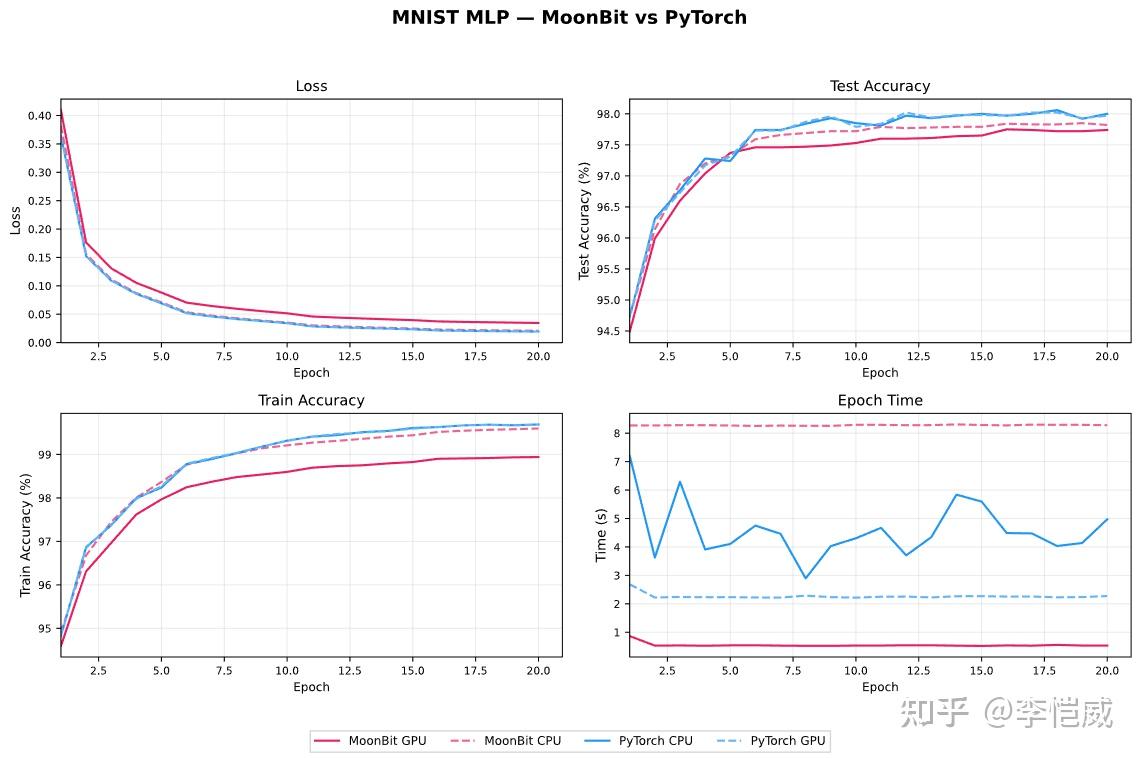
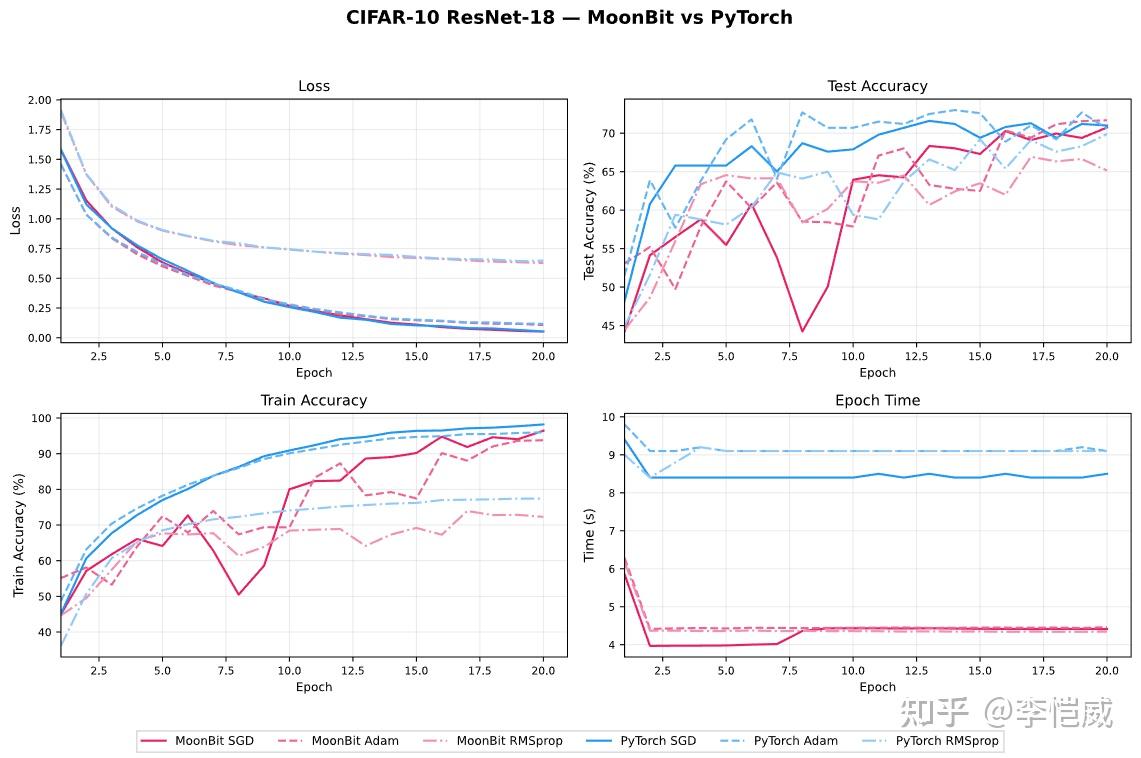
Experiments were run on MNIST digit recognition and CIFAR-10 image classification, using a 5060 laptop.

After various optimizations such as operator fusion, moonxi-net's training speed on GPU is about twice as fast as PyTorch. In convergence accuracy, it is slightly lower than the PyTorch version, which may be caused by differences in random seeds, kernel implementations, and so on, and needs further research.

Summary

moonxi-net is a deep learning training framework based on the MoonBit language, using a tagless-final architecture and referencing the PyTorch style. It has both type safety and flexible extensibility, and separates model definitions from multi-backend implementations. After operator fusion optimization, its GPU performance surpasses PyTorch. The first version of moonxi-net was completed in one month, proving the potential of the MoonBit programming language for implementing large system frameworks, while also validating that domestic models plus an open-source harness framework already have sufficient system-code development capability.

QuickCheck Tutorial Part 3

· 21 min read

This is the final installment in the QuickCheck tutorial series. It focuses on what happens after a property fails: how QuickCheck shrinks a raw failing sample, and how to tell whether the final counterexample really explains the bug.

In practice, randomized testing is only as useful as the failures it produces. A huge failing input may reveal a real defect without making it much easier to debug. A small, stable counterexample often does.

Shrinking is only part of the story. Once constrained inputs get more complicated, hand-written generators and shrinkers become harder to maintain. That leads naturally to more systematic techniques: small-scale exhaustive search, functional enumeration, and eventually inductive-relation-based approaches.

Counterexamples and Shrinking

In QuickCheck, failure is where analysis begins. Once a property fails, the question is no longer whether it failed, but why, and what the smallest failing condition is. Shrinking keeps the failure intact while compressing the sample toward the core defect.

Operationally, QuickCheck generates samples, finds a failure, and then searches for smaller failing values along a shrink tree. The property does not change, but the speed of understanding often does. A counterexample can be technically correct and still be too large to help. By contrast, a smaller counterexample that still preserves the relevant structure often points almost directly at the bug. Shrinking is therefore not a side feature of QuickCheck. Like the generator, it determines whether the testing workflow is actually usable. We will start with the Shrink trait and see how the framework models this process.

Default Shrink

Shrink is the QuickCheck trait for simplifying a value. Its core method, shrink, takes a value and returns an iterator of smaller candidates. The iterator matters because shrinking is meant to support lazy search. In many cases, we can find a smaller failing sample after checking only a few candidates, without having to enumerate all of them up front.

///|
pub trait Shrink {
  shrink(Self) -> Iter[Self]
}

For most primitive types and common container types, QuickCheck already provides default instances. So as soon as we use APIs such as @qc.quick_check_fn or @qc.Arrow, the matching shrink logic is enabled automatically. Integers tend to move toward 0, booleans shrink toward false, arrays and lists try both removing elements and shrinking elements, and tuples shrink component by component.

Let us start with the simplest case. For integers, default shrinking does not blindly enumerate every smaller value. Instead, it probes a small set of candidates that move quickly toward simpler values.

///|
test "shrink int sample" {
  json_inspect(@qc.Shrink::shrink(100), content=[99, 97, 94, 88, 75, 50, 0])
}

This already reveals the basic idea. Shrinking is guided search toward simpler values. For container types, the same pattern becomes structural: an array first tries to remove elements, and only then shrinks the entries that still matter.

Now consider a more realistic example. Suppose we write a broken removal function that deletes only the first occurrence of an element instead of removing all occurrences:

///|
fn remove_first_only(arr : Array[Int], x : Int) -> Array[Int] {
  guard arr.search(x) is Some(i) else { arr }
  arr.remove(i) |> ignore
  arr
}

///|
fn prop_remove_all(iarr : (Int, Array[Int])) -> Bool {
  let (x, arr) = iarr
  !remove_first_only(arr, x).contains(x)
}

///|
test "default shrink for tuple and array" {
  let x = @qc.quick_check_fn_silence(prop_remove_all)
  inspect(
    x,
    content=(
      #|*** [8/0/100] Failed! Falsified.
      #|(0, [0, 0, -1])
    ),
  )
}

Here quick_check_fn combines the default strategies for tuples, arrays, and integers automatically. The integer moves toward 0, while the array tries to drop irrelevant elements before shrinking the ones that still matter. The final counterexample is (0, [0, 0, -1]). That is already quite small, and it points straight at the issue: remove_first_only does not handle repeated 0s correctly.

Default shrinking works well in many common cases, but it is still a search process and cannot run forever. Both @qc.quick_check and @qc.quick_check_fn expose max_shrink / max_shrinks to cap the shrinking budget. This matters most when inputs are large and the shrink tree is wide. As always, there is an engineering trade-off between finding a smaller counterexample and getting feedback quickly.

Custom Shrink

The strength of default shrinking is that it is generic. Its weakness is the same: it knows nothing about domain invariants. As soon as an input carries extra meaning, such as "must be even", "must be non-negative", or "must stay sorted", default shrinking may produce values that are type-correct but outside the domain we actually want to test. In those cases, we need to take control of shrinking ourselves.

QuickCheck provides two directly relevant APIs:

fn[T : Testable, A : Show] @qc.forall_shrink(
  gen : @qc.Gen[A],
  shrinker : (A) -> Iter[A],
  f : (A) -> T,
) -> @qc.Property

fn[P : Testable, T] @qc.shrinking(
  shrinker : (T) -> Iter[T],
  x0 : T,
  pf : (T) -> P,
) -> @qc.Property

forall_shrink means: once a generator is fixed, explicitly define how generated values should shrink. shrinking is lower-level. It does not use random generation at all; instead, it starts from a concrete value and searches downward through the candidates produced by a shrinker. The former is the usual tool for day-to-day property testing. The latter is useful when we want to debug the shrinker itself.

Here is a simple example. Suppose the input domain is "non-negative even integers". If shrinking starts producing odd numbers, then it has already left the intended domain. One easy fix is to start from the default integer shrinker and filter it back into that domain:

///|
fn shrink_even_nat(x : Int) -> Iter[Int] {
  @qc.Shrink::shrink(x).filter(fn(y) { y >= 0 && y % 2 == 0 })
}

///|
test "forall_shrink keeps even invariant" {
  let gen = @qc.int_range(0, 100).fmap(fn(x) { x * 2 })
  let prop = @qc.forall_shrink(gen, shrink_even_nat, fn(x) { x < 20 })
  @qc.quick_check(prop, expect=Fail)
}

Here the generator only produces even numbers, and the custom shrinker ensures that shrinking never leaves that domain. If we used the default Int shrinker directly, QuickCheck would still find smaller counterexamples, but it would walk through many odd values on the way. Those values are type-valid, but they are not part of the input space we care about. A counterexample can be smaller and still be harder to interpret.

shrinking is useful for more local inspection. If we suspect a shrinker is behaving badly, we can bypass random generation and start from a concrete failing value:

///|
test "shrinking starts from explicit value" {
  let prop = @qc.shrinking(shrink_even_nat, 84, fn(x) { x < 20 })
  @qc.quick_check(prop, expect=Fail)
}

The value of this style is that it separates generation from shrinking. Once a property is already known to fail, we can pin down a concrete failing sample and ask whether the shrinker really drives it toward the business-level minimum we expect. This matters most for complex structures. Often the hard part is not the generator, but understanding why the final counterexample is still larger than it should be. In practice, forall_shrink is the API we use most often, or we pass the trait instance explicitly through a newtype wrapper.

Structure-Preserving Shrink

Constrained structures make the problem harder again. In Part 2, we already saw examples such as sorted arrays, BSTs, and balanced trees. These inputs come with explicit invariants. If shrinking breaks those invariants, a perfectly good failing sample can be reduced into an input that should never have existed at all. When that happens, the counterexample becomes much less informative.

Take a sorted array. Default array shrinking does two things: it removes elements and shrinks element values. That is sensible for ordinary arrays. But for sorted arrays, shrinking a value can easily break the global ordering invariant. We could try to patch this with filters, but that usually wastes many candidates and performs badly. The better approach is to preserve sortedness directly inside the shrinker, so both "remove an element" and "make an element smaller" are checked for legality as part of the shrink process:

///|
pub fn[T : @qc.Shrink + Compare] shrink_sorted_array(
  xs : Array[T],
  lo~ : T,
  hi~ : T,
) -> Iter[Array[T]] {
  let shrink_one_val = (nv : Array[T]) => {
    let l = nv.length() - 1
    Array::makei(l + 1, i => i)
    .iter()
    .flat_map(i => {
      let lo = if i == 0 { lo } else { nv[i - 1] }
      let hi = if i == l { hi } else { nv[i + 1] }
      @qc.Shrink::shrink(nv[i]).flat_map(x => {
        if lo <= x && x <= hi && x != nv[i] {
          let nv1 = nv.copy()
          nv1[i] = x
          Iter::singleton(nv1)
        } else {
          Iter::empty()
        }
      })
    })
  }
  let remove_one_val = (v : Array[T]) => {
    let l = v.length() - 1
    Array::makei(l + 1, i => i)
    .iter()
    .flat_map(i => {
      let nv = v.copy()
      nv.remove(i) |> ignore
      Iter::singleton(nv)
    })
  }
  remove_one_val(xs).concat(shrink_one_val(xs))
}

This code illustrates an important principle. For constrained structures, "smaller" is not enough. What we actually need is "smaller and still valid". Otherwise the shrinker may reduce the literal size of the sample while silently changing the question from "the algorithm fails on a legal input" to "the algorithm fails on an illegal input". That kind of counterexample is much less useful.

///|
test "shrink sorted array" {
  let s = shrink_sorted_array([1, 3, 5], lo=0, hi=9)
  inspect(
    s,
    content=(
      #|[[3, 5], [1, 5], [1, 3], [0, 3, 5], [1, 2, 5], [1, 3, 4], [1, 3, 3]]
    ),
  )
}

Once we attach this shrinker to a property, we get a shrinking process that preserves sortedness all the way down:

///|
test "forall_shrink for sorted array" {
  let gen = @qc.sorted_array(6, @qc.int_range(0, 9))
  let prop = @qc.forall_shrink(gen, x => shrink_sorted_array(x, lo=0, hi=10), fn(
    xs,
  ) {
    xs.length() < 3
  })
  let r = @qc.quick_check_silence(prop)
  inspect(
    r,
    content=(
      #|*** [0/0/100] Failed! Falsified.
      #|[0, 0, 0]
    ),
  )
}

The property here is intentionally simple, but it still shows why structure-preserving shrinking matters. The generator always produces sorted arrays of length 6, and the shrinker keeps trying to remove elements and shrink values until it reaches a smaller failing sample that is still sorted. In this case, [0, 0, 0] is already a very small counterexample, and it points directly at the core issue in the property: the length bound on sorted arrays.

The same idea applies to the BST example from Part 2. If a BST is built through a path such as "array -> insert -> tree", then the most robust shrink strategy is often not to shrink tree nodes directly. Instead, we go back to the original representation, shrink the array, and rebuild the tree with from_array or from_sorted. The advantage is that generation and shrinking now share the same structural meaning, which makes invariants easier to preserve and counterexamples easier to explain.

Failure and Distribution

Failure Messages

Shrinking gives us a smaller counterexample, but smaller does not automatically mean clearer. In many cases, the hard part is not finding the bug. It is understanding what the counterexample means in domain terms. We may see that an array or a tree fails, yet still have no idea which state transition mattered or which derived condition triggered the failure. If we only print the raw input, the reader still has to reconstruct those facts by hand.

QuickCheck provides the combinator counterexample for exactly this reason. It does not change whether the property holds. It only attaches extra information to the failure output. That lets us print derived values alongside the input itself: intermediate results, specification outputs, normalized forms, path tags, or anything else that makes the failure easier to read.

///|
test "counterexample adds derived information" {
  let prop = @qc.forall(@qc.pure((0, [0, 0, -1])), fn(iarr) {
    let (x, arr) = iarr
    let out = remove_first_only(arr.copy(), x)
    @qc.counterexample(!out.contains(x), "after remove: \{out}")
  })
  let r = @qc.quick_check_silence(prop)
  inspect(
    r,
    content=(
      #|*** [0/0/100] Failed! Falsified.
      #|(0, [0, 0, -1])
      #|after remove: [0, -1]
    ),
  )
}

In this example, the raw input (0, [0, 0, -1]) is already small. But without the extra line after remove: [0, -1], the reader still has to simulate the function mentally before noticing that one 0 remains.

This technique is especially useful in model-based testing and compiler testing. We often want to print both expected and actual, a normalized state, or a compact summary of an interpreter trace. Once a property becomes complicated enough, the failure output is really a small debugging report rather than a bare input sample.

Classification Statistics

Failure messages help us interpret a single counterexample. Classification statistics answer a different question: what does the overall sample distribution look like? Even if a property keeps passing, we should not relax too early. The generator may be spending most of its budget on a dull class of inputs, or it may be missing the branches we actually care about. If that distribution stays invisible, "random coverage" can easily become wishful thinking.

QuickCheck provides three common tools for inspecting sampled data: label, classify, and collect. label is useful when each sample should carry a single textual tag. classify is useful when we want to split samples into a few domain-level categories. collect is more general: it takes any Show value and records it as a tag. In practice, classify is often the best starting point because it quickly shows whether the categories we care about are appearing at all.

///|
fn t3_prop_rev_list(xs : @list.List[Int]) -> Bool {
  xs.rev().rev() == xs
}

///|
test "classify list distribution" {
  let r = @qc.quick_check_silence(
    @qc.Arrow(fn(xs : @list.List[Int]) {
      @qc.Arrow(t3_prop_rev_list)
      |> @qc.classify(xs.length() > 5, "long list")
      |> @qc.classify(xs.length() <= 5, "short list")
    }),
  )
  inspect(
    r,
    content=(
      #|+++ [100/0/100] Ok, passed!
      #|21% : short list
      #|79% : long list
    ),
  )
}

The interesting part of this output is not that the property passed. It is that the default generator is clearly biased toward longer lists. If we care about edge cases on empty, singleton, or very short lists, then this output already tells us that the default distribution is probably not enough and the generator needs adjustment.

label and collect work in the same general way, but at a different level of granularity. For example, we could use label("length is \{xs.length()}") to track a textual bucket for each length, or collect(xs.length()) to gather the raw length value directly. As a rule of thumb, classify is better for tutorials and routine regression tests because the categories are stable and easy to read. label and collect are more useful when we are actively tuning a generator and want a finer view of its behavior.

Discard Analysis

One distribution issue that is especially easy to miss is discard. When we use @qc.filter, preconditions, or guards around partial functions, many samples may be thrown away before the property is even evaluated. A small amount of discard is normal. But if discard remains high, it usually means we pushed constrained-input generation into the property body, and filtering is often the wrong tool for that job.

Consider a mild example. Suppose we only want to test non-empty lists, so we add a filter on top of the default list generator:

///|
test "discard on non-empty lists" {
  let prop_non_empty = fn(xs : @list.List[Int]) -> @qc.Property {
    (!xs.is_empty()) |> @qc.filter(!xs.is_empty())
  }
  inspect(
    @qc.quick_check_silence(@qc.Arrow(prop_non_empty)),
    content="+++ [100/40/100] Ok, passed!",
  )
}

The property passes, but 40 samples were thrown away. That means the framework had to do extra useless work just to obtain 100 valid samples. If the precondition were any sparser, the waste would grow quickly.

In the extreme case, the test may give up entirely:

///|
test "reject all gives up" {
  let prop_reject = fn(_x : Int) { @qc.filter(true, false) }
  inspect(
    @qc.quick_check_silence(@qc.Arrow(prop_reject), expect=GaveUp),
    content="+++ [0/1000/100] Ok, gave up!",
  )
}

This example is obviously artificial, but it captures the meaning of discard precisely. QuickCheck is not saying the property failed. It is saying that it could not obtain enough valid samples to run the test in a meaningful way, so it had to stop. So when we see gave up in a real project, or when discard stays high for a long time, the first thing to question is usually not the property itself. The real issue is often a structural mismatch between the generator and the precondition. In those cases, the first fix is usually to move as much of the constraint as possible into the generator instead of encoding it as a filter. That is exactly why Part 2 kept stressing the same point: put constraints in the generator whenever possible, not in the filter.

SmallCheck

So far, most of the discussion has stayed inside the QuickCheck model of randomized testing: sample values, then shrink the failing ones. SmallCheck takes a different route. If a class of inputs has a natural small-to-large order, we can test a small prefix of that space directly. The goal is not probabilistic coverage, but a search space that is reproducible, exhaustible, and easy to explain.

In MoonBit QuickCheck, the entry point small_check looks similar to quick_check, but it relies on a completely different capability:

pub fn[A : @feat.Enumerable + Show, B : Testable] @qc.small_check(
  f : (A) -> B,
  max_size? : Int,
  expect? : Expected,
  abort? : Bool,
) -> Unit raise Failure

The constraint here is not Arbitrary + Shrink, but Enumerable. SmallCheck is not asking how to sample one random value. It is asking how to arrange all values of a type in a small-to-large order. Once that order is well designed, the test becomes deterministic: the same max_size and the same property always explore the same prefix.

///|
test "small check fails on first non-zero int" {
  let r = @qc.small_check_silence(fn(x : Int) { x == 0 }, max_size=5)
  inspect(
    r,
    content=(
      #|*** [1/0/5] Failed! Falsified.
      #|1
    ),
  )
}

This result shows the workflow directly. For the default Enumerable instance of Int, the earliest values are 0, 1, -1, 2, -2, ..., so the property x == 0 fails immediately on the second sample, 1. That is also why SmallCheck often produces useful counterexamples without a separate shrinking phase.

One extra detail matters here. Classical SmallCheck is often presented in terms of a depth bound. The implementation here is closer to an enumeration-prefix model: max_size controls how many values are tested in the current run, and those values come from the ordered enumeration defined by Enumerable. Whether SmallCheck really explores the space from small to large therefore depends on the quality of the enumerator.

Enumerator Design

If SmallCheck is about enumerating small values, then the central question becomes obvious: what makes an enumerator well designed? In MoonBit, that information lives in the Enumerable trait:

pub(open) trait Enumerable {
  enumerate() -> @feat.Enumerate[Self]
}

pub fn[T] @feat.Enumerate::en_index(Self[T], BigInt) -> T

A good enumerator should satisfy at least three conditions. First, it should avoid duplicates. Otherwise the supposedly exhaustive prefix wastes budget revisiting the same values. Second, each size layer should be finite. Otherwise SmallCheck can get stuck on one layer forever and never reach larger values. Third, the enumeration order should track a reasonable notion of complexity, so that early values really do look like the small samples we want to prioritize.

The second point is especially important for recursive data types. If recursion does not increase cost, then a type such as the natural numbers collapses infinitely many values into the same layer. That breaks part-finiteness and can make enumeration diverge. This is exactly why Feat-style enumerators include an explicit pay operation: each recursive constructor application moves the value into the next layer.

///|
enum PeanoNat {
  PZero
  PSucc(PeanoNat)
} derive(Show, Eq)

///|
impl @feat.Enumerable for PeanoNat with enumerate() {
  @feat.pay(fn() {
    @feat.singleton(PZero) +
    @feat.Enumerable::enumerate().fmap(fn(n) { PeanoNat::PSucc(n) })
  })
}

///|
test "peano enumerate order" {
  let e : @feat.Enumerate[PeanoNat] = @feat.Enumerable::enumerate()
  let xs = [0N, 1, 2, 3, 4].map(fn(i) { e.en_index(i) })
  inspect(
    xs,
    content="[PZero, PSucc(PZero), PSucc(PSucc(PZero)), PSucc(PSucc(PSucc(PZero))), PSucc(PSucc(PSucc(PSucc(PZero))))]",
  )
}

Although this definition is short, it already shows the basic discipline of enumerator design. @feat.singleton(PZero) gives the base case. The recursive branch maps smaller naturals to PSucc(n) with fmap. The outer pay ensures that each extra constructor layer is deferred to the next part. Without pay, PZero, PSucc(PZero), PSucc(PSucc(PZero)), ... would all collapse into the same part, and SmallCheck would not be able to finish enumerating that layer in principle.

For more complicated data types, the overall pattern is still fairly mechanical. Nullary constructors are usually expressed with singleton. Unary constructors often use fmap directly. Multi-argument constructors are built by enumerating tuples or products and then mapping them back to the real constructor. If a type has multiple constructors, consts or union can combine them. The goal is not to make the code short. It is to keep the construction process aligned with the meaning of the data, so the enumeration remains duplicate-free and layered by complexity.

The Feat Style

The Enumerable interface above is not ad hoc. It is essentially MoonBit’s realization of the functional-enumeration approach from Feat: Functional Enumeration of Algebraic Types. Instead of treating a type as one long linear list of values, Feat represents it as a sequence of finite parts grouped by size. Each part carries two key pieces of information: its cardinality and an indexing function.

MoonBit’s current implementation follows exactly that shape. Internally, Enumerate[T] is a lazy stream of parts, and each Finite[T] carries two consumers, fCard and fIndex. That makes the behavior of global indexing via en_index quite clear. The implementation does not generate every earlier value one by one. Instead, it skips whole parts using their cardinalities, then indexes directly inside the part that contains the requested value. This is the "function view" from the paper, and it is fundamentally different from the list view used in many SmallCheck-style implementations.

That design has two immediate benefits. First, enumeration is not limited to scanning from the front; it also supports random access. Second, the same enumerator can support multiple testing strategies, including prefix enumeration and size-bounded random sampling through APIs such as @qc.Gen::feat_random. In that sense, Feat is not a separate testing framework. It is a shared data-generation substrate.

From the paper’s perspective, this is also the main way Feat improves on traditional SmallCheck. Classical SmallCheck often relies on constructor depth, but depth is not always a good proxy for semantic complexity. Functional enumeration instead encodes "smallness" directly into the construction of parts. For mutually recursive ASTs, syntax trees, and the sum-of-products structures common in type-system tooling, that style of layering is usually more stable and easier to compose mechanically than a plain depth bound.

Using SmallCheck in Practice

Once the enumerator is in place, using SmallCheck is straightforward. We decide what should count as "small", encode that order into Enumerable, and then let small_check verify a prefix of the sequence. At that point, test quality depends far less on the random seed and far more on the enumeration order.

///|
test "small check on peano prefix" {
  let r = @qc.small_check_silence(fn(n : PeanoNat) { n == PZero }, max_size=5)
  inspect(
    r,
    content=(
      #|*** [1/0/5] Failed! Falsified.
      #|PSucc(PZero)
    ),
  )
}

This makes a useful contrast with the earlier integer example. Since the enumerator for PeanoNat is one we wrote ourselves, the prefix of small values visited by SmallCheck is entirely determined by that definition. Here PZero is the first value and PSucc(PZero) is the second, so the property n == PZero fails immediately on the smallest non-zero natural number. Counterexamples like this need almost no post-processing, because the enumeration order is already doing much of the work that shrinking would otherwise have to do.

In real engineering work, we would not write an enumerator just to find a tiny counterexample like PSucc(PZero). The real value appears with more complicated recursive structures. Once a type has several recursive layers, multiple constructors, or mutually recursive definitions, a hand-written QuickCheck generator often starts to resemble the implementation under test. A Feat-style enumerator, by contrast, often stays mechanical, local, and compositional. That is also why the paper puts so much emphasis on large mutually recursive syntax trees.

Overall, SmallCheck works well as a prefix validator. We can first sweep through sufficiently small and representative values to eliminate shallow bugs early, then move on to feat_random or another randomized strategy if we need to explore further.

Summary

This brings the main QuickCheck tutorial series to a close. Part 1 was about properties. Part 2 was about generators. Part 3 was about counterexamples, failure diagnosis, and systematic small-value coverage.

QuickCheck, SmallCheck, and functional enumeration are complementary tools. Use randomized generation plus shrinking when the input space is huge. Use SmallCheck when a type has a natural small-to-large order and you care about shallow counterexamples. Use a good Enumerable instance when you want one definition to support both styles. The main mistake is not choosing the wrong tool, but letting properties, generators, and failure explanations drift apart.

QuickCheck Tutorial Part 2

· 18 min read

The Challenge of Constrained Generators

One of the biggest challenges in property-based testing (PBT) is constrained random generation. Real-world inputs are often not something a simple structural generator can handle. We can automatically derive generators for simple types, but once a type has internal invariants—or values must satisfy a predicate—this approach quickly runs out of steam. A naïve idea is: "generate values from a large domain first, then filter out the ones that don’t satisfy the condition inside the property." But that often makes testing extremely inefficient, or even yields no valid samples at all, because valid inputs are typically very sparse.

Consider a classic constrained PBT scenario:

x,t,isBST(t)    isBST(insert(t,x))\forall x,\forall t, \text{isBST}(t) \implies \text{isBST}(\text{insert}(t, x))

This says: if a tree tt is a valid binary search tree (BST), then inserting a new value xx into tt produces another valid BST.

To test this property, the framework repeatedly samples (x, t). If t is not a BST, the sample is discarded immediately; only samples that meet the precondition will proceed to insert and then check the result. The problem is that the probability of a random tree being a BST is very low, so a naïve generator will waste most test iterations on discards. In such cases, we have to design a specialized generator that directly produces trees satisfying isBST. In this article, we’ll gradually explore how to design custom generators and implement them using QuickCheck’s API, so we can efficiently test constrained properties.

Simple Generators

Let’s start with a class of simple generators—the building blocks of more complex ones. They mainly handle things like restricting the domain of primitive values, mixing container types, combining product types, and so on.

Range Control

In PBT, the commonest starting point is modeling the range of values for primitive types—more precisely, constraining the domain of an ordered type. For integers, we might only care about a certain interval; for characters, we might focus on a specific range or category. In QuickCheck, we have functions such as @qc.int_range, @qc.small_int, @qc.nat, and @qc.neg_int to express different integer domains, as well as @qc.char_range, @qc.alphabet, and @qc.numeral for constraining character domains. In practice, we usually use these generators to restrict inputs to the range allowed by the intended semantics, and then rely on the property to validate higher-level relationships.

///|
test "gen @qc.int_range invariant" {
  let gen = @qc.int_range(-10, 10)
  let prop = @qc.forall(gen, fn(x) { x >= -10 && x <= 10 })
  @qc.quick_check(prop)
}

Generators are not always "random". We can also construct a constant generator with @qc.pure, which is useful for representing boundary cases or fixing certain preconditions. This kind of generator is crucial when composing generators: it lets us hold some inputs steady so we can focus on variation in the rest.

///|
test "gen @qc.pure value" {
  let gen = @qc.pure(7)
  let prop = @qc.forall(gen, fn(x) { x == 7 })
  @qc.quick_check(prop)
}

Deriving Generators with Arbitrary

Arbitrary is an important trait in QuickCheck: it defines how to generate random values for a given type. The MoonBit compiler has built-in support for automatically deriving Arbitrary instances, producing a default random generator for simplest types. You only need to write derive(Arbitrary).

///|
enum Color {
  Red
  Green
  Blue
} derive(Arbitrary, Show)

If a type already has an Arbitrary instance, then @qc.Gen::spawn can produce a generator with the default distribution. This matches the implicit generation logic used by @qc.quick_check_fn, but it also allows us to insert the generator explicitly into @qc.forall. That keeps generator composition structurally clear, and still lets us layer additional constraints on top.

///|
test "gen spawn for arbitrary" {
  let gc : @qc.Gen[Color] = @qc.Gen::spawn()
  let gen : @qc.Gen[Int] = @qc.Gen::spawn()
  inspect(
    gc.samples(size=5),
    content=(
      #|[Green, Green, Green, Blue, Red]
    ),
  )
  inspect(
    gen.samples(),
    content=(
      #|[6, 4, -6, -3, 0, 2, -8, 4, 5, 2]
    ),
  )
}

Collections and Multi-Argument Composition

When a task involves collection structures, a basic generator needs to express both "length" and "where elements come from". @qc.Gen::array_with_size generates fixed-length arrays, and @qc.list_with_size constructs lists of a specified length. Fixed length is not just for convenience; it often corresponds directly to preconditions in protocols, formats, or algorithms.

///|
test "gen array_with_size" {
  let gen = @qc.int_range(0, 9).array_with_size(5)
  json_inspect(gen.samples(size=5), content=[
    [0, 6, 4, 3, 8],
    [0, 4, 6, 5, 7],
    [5, 2, 0, 0, 2],
    [4, 1, 0, 4, 3],
    [5, 3, 3, 1, 4],
  ])
}

///|
test "gen @qc.list_with_size sample" {
  let gen = @qc.char_range('a', 'f').list_with_size(3)
  json_inspect(gen.sample(), content=["a", "b", "f"])
}

Multi-argument functions are the norm in real systems. @qc.tuple, @qc.triple, and @qc.quad let us combine multiple generators into a single input, so we can keep the uniform "single-argument property" execution model. This not only simplifies the property itself, but also allows shrinking to consider interactions between multiple parameters at the same time.

///|
test "gen @qc.tuple for two args" {
  let gen = @qc.tuple(@qc.int_range(-20, 20), @qc.int_range(-20, 20))
  let prop = @qc.forall(gen, fn(p) {
    let (a, b) = p
    a - b + b == a
  })
  @qc.quick_check(prop)
}

The last key step in these building blocks is transformation. @qc.Gen::fmap lets us apply a pure function to certain results, mapping an existing domain into a new one. This capability looks simple, but it’s central to building business-specific inputs; later distribution control and conditional filtering will also be built on top of this layer.

///|
test "gen fmap transform" {
  let gen = @qc.int_range(0, 50).fmap(fn(x) { x * 2 })
  let prop = @qc.forall(gen, fn(x) { x % 2 == 0 })
  @qc.quick_check(prop)
}

With these basic structures, we can already cover the commonest input shapes in real-world testing: constrained numeric, fixed-length collections, and multi-parameter combinations. From here, the next problem is whether our distribution is "reasonable"—that is, how to get closer to real-world data while staying within a controllable design space. That will be the focus of the next section.

Statistical Distribution Control

Once we can generate inputs with "valid shapes", the next question is: do those inputs appear with frequencies that resemble the real world? That’s where distribution control comes in. Real data is often multimodal, skewed, or structurally biased. If we rely on a single range generator, coverage will feel thin. We need composition and weighting to bring the input distribution closer to realistic scenarios, while keeping properties concise.

When the domain has multiple categories or paths, @qc.one_of is the directest combinator. It chooses uniformly among several generators. This is useful for placing boundary samples alongside normal cases, so a property can hit extreme conditions while still covering ordinary variations.

///|
test "gen @qc.one_of mix" {
  let gen = @qc.one_of([@qc.pure(0), @qc.pure(1), @qc.int_range(-10, 10)])
  let prop = @qc.forall(gen, fn(x) { x >= -10 && x <= 10 })
  @qc.quick_check(prop)
}

Uniform choice is often not ideal: real data usually has clear mainstream ranges or "hot" values. In that case, we can use @qc.frequency to weight branches. This lets us express a distribution like "most cases come from one range; a few come from another," concentrating test budget where bugs are likelier, while still keeping coverage of rare paths.

///|
test "gen @qc.frequency weighted" {
  let gen = @qc.frequency([
    (6, @qc.int_range(-3, 3)),
    (1, @qc.int_range(-30, 30)),
  ])
  let prop = @qc.forall(gen, fn(x) { x >= -30 && x <= 30 })
  @qc.quick_check(prop)
}

For discrete enumerations, @qc.one_of_array and @qc.one_of_list are more natural: they sample directly from a given set, without requiring overly elaborate generator construction. We often use them to simulate protocol fields, status codes, or configuration values from a fixed set, making properties closer to real inputs.

///|
test "gen @qc.one_of_array enum" {
  let methods : Array[String] = ["GET", "POST", "PUT"]
  let gen = @qc.one_of_array(methods)
  let prop = @qc.forall(gen, fn(m) { methods.contains(m) })
  @qc.quick_check(prop)
}

When multiple fields have dependencies, @qc.Gen::bind allows us to encode those dependencies during generation. It lets us generate one value first, then generate subsequent fields based on it—satisfying constraints at the data level and avoiding large stacks of precondition checks inside the property.

bind is a powerful monadic operation. It allows us to dynamically adjust distributions and structure during generation, producing inputs that satisfy complex relationships directly. At the same time, it’s harder to understand and debug, so we should keep the structure layered and clear—avoiding excessive nesting or relying on bind as a catch-all way to express complicated logic.

///|
test "gen bind dependent" {
  let gen = @qc.int_range(-10, 10).bind(fn(base) {
    @qc.int_range(0, 5).fmap(fn(delta) { (base, base + delta) })
  })
  let prop = @qc.forall(gen, fn(p) {
    let (a, b) = p
    a <= b && b - a <= 5
  })
  @qc.quick_check(prop)
}

We already introduced @qc.Gen::fmap, and it remains a fundamental tool for composition: without changing branch probabilities, it maps generated values into a business-level structure. This mapping preserves the shape of the distribution while making the data better match interface semantics, so it’s commonly used to construct identifiers, normalized inputs, or derived fields.

In practice, we often use @qc.one_of or @qc.frequency to set the "macro distribution", and then use bind and fmap to handle "micro structure" constraints and derivations. This two-level structure balances coverage and realism while keeping generators readable. Composition and distribution do not change the property itself, but they can significantly affect test effectiveness. Distribution design should follow the intended semantics: avoid being overly uniform, and avoid being overly biased, so that random testing can discover defects more reliably under a limited budget.

On top of that, we still need to control size and complexity. That involves how the size parameter evolves and how we scale generators—this will be the focus of the next section.

Size and Complexity

This section discusses how the size parameter affects data size and test complexity. Random testing is not "bigger is always better": inputs that are too large can obscure the essence of a bug, while inputs that are too small may not provide meaningful coverage. We should treat size as a knob that trades off cost and benefit, and use configuration and generator strategies to approximate real complexity within a controllable budget.

@qc.quick_check provides max_size to cap overall size. This is the most direct control mechanism. We often use it when algorithmic complexity is high or the input domain can grow exponentially, to prevent test time from blowing up while still checking the property thoroughly within a reasonable range.

///|
test "@qc.quick_check max_size" {
  let gen = @qc.sized(fn(n) { @qc.small_int().list_with_size(n) })
  let prop = @qc.forall(gen, fn(xs) { xs.length() >= 0 })
  @qc.quick_check(prop, max_size=30)
}

When we want "data structures to grow in sync with size", @qc.sized is the most explicit tool. It passes size into the generation logic, letting us encode size constraints inside the generator and avoid dealing with size-related preconditions in the property. This is especially effective for arrays, lists, trees, and similar structures, because it internalizes complexity control into the construction rules of the input domain.

///|
test "@qc.sized array with explicit length" {
  let gen = @qc.sized(fn(n) {
    let len = if n < 0 { 0 } else { n }
    @qc.tuple(@qc.pure(len), @qc.int_range(0, 9).array_with_size(len))
  })
  inspect(
    gen.sample(),
    content=(
      #|(100, [5, 5, 0, 2, 0, 5, 4, 6, 4, 2, 1, 3, 3, 3, 0, 8, 2, 4, 2, 3, 5, 6, 5, 8, 8, 6, 2, 1, 7, 3, 6, 6, 1, 3, 8, 3, 4, 7, 4, 8, 7, 4, 0, 7, 2, 5, 4, 6, 5, 5, 8, 8, 5, 6, 5, 6, 2, 3, 5, 7, 3, 3, 0, 3, 7, 4, 0, 4, 0, 7, 6, 6, 2, 5, 1, 5, 3, 3, 2, 7, 8, 8, 8, 1, 4, 2, 8, 0, 8, 8, 4, 2, 6, 5, 0, 2, 5, 2, 0, 6])
    ),
  )
}

When we want to restrict size without changing the generator’s structure, we can use @qc.Gen::resize. It fixes size to a specific value, making complexity stable and predictable. This is often useful during debugging or regression testing, where we want counterexamples to be more concentrated and runtime more consistent.

///|
test "resize clamps size" {
  let gen = @qc.sized(fn(n) { @qc.int_range(0, 9).list_with_size(n) })
  let small = gen.resize(5)
  let prop = @qc.forall(small, fn(xs) { xs.length() == 5 })
  @qc.quick_check(prop)
}

If we want size to vary with size but grow less steeply, we can use @qc.Gen::scale to adjust the size mapping. This effectively adds a function on top of the "complexity growth curve", letting input size grow more gradually as test rounds progress, resulting in more stable coverage and more controllable runtime within a limited budget.

///|
test "scale slows growth" {
  let gen = @qc.sized(fn(n) { @qc.int_range(0, 9).list_with_size(n) })
  let scaled = gen.scale(fn(n) { n / 2 })
  let prop = @qc.forall(scaled, fn(xs) { xs.length() <= 20 })
  @qc.quick_check(prop, max_size=40)
}

Size control affects not only performance but also failure explanation. Structures that are too large increase shrinking time, add noise to counterexamples, and can even hide the critical path. That’s why we should treat max_size, resize, and scale as one coherent strategy: use different growth curves at different stages so that properties can reach complex cases while keeping failures readable and diagnosable.

Combinator Constructors

At this point we have range constraints, distribution control, and size control. The remaining difficulty is structural constraints. For example, binary search or interval merging typically requires the input array to be sorted—something a basic generator like int_range cannot express directly as a precondition. A straightforward approach is to generate an array first, then use @qc.filter to keep only sorted samples; this is a common entry point to combinator-based construction.

///|
test "combinator sorted array with filter" {
  fn is_non_decreasing(xs : Array[Int]) -> Bool {
    fn go(i : Int) -> Bool {
      if i + 1 >= xs.length() {
        true
      } else {
        xs[i] <= xs[i + 1] && go(i + 1)
      }
    }

    go(0)
  }

  let base = @qc.int_range(-8, 8).array_with_size(3)
  let prop = @qc.forall(base, fn(arr) {
    @qc.forall(@qc.one_of_array(arr), fn(x) {
      arr[0] <= x && x <= arr[arr.length() - 1]
    })
    |> @qc.filter(is_non_decreasing(arr))
  })

  @qc.quick_check(prop, discard_ratio=20)
}

This example has three layers of composition: first, array_with_size fixes the structure; then, nested forall + one_of_array sets up a dependency between an element and its container; finally, filter enforces the "sorted" constraint. The style is intuitive and works well for quickly validating an idea, but it still discards some samples.

When the discard rate is high, it’s usually better to move constraints into the construction phase. QuickCheck already provides @qc.sorted_array, which we can use directly:

///|
test "combinator sorted array constructor" {
  let gen = @qc.sorted_array(5, @qc.int_range(-30, 30))
  let prop = @qc.forall(gen, fn(arr) {
    @qc.forall(@qc.one_of_array(arr), fn(x) {
      arr[0] <= x && x <= arr[arr.length() - 1]
    })
  })
  @qc.quick_check(prop)
}

filter is good for expressing temporary preconditions; constructors like sorted_array are better for stable structural invariants. In engineering practice, we usually start with a filter to locate the right property, then gradually replace it with specialized constructors to make tests both readable and efficient.

A Case Study: Constructing Constrained Structures

After introducing these combinators, it’s time to get to the main topic: designing generators that satisfy a specific property—sorted arrays, balanced trees, protocol-specific formats, and so on. Of course, this is not easy. This section can only offer a rough framework; complex situations still require creative design and iterative debugging from the tester.

At the core, writing QuickCheck generators by hand boils down to two goals:

  • Encode the "valid input space" into generation—don’t rely on filtering.
  • Keep distribution and size (size) controllable, so tests can run efficiently while still covering the structural corners you care about.

Size as a First-Class Parameter

QuickCheck’s Gen has an implicit size parameter: as the number of tests increases, size gradually grows. When writing generators for recursive structures, the most important thing is that each recursive layer must consume size. Otherwise, you either get infinite recursion or structures that explode in size and slow tests to a crawl.

fn gen_t() -> @qc.Gen[T] {
  letrec go = (s : Int) => {
    match s {
      0 => base case
      n => recursive case, can call go(n - 1) for smaller substructures
    }
  }
  @qc.sized(go)
}

If you don’t want to "subtract 1 at every level", you can also split n into left and right sub-sizes (this is the standard pattern for trees, graphs, and ASTs): let k = int_range(0, n - 1), use k on the left and n - 1 - k on the right. This tends to produce a more natural shape than always growing one-sided in depth. Alternatively, you can use go(n / 2) to slow growth.

The Binary Search Tree Example

First, define the BST data structure:

///|
enum Tree[T] {
  Leaf
  Node(Tree[T], T, Tree[T])
} derive(Debug, Show)

If the property does not strongly depend on the "shape distribution" of trees, the first approach is to define an insert function that inserts arbitrary values into a BST, and then use from_array to build a BST from an array. That way, we can generate a plain array with @qc.int_range().array_with_size(), convert it into a tree with from_array, and obtain a tree that naturally satisfies the BST invariant. Shrinking is also straightforward (shrink the list).

///|
fn[T : Compare] Tree::insert(t : Tree[T], v : T) -> Tree[T] {
  match t {
    Leaf => Node(Leaf, v, Leaf)
    Node(l, x, r) if v < x => Node(l.insert(v), x, r)
    Node(l, x, r) if v > x => Node(l, x, r.insert(v))
    Node(l, x, r) => Node(l, x, r) // v == x, no duplicates
  }
}

///|
fn[T : Compare] Tree::from_array(arr : Array[T]) -> Tree[T] {
  arr.fold(init=Leaf, Tree::insert)
}

///|
/// inorder traversal should be sorted
fn[T] inorder(tree : Tree[T]) -> Array[T] {
  match tree {
    Leaf => []
    Node(l, x, r) => inorder(l) + [x] + inorder(r)
  }
}

///|
test "generate BST" {
  let int_arr = @qc.int_range(-100, 100).array_with_size(10)
  let gen_bst = int_arr.fmap(Tree::from_array)
  let prop = @qc.forall(gen_bst, fn(t) {
    let arr = inorder(t)
    arr == arr.copy()..sort()
  })
  @qc.quick_check(prop)
}

However, this requires us to understand BST insertion well enough to implement Tree::insert correctly. If insert itself is wrong, test results can become confusing. This approach can also be inefficient, because from_array may produce very unbalanced trees. So a natural next optimization is to generate "more balanced" trees, making it easier to cover diverse shapes.

A BST has a natural representation: its in order traversal is a sorted sequence. So we can generate a list, sort and deduplicate it, and then build an approximately balanced tree by repeatedly choosing the midpoint:

///|
fn[T] from_sorted(arr : ArrayView[T]) -> Tree[T] {
  guard !arr.is_empty() else { Leaf }
  let m = arr.length() / 2
  let (l, x, r) = (arr[:m], arr[m], arr[m + 1:])
  Node(from_sorted(l), x, from_sorted(r))
}

///|
test "generate balanced BST" {
  let int_arr = @qc.int_range(-100, 100).array_with_size(10)
  let gen_bst = int_arr.fmap(fn(arr) { arr..sort()..dedup() |> from_sorted })
  let prop = @qc.forall(gen_bst, fn(t) {
    let arr = inorder(t)
    arr == arr.copy()..sort()
  })
  @qc.quick_check(prop)
}

The advantage here is that most trees are more balanced: it becomes easier to hit cases where both left and right subtrees are non-empty, and we reduce performance issues caused by extreme depth.

The next approach is range-based recursive generation, where we grow the tree according to BST semantics directly. The key is to maintain a value interval (lo, hi) during recursion: values in the left subtree must be (< root), and values in the right subtree must be (> root). This gives us fine-grained control. Below we use Tree[Int] as the example (since QuickCheck provides int_range out of the box):

///|
fn gen_bst_ranged(min: Int, max: Int) -> @qc.Gen[Tree[Int]] {
  letrec go = (n : Int, lo : Int, hi : Int) => {
    guard lo <= hi && n > 0 else { @qc.pure(Leaf) }
    @qc.frequency([
      (1, @qc.pure(Leaf)),
      (
        4,
        @qc.Gen::new((i, rs) => {
          let x = @qc.int_range(lo, hi).run(i, rs)
          let nL = @qc.int_range(0, n - 1).run(i, rs)
          let nR = n - 1 - nL
          let l = go(nL, lo, x - 1).run(i, rs)
          let r = go(nR, x + 1, hi).run(i, rs)
          Node(l, x, r)
        })
      ),
    ])
  }
  @qc.sized(n => go(n, min, max))
}

test "generate ranged BST" {
  let gen_bst = gen_bst_ranged(-100, 100)
  let prop = @qc.forall(gen_bst, fn(t) {
    let arr = inorder(t)
    arr == arr.copy()..sort()
  })
  @qc.quick_check(prop)
}

Note that to avoid duplicates, we use the "discrete domain" trick x - 1 / x + 1. If you allow duplicates, you need to change the intervals to (lo, x) for l and (x, hi) for r, and decide consistently which side duplicates go to (the convention must be uniform, e.g. <= or >=).

The real value of the range-based approach is that, when your structural constraints are more complex (e.g. red-black trees, AVL trees, or ASTs with additional tags), you can carry the "constraint state" all the way down so generation is always valid—instead of gambling on filtering. In other words, this method is the most extensible, because it encodes the semantic invariants directly into the generation logic.

Summary

Designing constrained generators is one of the core challenges in PBT. By composing basic generators carefully, controlling distribution and size, and internalizing semantic constraints into the generation process, we can efficiently test most constrained properties. Of course, we hope to make this more automated in the future—for example, letting users write only the property and deriving a generator that satisfies its preconditions—lowering the barrier to PBT and expanding its reach. This is quite feasible, and in the next article we’ll discuss more of these frontier techniques (such as inductive relations and functional enumeration).


QuickCheck Tutorial Part 1

· 21 min read

This is a long-form series intended to systematically introduce the QuickCheck framework in MoonBit and its use in real-world engineering practice, with the goal of presenting the concepts and methodology of property-based testing to a broad developer audience.

The series will be divided into three major parts. The first part—this article—focuses on QuickCheck’s core concepts and on the methodology of designing properties. Later parts will cover advanced generator design, shrinking strategies, and techniques for controlling statistical distributions.

Core Concepts

This chapter aims to build an intuitive understanding of property-based testing. We will not rush into complex generators or sophisticated properties. Instead, we begin from the most straightforward perspective: what exactly does QuickCheck in MoonBit verify?

A property is not a collection of examples, but a program that describes a rule. It is executed repeatedly against a large amount of randomly generated data (in code, this typically appears as a function or an executable expression), allowing us to cover a much larger behavioral space at a lower cost.

When we submit a property to QuickCheck, the framework must first determine whether it is executable. For this purpose, QuickCheck provides the abstraction Testable, which unifies Bool, functions, and even generators into a runnable Property. In other words, what we write is not necessarily a single test, but a value that can be translated into a test workflow and being executed, measured, collected, and finally concluded.

fn[P : @qc.Testable] @qc.quick_check(prop : P, max_success? : Int, ...) -> Unit raise Failure

The signature above shows QuickCheck’s primary entry point, @qc.quick_check. It accepts a Testable value, converts it into a Property, and runs the test. The max_success parameter controls the number of generated samples, defaulting to 100. If the property holds for all samples, the test passes; otherwise, it raises Failure and prints a counterexample. Of course, the configuration surface is not limited to max_success; later chapters will introduce additional options as needed.

///|
test "@qc.quick_check minimal" {
  @qc.quick_check(true)
}

This minimal example contains almost no information, yet it helps us precisely grasp the interface shape. Since @qc.quick_check accepts any Testable value, a boolean can be used directly as a property (because it implements the trait): if it is false, the test fails. Although extremely small, this example clearly reveals the entry semantics: QuickCheck only cares whether “this executable property ultimately holds”.

When the property is a function, the most convenient entry point is @qc.quick_check_fn. It requires the function’s argument types to support Arbitrary, Shrink, and Show, so that QuickCheck can automatically generate test data, shrink counterexamples, and print failing samples. We will explain these traits in more detail later; for now, it is enough to know that QuickCheck provides instances for the standard library’s basic types.

You can think of this as a testing mode where “we provide the rule, and the system provides the data”, which is highly efficient for simple models. The example below checks the property “adding zero does not change an integer”. The generator produces 100 integer samples (from small to large) and runs the property; if all results are true, the test passes, otherwise it prints the first failing sample.

///|
fn prop_add_zero(x : Int) -> Bool {
  x + 0 == x
}

///|
test "@qc.quick_check_fn" {
  @qc.quick_check_fn(prop_add_zero)
}

Real-world business functions are often multi-argument, while a property accepts only one argument. We therefore bundle multiple inputs into a tuple. This is not a workaround—it is the idiomatic, language-level approach. It allows QuickCheck to preserve a uniform “single-argument property” execution model, while also making it easier to shrink toward smaller counterexample combinations.

///|
fn prop_add_comm(pair : (Int, Int)) -> Bool {
  let (a, b) = pair
  a + b == b + a
}

///|
test "@qc.tuple property" {
  @qc.quick_check_fn(prop_add_comm)
}

When we need to actively control the data distribution—or when the default Arbitrary instance is not suitable—we should use explicit generators. The corresponding entry point is @qc.forall. The meaning of @qc.forall is: “for every value produced by the generator, the property must hold”. It binds a generator and a property function into a Property, and is the foundation for more advanced designs later. Here we begin with a small-range integer generator so the idea remains easy to grasp.

///|
test "@qc.forall with @qc.int_range" {
  let gen = @qc.int_range(-10, 10)
  let prop = @qc.forall(gen, fn(x) { x + 1 > x })
  @qc.quick_check(prop)
}

A generator is not a mysterious black box. It is a deterministic function driven by size and a random seed. While @qc.quick_check manages these parameters automatically, during property design it is still useful to “peek” at the generator using @qc.Gen::sample to calibrate whether the distribution matches expectations.

///|
test "peek generator" {
  let gen = @qc.int_range(-3, 3)
  inspect(gen.sample(size=5, seed=1), content="-2")
}

At this point we can briefly mention some internal structural details of QuickCheck:

From an execution perspective, Testable is converted into a Property, and a Property is further expanded into a traversable test tree. QuickCheck traverses this tree, runs tests, records results, shrinks counterexamples, and ultimately decides the outcome. We do not need to understand these internals right now, but we should recognize that a property is an executable object rather than static documentation. This understanding will influence how we organize properties and generators later.

Readers need not worry that these details will get in the way: the framework encapsulates the complexity. We only need to focus on “writing properties” and “choosing generators”.

Failure handling is also part of the interface semantics: @qc.quick_check raises Failure and prints a counterexample when the property fails, whereas @qc.quick_check_silence returns a report string, making it easier to integrate into toolchains for secondary processing. Understanding this distinction helps us choose the right entry point for debugging and CI.

///|
test "@qc.quick_check_silence" {
  let prop = @qc.forall(@qc.int_range(0, 5), fn(x) { x >= 0 })
  inspect(@qc.quick_check_silence(prop), content="+++ [100/0/100] Ok, passed!")
}

By now we can already express an intuitive rule as an executable property and run it with either default or explicit generators. QuickCheck does not require us to master shrinking details upfront. Instead, it provides a clear path from “rule” to “execution”—which is why property-based testing can dramatically reduce testing costs.

An Introduction to Property Design

This chapter focuses on how to extract verifiable properties from requirements or code. We again avoid complex generators and concentrate on relations and invariants.

Requirements are often expressed in natural language or mathematical notation; they implicitly contain invariants and algebraic laws. Our job is to translate these laws into executable properties and let randomized testing check whether they hold robustly.

Algebraic Properties

In property-based testing, the most reliable starting point is an equation-like relationship: it describes constraints between inputs and outputs that should hold over time. Compared to example-based assertions, such relationships are universal and can cover a much larger set of input combinations. We can translate semantics such as “should be equal”, “should preserve order”, or “stops changing after repeated application” into functional laws and hand them to QuickCheck.

QuickCheck provides built-in properties for common algebraic laws, which directly correspond to patterns frequently implied by requirements. For example, when a requirement implies commutativity, we can express it with @qc.commutative. Here we use integer addition as an example, and restrict the input range to avoid overflow contaminating the intended semantics. This range restriction does not weaken the test; it helps us stay focused on the property we actually care about.

///|
test "@qc.commutative for add" {
  let gen = @qc.tuple(@qc.int_range(-200, 200), @qc.int_range(-200, 200))
  let prop = @qc.forall(gen, @qc.commutative(fn(a, b) { a + b }))
  @qc.quick_check(prop)
}

A common requirement is that merging is independent of grouping, which is naturally captured by associativity—especially relevant for aggregation, concatenation, and merge functions. We use @qc.associative to state associativity directly, and use a triple generator to keep the property single-argument.

///|
test "@qc.associative for add" {
  let gen = @qc.triple(
    @qc.int_range(-20, 20),
    @qc.int_range(-20, 20),
    @qc.int_range(-20, 20),
  )
  let prop = @qc.forall(gen, @qc.associative(Int::add))
  @qc.quick_check(prop)
}

When a requirement involves distribution, we typically need to fix the relationship between two operations. Distributivity not only reveals structure, but also quickly checks whether an implementation respects mathematical rules. Here we use left distributivity of multiplication over addition.

///|
test "@qc.distributive_left for mul/add" {
  let gen = @qc.triple(
    @qc.int_range(-12, 12),
    @qc.int_range(-12, 12),
    @qc.int_range(-12, 12),
  )
  let prop = @qc.forall(gen, @qc.distributive_left(Int::mul, Int::add))
  @qc.quick_check(prop)
}

Beyond algebraic laws, many business requirements amount to “reapplying this operation doesn’t change the result further”. This fits idempotence, common in normalization, denoising, clamping, and similar operations. We first define a simple non-negative clamp and then verify idempotence with @qc.idempotent.

///|
fn clamp_nonneg(x : Int) -> Int {
  guard x < 0 else { x }
  0
}

///|
test "@qc.idempotent clamp" {
  let prop = @qc.forall(@qc.int_range(-50, 50), @qc.idempotent(clamp_nonneg))
  @qc.quick_check(prop)
}

Another common pattern is “apply an operation twice and return to the original”, i.e. an involution. Many encode/decode, encrypt/decrypt, toggle/restore patterns can be modeled this way. We use negation as the simplest example and express this with @qc.involutory.

///|
test "@qc.involutory neg" {
  let prop = @qc.forall(@qc.int_range(-100, 100), @qc.involutory(Int::neg))
  @qc.quick_check(prop)
}

When a requirement says “different implementations should yield the same result”, @qc.ext_equal gives a direct expression. It does not care about internal algorithms; it only requires both implementations to produce identical outputs for all inputs. This is especially useful for regression tests during refactoring or optimization.

///|
fn double1(x : Int) -> Int {
  x + x
}

///|
fn double2(x : Int) -> Int {
  x * 2
}

///|
test "@qc.ext_equal for double" {
  let prop = @qc.forall(
    @qc.int_range(-100, 100),
    @qc.ext_equal(double1, double2),
  )
  @qc.quick_check(prop)
}

Some requirements express invertibility. In that case, we can use @qc.inverse. We express invertibility with increment and decrement, verifying this relationship within a controlled range. Note that we again restrict the generator to avoid leaving the semantic precondition domain.

///|
fn inc(x : Int) -> Int {
  x + 1
}

///|
fn dec(x : Int) -> Int {
  x - 1
}

///|
test "@qc.inverse for inc/dec" {
  let prop = @qc.forall(@qc.int_range(-100, 100), @qc.inverse(inc, dec))
  @qc.quick_check(prop)
}

These examples show that the key to property design is not “writing more assertions”, but selecting the right structure to express requirements. When we map requirements to algebraic laws or equivalence relations, testing becomes systematic sampling over the input space rather than fragmented example checks.

Also, properties are not “the stronger the better”. Overly strong properties may smuggle in unrealistic assumptions; overly weak properties may fail to constrain the implementation. In practice, properties should be explainable, falsifiable, and traceable back to the requirements text.

Common Pitfalls

Algebraic properties are ubiquitous, but not a silver bullet. In practice, watch for:

  • Partial functions: If a property involves division by zero, out-of-bounds indexing, etc., ensure the generator avoids such inputs, or handle exceptional cases in the property itself.
  • Floating-point numbers: Precision and special values (NaN, Infinity) can break properties. Avoid direct equality; instead consider an error bound such as ( \mid x - y \mid < \epsilon ).
  • Distribution issues: Consider whether the generator’s distribution is reasonable. Overly uniform or overly skewed distributions may reduce effective coverage. Later chapters will address this in detail.

Operational Invariants

This section explains the classic failure mode where “testing axioms only” can lead to false confidence for abstract data types, and how operational invariance tests mitigate this gap. We focus on abstract data types that hide internal representation, where users can only observe behavior through public operations.

As an example, consider a FIFO queue. We specify operation signatures and axioms Q1–Q6, and then present an implementation with an internal invariant.

///|
declare fn empty() -> Queue

///|
declare fn enqueue(x : Int, q : Queue) -> Queue

///|
declare fn is_empty(q : Queue) -> Bool

///|
declare fn front(q : Queue) -> Int

///|
declare fn dequeue(q : Queue) -> Queue

Axioms:

  • Q1: is_empty(empty()) == true
  • Q2: is_empty(enqueue(x, q)) == false
  • Q3: front(enqueue(x, empty())) == x
  • Q4: !is_empty(q) => front(enqueue(x, q)) == front(q)
  • Q5: dequeue(enqueue(x, empty())) == empty()
  • Q6: !is_empty(q) => dequeue(enqueue(x, q)) == enqueue(x, dequeue(q))

A very naive testing strategy is to implement Queue and test these axioms directly:

///|
/// `gen_queue()` is a generator that produces random Queue instances
test "property Q2" {
  let prop = @qc.forall(@qc.tuple(@qc.small_int(), gen_queue()), fn(p) {
    let (x, q) = p
    is_empty(enqueue(x, q)) == false
  })
  @qc.quick_check(prop)
}

These tests can even be written without knowing the internal representation of Queue. However, using == on Queue implies a reasonable Eq instance. Suppose the tester writes an appropriate generator gen_queue and verifies all six axioms—does that guarantee full correctness? Unfortunately, not necessarily. Consider the following construction:

///|
struct Queue {
  f : @list.List[Int]
  r : @list.List[Int]
} derive(Show)

///|
fn bq(f : @list.List[Int], r : @list.List[Int]) -> Queue {
  match f {
    Empty => { f: r.rev(), r: @list.empty() }
    _ => { f, r }
  }
}

///|
fn enqueue(x : Int, q : Queue) -> Queue {
  bq(q.f, q.r.prepend(x))
}

///|
fn empty() -> Queue {
  bq(@list.empty(), @list.empty())
}

///|
fn is_empty(q : Queue) -> Bool {
  q.f.is_empty()
}

///|
fn front(q : Queue) -> Int {
  q.f.unsafe_last()
}

///|
fn dequeue(q : Queue) -> Queue {
  let { f, r } = q
  bq(f.unsafe_tail(), r)
}

Readers familiar with the algorithm will notice that front is incorrect: it takes the last element of f rather than the head. Now define == as follows:

///|
impl Eq for Queue with equal(self, other) {
  let to_list = (q : Queue) => q.f.concat(q.r.rev())
  to_list(self) == to_list(other)
}

Along with:

///|
fn q1() -> Bool {
  is_empty(empty()) == true
}

///|
fn q2(xq : (Int, Queue)) -> Bool {
  let (x, q) = xq
  is_empty(enqueue(x, q)) == false
}

///|
fn q3(x : Int) -> Bool {
  front(enqueue(x, empty())) == x
}

///|
fn q4(xq : (Int, Queue)) -> Bool {
  let (x, q) = xq
  guard !is_empty(q) else { true }
  front(enqueue(x, q)) == front(q)
}

///|
fn q5(x : Int) -> Bool {
  dequeue(enqueue(x, empty())) == empty()
}

///|
fn q6(xq : (Int, Queue)) -> Bool {
  let (x, q) = xq
  guard !is_empty(q) else { true }
  dequeue(enqueue(x, q)) == enqueue(x, dequeue(q))
}

Because == is defined as “convert to lists and compare”—i.e. a form of semantic equality—the axioms Q1–Q6 will hold. This can be validated with:

///|
fn gen_int_list() -> @qc.Gen[@list.List[Int]] {
  @qc.sized(fn(n) { @qc.list_with_size(n, @qc.small_int()) })
}

///|
fn gen_queue() -> @qc.Gen[Queue] {
  let gl = gen_int_list()
  gl.bind(fn(f) { gl.bind(fn(r) { @qc.pure(bq(f, r)) }) })
}

///|
test "queue axioms q1-q6" {
  let gen_xq = @qc.tuple(@qc.small_int(), gen_queue())
  let gen_x = @qc.small_int()
  @qc.quick_check(q1())
  @qc.quick_check(@qc.forall(gen_xq, q2))
  @qc.quick_check(@qc.forall(gen_x, q3))
  @qc.quick_check(@qc.forall(gen_xq, q4))
  @qc.quick_check(@qc.forall(gen_x, q5))
  @qc.quick_check(@qc.forall(gen_xq, q6))
}

In a randomized sense, the tests above will “all pass”, because they constrain only the behavior of == over equivalence classes—and that equality happens to be consistent with the faulty implementation. Semantically, the issue is visible: for a FIFO queue, enqueueing 1, 2, 3 and then dequeuing should yield a front element of 2. But the buggy implementation returns 3 because front takes the tail element.

This shows that relying solely on axiom properties is not equivalent to verifying correct observable behavior.

The reason is that in equational reasoning over axioms, we implicitly assume that operations are congruent with respect to equality; the tests checked only the axioms, not this hidden assumption. Fundamentally, this is a mismatch between observational equivalence and program equivalence. Users can observe behavior only through public operations. Therefore, when two values are considered equivalent under ==, we expect any observation operation to produce equivalent results. If this fails, then the external behavior has deviated from the specification, even if the base axioms remain true.

To mitigate this, we introduce operational invariance testing: when two values are equivalent under ==, any observation operation should also yield equivalent results. Testing this directly with random q and q' often fails due to the scarcity of equivalent pairs. Therefore, we construct a generator for equivalence pairs (@qc.Equivalence) and define a compatibility property on top of it:

///|
fn from_list(xs : @list.List[Int]) -> @qc.Gen[Queue] {
  let len = xs.length()
  let gen_i = if len <= 0 { @qc.pure(0) } else { @qc.int_range(0, len + 1) }
  gen_i.fmap(fn(i) {
    let xs1 = xs.take(i)
    let xs2 = xs.drop(i)
    bq(xs1, xs2.rev())
  })
}

///|
fn gen_equiv_queue() -> @qc.Gen[@qc.Equivalence[Queue]] {
  gen_int_list().bind(fn(z) {
    from_list(z).bind(fn(x) { from_list(z).fmap(fn(y) { { lhs: x, rhs: y } }) })
  })
}

///|
test "queue invariance" {
  let prop = @qc.forall(gen_equiv_queue(), eqv => {
    let { lhs, rhs } = eqv
    guard !is_empty(lhs) else { true }
    front(lhs) == front(rhs)
  })
  @qc.quick_check(prop, expect=@qc.Expected::Fail)
}

Such tests more directly expose the incorrect front implementation. However, they also reveal a practical constraint: generating equivalent pairs depends on knowing how to “perturb” the internal representation, which is typically not available to users. In other words, it relies on a deep understanding of the representation and the ability to construct equivalence pairs. Even worse, if the equivalence-pair generator is too conservative, the test may still produce a misleading “all passed” result. We therefore need a more systematic, more automated mechanism.

To that end, we propose a second approach: systematically deriving tests through single-step axiom rewriting. Concretely, we take the left and right sides of an axiom and substitute them into a chosen operation’s argument position; we fill the remaining arguments with random values; and when necessary, we add preconditions—thus obtaining an executable family of operational invariance properties. This approach sacrifices completeness but substantially reduces generation complexity and test cost.

The key observation is: if we want == to be a congruence for all operations, in principle we want to verify that for every operation f:

[ t \equiv t' \implies f(\ldots, t, \ldots) \equiv f(\ldots, t', \ldots) ]

The difficulty is that it is hard to generate sufficiently rich equivalence pairs (t \equiv t'). But notice: if the property truly fails, then along any rewrite sequence from (t) to (t'), there must exist some step—some single axiom application—that already causes the outer operation’s results to differ. Otherwise, if all intermediate results were equal, transitivity would imply the final results are also equal, contradicting the failure.

Therefore, our eventual testing strategy is: for a chosen operation f, an argument position i, and an axiom lhs = rhs, we construct the property:

f(x1,,lhs(y1,,ym),,xn)=f(x1,,rhs(y1,,ym),,xn)f(x_1, \cdots, \text{lhs}(y_1,\cdots, y_m), \cdots, x_n) = f(x_1, \cdots, \text{rhs}(y_1,\cdots, y_m), \cdots, x_n)
  • (y_j) are variables appearing in the axiom; we can generate random values for them.
  • (x_k) are the variables for other argument positions of f; we fill them with random values and keep them identical on both sides, because we only care about the substitution effect between lhs and rhs.
///|
fn enqueue_1_q3(xq : (Int, Queue)) -> Bool {
  let (x, q) = xq
  let lhs = front(enqueue(x, empty()))
  let rhs = x
  enqueue(lhs, q) == enqueue(rhs, q)
}

///|
fn enqueue_1_q4(xqp : (Int, Queue, Queue)) -> Bool {
  let (x, q, p) = xqp
  guard !is_empty(q) else { true }
  let lhs = front(enqueue(x, q))
  let rhs = front(q)
  enqueue(lhs, p) == enqueue(rhs, p)
}

///|
fn front_1_q6(xq : (Int, Queue)) -> Bool {
  let (x, q) = xq
  guard !is_empty(q) else { true }
  let lhs = dequeue(enqueue(x, q))
  let rhs = enqueue(x, dequeue(q))
  front(lhs) == front(rhs)
}

///|
test "operation invariance tests" {
  let gen_xq = @qc.tuple(@qc.small_int(), gen_queue())
  let gen_xqp = @qc.triple(@qc.small_int(), gen_queue(), gen_queue())
  @qc.quick_check(@qc.forall(gen_xq, enqueue_1_q3))
  @qc.quick_check(@qc.forall(gen_xqp, enqueue_1_q4))
  @qc.quick_check(@qc.forall(gen_xq, front_1_q6), expect=Fail)
}

These function names follow a consistent convention that clearly identifies the “operation position + axiom number” combination. For example, enqueue_1_q3 means substituting the left/right sides of axiom Q3 into the first argument position of enqueue; front_1_q6 means substituting the two sides of Q6 into front’s sole argument position (1). We can treat them as the target shape for “systematically generated tests”: each test revolves around a local equivalence substitution rather than enumerating full equivalence pairs, shifting the difficulty from “generating equivalent inputs” to “generating random parameters under usable preconditions”. This test suite successfully detects the error in front.

We can see the core value of operational invariance testing: it can provide stronger guarantees at the level of “observational consistency over equivalent inputs” without requiring the tester to understand internal representations. The method is not theoretically complete, because it considers only single-step axiom rewrites rather than arbitrary-depth nested rewrites. In engineering practice, however, this tradeoff substantially reduces cost and, in the queue example, successfully exposes the defect in front.

Model-Based Testing

Model-based testing is closer to a semantics-driven specification approach: you first write a simpler, more trustworthy reference model (the model/specification), then assert that the real implementation (the system under test, SUT) matches the model in observable behavior.

Rather than testing a complex system directly, you equip it with a “shadow world” that can be enumerated, reasoned about, and explained. When the SUT fails, the model often tells you not only that something is wrong, but what the semantic mistake is.

When to Use a Model

  • The SUT has complex state (caches, connection pools, concurrent queues, LRU, indices, etc.), making equational laws difficult to write directly.
  • You have a naive but trustworthy version (slower, based on lists/Maps, or even a direct specification).
    • For example, you can test a more complex quicksort against a trusted bubble sort.
    • Or when porting software to MoonBit, you can use the original implementation as a model.
    • In compiler construction, an “interpreter as model” is common: test that “compile + run” matches the interpreter.

A Set Model

Set is one of the most common data types. It naturally expresses “unordered, no duplicates” semantics. Suppose we implement a set type and want to validate insertion and deletion. A common approach is to use a list as the model: lists make insertion/removal easy, and we can simulate set behavior by sorting and deduplicating.

///|
struct ModelSet[T](@list.List[T])

///|
fn[T] ModelSet::empty() -> ModelSet[T] {
  ModelSet(@list.empty())
}

///|
fn[T : Eq] ModelSet::contains(self : ModelSet[T], x : T) -> Bool {
  self.0.contains(x)
}

///|
fn[T : Eq] ModelSet::insert(self : ModelSet[T], x : T) -> ModelSet[T] {
  guard not(self.contains(x)) else { self }
  self.0.prepend(x)
}

///|
fn[T : Eq] ModelSet::remove(self : ModelSet[T], x : T) -> ModelSet[T] {
  ModelSet(self.0.filter(fn(y) { y != x }))
}

Next we define a set of commands representing an operation sequence on the set:

///|
enum Cmd {
  Insert(Int)
  Remove(Int)
  Contains(Int)
} derive(Show, @coreqc.Arbitrary)

///|
struct Trace(@list.List[Bool]) derive(Eq) // records results of contains

We then execute the command sequence on the model:

///|
pub fn run_model(cmds : @list.List[Cmd]) -> (ModelSet[Int], Trace) {
  let step = (str : (ModelSet[Int], Trace), cmd : Cmd) => {
    let (st, tr) = str
    match cmd {
      Insert(x) => (st.insert(x), tr)
      Remove(x) => (st.remove(x), tr)
      Contains(x) => (st, Trace(tr.0.prepend(st.contains(x))))
    }
  }
  @list.List::fold(cmds, init=(ModelSet::empty(), Trace(@list.empty())), step)
}

We run the same command sequence on the SUTSet and compare final state and trace:

///|
type SUTSet[T] = @sorted_set.SortedSet[T] // assume this is the complex implementation under test

///|
pub fn run_sut(cmds : @list.List[Cmd]) -> (SUTSet[Int], Trace) {
  let step = (str : (SUTSet[Int], Trace), cmd : Cmd) => {
    let (st, tr) = str
    match cmd {
      Insert(x) => (st.add(x), tr)
      Remove(x) => (st.remove(x), tr)
      Contains(x) => (st, Trace(tr.0.prepend(st.contains(x))))
    }
  }
  @list.List::fold(cmds, init=(SUTSet::new(), Trace(@list.empty())), step)
}

///|
test "model-based testing for Set" {
  let gen = @qc.list_with_size(20, @qc.Gen::spawn())
  let prop = @qc.forall(gen, fn(cmds) {
    let (model_set, model_trace) = run_model(cmds)
    let (sut_set, sut_trace) = run_sut(cmds)
    let model_set_arr = model_set.0.sort()
    let sut_set = @list.from_array(sut_set.to_array())
    model_trace == sut_trace && model_set_arr == sut_set
  })
  @qc.quick_check(prop)
}

Note that we also account for the internal ordering behavior of SortedSet: we compare query results via Trace, and we also compare the final contents to ensure they are consistent and ordered. This dual verification helps ensure the SUT matches the model across all operations.

The above covers only a particularly simple case. In practice, models can be more complex. In programming language design and implementation, a common pattern is “interpreter + compiler”: the interpreter (often implemented as an abstract machine) directly executes source code, while the compiler translates source code into target code and runs it. One can use the interpreter as a model to verify that compiled code behaves identically for all inputs. In such cases, however, input generation is nontrivial; interested readers may consult the program synthesis literature.

Implementing IntMap in MoonBit

· 8 min read

Key-value containers are an essential part of the standard library in modern programming languages, and their widespread use means that the performance of their basic operations is very important. Most key-value containers in functional languages are implemented based on some kind of balanced binary search tree, which performs well in lookup and insertion operations, but poorly when merging two key-value containers. Hash tables, commonly used in imperative languages, are also not good at merging operations.

IntMap is an immutable key-value container specialized for integers. It can only use integers as keys, and by sacrificing some generality, it achieves efficient merge/intersection operations. This article will start from the simplest binary trie and gradually improve it to IntMap.

Binary Trie

A binary trie is a binary tree that uses the binary representation of each key to determine its position. The binary representation of a key is a finite string of 0s and 1s. If the current bit is 0, it recurses to the left child; if the current bit is 1, it recurses to the right child.

///|
enum BinTrie[T] {
  
BinTrie[T]
Empty
(T) -> BinTrie[T]
Leaf
(

type parameter T

T
)
(left~ : BinTrie[T], right~ : BinTrie[T]) -> BinTrie[T]
Branch
(
BinTrie[T]
left
~ :
enum BinTrie[T] {
  Empty
  Leaf(T)
  Branch(left~ : BinTrie[T], right~ : BinTrie[T])
}
BinTrie
[

type parameter T

T
],
BinTrie[T]
right
~ :
enum BinTrie[T] {
  Empty
  Leaf(T)
  Branch(left~ : BinTrie[T], right~ : BinTrie[T])
}
BinTrie
[

type parameter T

T
])
}

To find the value corresponding to a key in a binary trie, you simply read the binary bits of the key one by one, moving left or right according to their value, until you reach a leaf node.

Here, the order of reading binary bits is from the least significant bit to the most significant bit of the integer.

fn[T] 
enum BinTrie[T] {
  Empty
  Leaf(T)
  Branch(left~ : BinTrie[T], right~ : BinTrie[T])
}
BinTrie
::
fn[T] BinTrie::lookup(self : BinTrie[T], key : UInt) -> T?
lookup
(
BinTrie[T]
self
:
enum BinTrie[T] {
  Empty
  Leaf(T)
  Branch(left~ : BinTrie[T], right~ : BinTrie[T])
}
BinTrie
[

type parameter T

T
],
UInt
key
:
UInt
UInt
) ->

type parameter T

T
? {
match
BinTrie[T]
self
{
BinTrie[T]
Empty
=>
T?
None
(T) -> BinTrie[T]
Leaf
(
T
value
) =>
(T) -> T?
Some
(
T
value
)
(left~ : BinTrie[T], right~ : BinTrie[T]) -> BinTrie[T]
Branch
(
BinTrie[T]
left
~,
BinTrie[T]
right
~) =>
if
UInt
key
fn Mod::mod(self : UInt, other : UInt) -> UInt

Calculates the remainder of dividing one unsigned integer by another.

Parameters:

  • self : The unsigned integer dividend.
  • other : The unsigned integer divisor.

Returns the remainder of the division operation.

Throws a panic if other is zero.

Example:

test {
  let a = 17U
  let b = 5U
  inspect(a % b, content="2") // 17 divided by 5 gives quotient 3 and remainder 2
  inspect(7U % 4U, content="3")
}
%
2U
fn Eq::equal(self : UInt, other : UInt) -> Bool

Compares two unsigned 32-bit integers for equality.

Parameters:

  • self : The first unsigned integer operand.
  • other : The second unsigned integer operand to compare with.

Returns true if both integers have the same value, false otherwise.

Example:

test {
  let a = 42U
  let b = 42U
  let c = 24U
  inspect(a == b, content="true")
  inspect(a == c, content="false")
}
==
0 {
BinTrie[T]
left
.
fn[T] BinTrie::lookup(self : BinTrie[T], key : UInt) -> T?
lookup
(
UInt
key
fn Div::div(self : UInt, other : UInt) -> UInt

Performs division between two unsigned 32-bit integers. The operation follows standard unsigned integer division rules, where the result is truncated towards zero.

Parameters:

  • self : The dividend (the number to be divided).
  • other : The divisor (the number to divide by).

Returns an unsigned 32-bit integer representing the quotient of the division.

Example:

test {
  let a = 42U
  let b = 5U
  inspect(a / b, content="8") // Using infix operator
}
/
2)
} else {
BinTrie[T]
right
.
fn[T] BinTrie::lookup(self : BinTrie[T], key : UInt) -> T?
lookup
(
UInt
key
fn Div::div(self : UInt, other : UInt) -> UInt

Performs division between two unsigned 32-bit integers. The operation follows standard unsigned integer division rules, where the result is truncated towards zero.

Parameters:

  • self : The dividend (the number to be divided).
  • other : The divisor (the number to divide by).

Returns an unsigned 32-bit integer representing the quotient of the division.

Example:

test {
  let a = 42U
  let b = 5U
  inspect(a / b, content="8") // Using infix operator
}
/
2)
} } }

To avoid creating too many empty trees, we don't directly call the value constructor, but instead use the branch method.

fn[T] 
enum BinTrie[T] {
  Empty
  Leaf(T)
  Branch(left~ : BinTrie[T], right~ : BinTrie[T])
}
BinTrie
::
fn[T] BinTrie::br(left : BinTrie[T], right : BinTrie[T]) -> BinTrie[T]
br
(
BinTrie[T]
left
:
enum BinTrie[T] {
  Empty
  Leaf(T)
  Branch(left~ : BinTrie[T], right~ : BinTrie[T])
}
BinTrie
[

type parameter T

T
],
BinTrie[T]
right
:
enum BinTrie[T] {
  Empty
  Leaf(T)
  Branch(left~ : BinTrie[T], right~ : BinTrie[T])
}
BinTrie
[

type parameter T

T
]) ->
enum BinTrie[T] {
  Empty
  Leaf(T)
  Branch(left~ : BinTrie[T], right~ : BinTrie[T])
}
BinTrie
[

type parameter T

T
] {
match (
BinTrie[T]
left
,
BinTrie[T]
right
) {
(
BinTrie[T]
Empty
,
BinTrie[T]
Empty
) =>
BinTrie[T]
Empty
_ =>
(left~ : BinTrie[T], right~ : BinTrie[T]) -> BinTrie[T]
Branch
(
BinTrie[T]
left
~,
BinTrie[T]
right
~)
} }

Patricia Tree

The Patricia Tree stores more information than a binary trie to speed up lookups. At each fork, it retains the common prefix of all keys in the subtree (although here it's calculated from the least significant bit, we still use the term prefix) and marks the current branching bit with an unsigned integer. This greatly reduces the number of branches that need to be traversed during a lookup.

///|
enum PatriciaTree[T] {
  
PatriciaTree[T]
Empty
(key~ : Int, value~ : T) -> PatriciaTree[T]
Leaf
(
Int
key
~ :
Int
Int
,
T
value
~ :

type parameter T

T
)
(prefix~ : UInt, mask~ : UInt, left~ : PatriciaTree[T], right~ : PatriciaTree[T]) -> PatriciaTree[T]
Branch
(
UInt
prefix
~ :
UInt
UInt
,
UInt
mask
~ :
UInt
UInt
,
PatriciaTree[T]
left
~ :
enum PatriciaTree[T] {
  Empty
  Leaf(key~ : Int, value~ : T)
  Branch(prefix~ : UInt, mask~ : UInt, left~ : PatriciaTree[T], right~ : PatriciaTree[T])
}
PatriciaTree
[

type parameter T

T
],
PatriciaTree[T]
right
~ :
enum PatriciaTree[T] {
  Empty
  Leaf(key~ : Int, value~ : T)
  Branch(prefix~ : UInt, mask~ : UInt, left~ : PatriciaTree[T], right~ : PatriciaTree[T])
}
PatriciaTree
[

type parameter T

T
]
) } ///| fn[T]
enum PatriciaTree[T] {
  Empty
  Leaf(key~ : Int, value~ : T)
  Branch(prefix~ : UInt, mask~ : UInt, left~ : PatriciaTree[T], right~ : PatriciaTree[T])
}
PatriciaTree
::
fn[T] PatriciaTree::lookup(self : PatriciaTree[T], key : Int) -> T?
lookup
(
PatriciaTree[T]
self
:
enum PatriciaTree[T] {
  Empty
  Leaf(key~ : Int, value~ : T)
  Branch(prefix~ : UInt, mask~ : UInt, left~ : PatriciaTree[T], right~ : PatriciaTree[T])
}
PatriciaTree
[

type parameter T

T
],
Int
key
:
Int
Int
) ->

type parameter T

T
? {
match
PatriciaTree[T]
self
{
PatriciaTree[T]
Empty
=>
T?
None
(key~ : Int, value~ : T) -> PatriciaTree[T]
Leaf
(
Int
key
=
Int
k
,
T
value
~) => if
Int
k
fn Eq::equal(self : Int, other : Int) -> Bool

Compares two integers for equality.

Parameters:

  • self : The first integer to compare.
  • other : The second integer to compare.

Returns true if both integers have the same value, false otherwise.

Example:

test {
  inspect(42 == 42, content="true")
  inspect(42 == -42, content="false")
}
==
Int
key
{
(T) -> T?
Some
(
T
value
) } else {
T?
None
}
(prefix~ : UInt, mask~ : UInt, left~ : PatriciaTree[T], right~ : PatriciaTree[T]) -> PatriciaTree[T]
Branch
(
UInt
prefix
~,
UInt
mask
~,
PatriciaTree[T]
left
~,
PatriciaTree[T]
right
~) =>
if
Bool
!
fn match_prefix(key~ : UInt, prefix~ : UInt, mask~ : UInt) -> Bool
match_prefix
Bool
(
UInt
key
Bool
=
Int
key
Bool
.
fn Int::reinterpret_as_uint(self : Int) -> UInt

reinterpret the signed int as unsigned int, when the value is non-negative, i.e, 0..=2^31-1, the value is the same. When the value is negative, it turns into a large number, for example, -1 turns into 2^32-1

reinterpret_as_uint
Bool
(),
UInt
prefix
Bool
~,
UInt
mask
Bool
~)
{
T?
None
} else if
fn zero(k : UInt, mask~ : UInt) -> Bool
zero
(
Int
key
.
fn Int::reinterpret_as_uint(self : Int) -> UInt

reinterpret the signed int as unsigned int, when the value is non-negative, i.e, 0..=2^31-1, the value is the same. When the value is negative, it turns into a large number, for example, -1 turns into 2^32-1

reinterpret_as_uint
(),
UInt
mask
~) {
PatriciaTree[T]
left
.
fn[T] PatriciaTree::lookup(self : PatriciaTree[T], key : Int) -> T?
lookup
(
Int
key
)
} else {
PatriciaTree[T]
right
.
fn[T] PatriciaTree::lookup(self : PatriciaTree[T], key : Int) -> T?
lookup
(
Int
key
)
} } } ///| fn
fn get_prefix(key : UInt, mask~ : UInt) -> UInt
get_prefix
(
UInt
key
:
UInt
UInt
,
UInt
mask
~ :
UInt
UInt
) ->
UInt
UInt
{
UInt
key
fn BitAnd::land(self : UInt, other : UInt) -> UInt

Performs a bitwise AND operation between two unsigned 32-bit integers. For each bit position, the result is 1 if the bits at that position in both operands are 1, and 0 otherwise.

Parameters:

  • self : The first unsigned 32-bit integer operand.
  • other : The second unsigned 32-bit integer operand.

Returns an unsigned 32-bit integer representing the result of the bitwise AND operation.

Example:

test {
  let a = 0xF0F0U // 1111_0000_1111_0000
  let b = 0xFF00U // 1111_1111_0000_0000
  inspect(a & b, content="61440") // 1111_0000_0000_0000 = 61440
}
&
(
UInt
mask
fn Sub::sub(self : UInt, other : UInt) -> UInt

Performs subtraction between two unsigned 32-bit integers. When the result would be negative, the function wraps around using modular arithmetic (2^32).

Parameters:

  • self : The first unsigned 32-bit integer (minuend).
  • other : The second unsigned 32-bit integer to subtract from the first (subtrahend).

Returns a new unsigned 32-bit integer representing the difference between the two numbers. If the result would be negative, it wraps around to a positive number by adding 2^32 repeatedly until the result is in range.

Example:

test {
  let a = 5U
  let b = 3U
  inspect(a - b, content="2")
  let c = 3U
  let d = 5U
  inspect(c - d, content="4294967294") // wraps around to 2^32 - 2
}
-
1U)
} ///| fn
fn match_prefix(key~ : UInt, prefix~ : UInt, mask~ : UInt) -> Bool
match_prefix
(
UInt
key
~ :
UInt
UInt
,
UInt
prefix
~ :
UInt
UInt
,
UInt
mask
~ :
UInt
UInt
) ->
Bool
Bool
{
fn get_prefix(key : UInt, mask~ : UInt) -> UInt
get_prefix
(
UInt
key
,
UInt
mask
~)
fn Eq::equal(self : UInt, other : UInt) -> Bool

Compares two unsigned 32-bit integers for equality.

Parameters:

  • self : The first unsigned integer operand.
  • other : The second unsigned integer operand to compare with.

Returns true if both integers have the same value, false otherwise.

Example:

test {
  let a = 42U
  let b = 42U
  let c = 24U
  inspect(a == b, content="true")
  inspect(a == c, content="false")
}
==
UInt
prefix
} ///| fn
fn zero(k : UInt, mask~ : UInt) -> Bool
zero
(
UInt
k
:
UInt
UInt
,
UInt
mask
~ :
UInt
UInt
) ->
Bool
Bool
{
(
UInt
k
fn BitAnd::land(self : UInt, other : UInt) -> UInt

Performs a bitwise AND operation between two unsigned 32-bit integers. For each bit position, the result is 1 if the bits at that position in both operands are 1, and 0 otherwise.

Parameters:

  • self : The first unsigned 32-bit integer operand.
  • other : The second unsigned 32-bit integer operand.

Returns an unsigned 32-bit integer representing the result of the bitwise AND operation.

Example:

test {
  let a = 0xF0F0U // 1111_0000_1111_0000
  let b = 0xFF00U // 1111_1111_0000_0000
  inspect(a & b, content="61440") // 1111_0000_0000_0000 = 61440
}
&
UInt
mask
)
fn Eq::equal(self : UInt, other : UInt) -> Bool

Compares two unsigned 32-bit integers for equality.

Parameters:

  • self : The first unsigned integer operand.
  • other : The second unsigned integer operand to compare with.

Returns true if both integers have the same value, false otherwise.

Example:

test {
  let a = 42U
  let b = 42U
  let c = 24U
  inspect(a == b, content="true")
  inspect(a == c, content="false")
}
==
0
}

Now the branch method can be further optimized to ensure that Branch nodes do not contain Empty subtrees.

///|
fn[T] 
enum PatriciaTree[T] {
  Empty
  Leaf(key~ : Int, value~ : T)
  Branch(prefix~ : UInt, mask~ : UInt, left~ : PatriciaTree[T], right~ : PatriciaTree[T])
}
PatriciaTree
::
fn[T] PatriciaTree::branch(prefix~ : UInt, mask~ : UInt, left~ : PatriciaTree[T], right~ : PatriciaTree[T]) -> PatriciaTree[T]
branch
(
UInt
prefix
~ :
UInt
UInt
,
UInt
mask
~ :
UInt
UInt
,
PatriciaTree[T]
left
~ :
enum PatriciaTree[T] {
  Empty
  Leaf(key~ : Int, value~ : T)
  Branch(prefix~ : UInt, mask~ : UInt, left~ : PatriciaTree[T], right~ : PatriciaTree[T])
}
PatriciaTree
[

type parameter T

T
],
PatriciaTree[T]
right
~ :
enum PatriciaTree[T] {
  Empty
  Leaf(key~ : Int, value~ : T)
  Branch(prefix~ : UInt, mask~ : UInt, left~ : PatriciaTree[T], right~ : PatriciaTree[T])
}
PatriciaTree
[

type parameter T

T
],
) ->
enum PatriciaTree[T] {
  Empty
  Leaf(key~ : Int, value~ : T)
  Branch(prefix~ : UInt, mask~ : UInt, left~ : PatriciaTree[T], right~ : PatriciaTree[T])
}
PatriciaTree
[

type parameter T

T
] {
match (
PatriciaTree[T]
left
,
PatriciaTree[T]
right
) {
(
PatriciaTree[T]
Empty
,
PatriciaTree[T]
right
) =>
PatriciaTree[T]
right
(
PatriciaTree[T]
left
,
PatriciaTree[T]
Empty
) =>
PatriciaTree[T]
left
_ =>
(prefix~ : UInt, mask~ : UInt, left~ : PatriciaTree[T], right~ : PatriciaTree[T]) -> PatriciaTree[T]
Branch
(
UInt
prefix
~,
UInt
mask
~,
PatriciaTree[T]
left
~,
PatriciaTree[T]
right
~)
} }

Insertion and Merging

Now that the type definitions are established, the next step is to implement the insertion and merging operations. Since an insertion operation can also be viewed as merging a tree with only one leaf node into an existing tree, we will prioritize introducing the implementation of the merge operation.

We first discuss a shortcut: suppose we have two non-empty trees, t0 and t1, whose longest common prefixes are p0 and p1, respectively, and p0 and p1 do not contain each other. In this case, no matter how large t0 and t1 are, the cost of merging them is the same, because only a new Branch node needs to be created. We implement this using the helper function join.

The gen_mask function, which generates a mask, utilizes a property of two's complement representation of integers to find the lowest branching bit.

Assume the binary representation of the input x is

00100100000

Then, x.lnot() gives

11011011111

Adding one gives

11011100000

After a bitwise AND with the original x, we get:

00000100000
///|
fn[T] 
fn[T] join(p0 : UInt, t0 : PatriciaTree[T], p1 : UInt, t1 : PatriciaTree[T]) -> PatriciaTree[T]
join
(
UInt
p0
:
UInt
UInt
,
PatriciaTree[T]
t0
:
enum PatriciaTree[T] {
  Empty
  Leaf(key~ : Int, value~ : T)
  Branch(prefix~ : UInt, mask~ : UInt, left~ : PatriciaTree[T], right~ : PatriciaTree[T])
}
PatriciaTree
[

type parameter T

T
],
UInt
p1
:
UInt
UInt
,
PatriciaTree[T]
t1
:
enum PatriciaTree[T] {
  Empty
  Leaf(key~ : Int, value~ : T)
  Branch(prefix~ : UInt, mask~ : UInt, left~ : PatriciaTree[T], right~ : PatriciaTree[T])
}
PatriciaTree
[

type parameter T

T
],
) ->
enum PatriciaTree[T] {
  Empty
  Leaf(key~ : Int, value~ : T)
  Branch(prefix~ : UInt, mask~ : UInt, left~ : PatriciaTree[T], right~ : PatriciaTree[T])
}
PatriciaTree
[

type parameter T

T
] {
let
UInt
mask
=
fn gen_mask(p0 : UInt, p1 : UInt) -> UInt
gen_mask
(
UInt
p0
,
UInt
p1
)
if
fn zero(k : UInt, mask~ : UInt) -> Bool
zero
(
UInt
p0
,
UInt
mask
~) {
PatriciaTree::
(prefix~ : UInt, mask~ : UInt, left~ : PatriciaTree[T], right~ : PatriciaTree[T]) -> PatriciaTree[T]
Branch
(
UInt
prefix
=
fn get_prefix(key : UInt, mask~ : UInt) -> UInt
get_prefix
(
UInt
p0
,
UInt
mask
~),
UInt
mask
~,
PatriciaTree[T]
left
=
PatriciaTree[T]
t0
,
PatriciaTree[T]
right
=
PatriciaTree[T]
t1
)
} else { PatriciaTree::
(prefix~ : UInt, mask~ : UInt, left~ : PatriciaTree[T], right~ : PatriciaTree[T]) -> PatriciaTree[T]
Branch
(
UInt
prefix
=
fn get_prefix(key : UInt, mask~ : UInt) -> UInt
get_prefix
(
UInt
p0
,
UInt
mask
~),
UInt
mask
~,
PatriciaTree[T]
left
=
PatriciaTree[T]
t1
,
PatriciaTree[T]
right
=
PatriciaTree[T]
t0
)
} } ///| fn
fn gen_mask(p0 : UInt, p1 : UInt) -> UInt
gen_mask
(
UInt
p0
:
UInt
UInt
,
UInt
p1
:
UInt
UInt
) ->
UInt
UInt
{
fn
(UInt) -> UInt
lowest_bit
(
UInt
x
:
UInt
UInt
) ->
UInt
UInt
{
UInt
x
fn BitAnd::land(self : UInt, other : UInt) -> UInt

Performs a bitwise AND operation between two unsigned 32-bit integers. For each bit position, the result is 1 if the bits at that position in both operands are 1, and 0 otherwise.

Parameters:

  • self : The first unsigned 32-bit integer operand.
  • other : The second unsigned 32-bit integer operand.

Returns an unsigned 32-bit integer representing the result of the bitwise AND operation.

Example:

test {
  let a = 0xF0F0U // 1111_0000_1111_0000
  let b = 0xFF00U // 1111_1111_0000_0000
  inspect(a & b, content="61440") // 1111_0000_0000_0000 = 61440
}
&
(
UInt
x
.
fn UInt::reinterpret_as_int(self : UInt) -> Int

reinterpret the unsigned int as signed int For number within the range of 0..=2^31-1, the value is the same. For number within the range of 2^31..=2^32-1, the value is negative

reinterpret_as_int
().
fn Neg::neg(self : Int) -> Int

Performs arithmetic negation on an integer value, returning its additive inverse.

Parameters:

  • self : The integer value to negate.

Returns the negation of the input value. For all inputs except Int::min_value(), returns the value with opposite sign. When the input is Int::min_value(), returns Int::min_value() due to two's complement representation.

Example:

test {
  inspect(-42, content="-42")
  inspect(42, content="42")
  inspect(2147483647, content="2147483647") // negating near min value
}
neg
().
fn Int::reinterpret_as_uint(self : Int) -> UInt

reinterpret the signed int as unsigned int, when the value is non-negative, i.e, 0..=2^31-1, the value is the same. When the value is negative, it turns into a large number, for example, -1 turns into 2^32-1

reinterpret_as_uint
())
}
(UInt) -> UInt
lowest_bit
(
UInt
p0
fn BitXOr::lxor(self : UInt, other : UInt) -> UInt

Performs a bitwise XOR (exclusive OR) operation between two unsigned 32-bit integers. Each bit in the result is set to 1 if the corresponding bits in the operands are different, and 0 if they are the same.

Parameters:

  • self : The first unsigned 32-bit integer operand.
  • other : The second unsigned 32-bit integer operand.

Returns the result of the bitwise XOR operation.

Example:

test {
  let a = 0xFF00U // Binary: 1111_1111_0000_0000
  let b = 0x0F0FU // Binary: 0000_1111_0000_1111
  inspect(a ^ b, content="61455") // Binary: 1111_0000_0000_1111
}
^
UInt
p1
)
}

Everything is ready, and we can now start writing the insert_with function. The handling of Empty and Leaf branches is very straightforward, while for Branch, we call join when the prefixes do not contain each other, and otherwise, we recursively descend into one of the branches based on the branch bit.

///|
fn[T] 
enum PatriciaTree[T] {
  Empty
  Leaf(key~ : Int, value~ : T)
  Branch(prefix~ : UInt, mask~ : UInt, left~ : PatriciaTree[T], right~ : PatriciaTree[T])
}
PatriciaTree
::
fn[T] PatriciaTree::insert_with(self : PatriciaTree[T], k : Int, v : T, combine~ : (T, T) -> T) -> PatriciaTree[T]
insert_with
(
PatriciaTree[T]
self
:
enum PatriciaTree[T] {
  Empty
  Leaf(key~ : Int, value~ : T)
  Branch(prefix~ : UInt, mask~ : UInt, left~ : PatriciaTree[T], right~ : PatriciaTree[T])
}
PatriciaTree
[

type parameter T

T
],
Int
k
:
Int
Int
,
T
v
:

type parameter T

T
,
(T, T) -> T
combine
~ : (

type parameter T

T
,

type parameter T

T
) ->

type parameter T

T
,
) ->
enum PatriciaTree[T] {
  Empty
  Leaf(key~ : Int, value~ : T)
  Branch(prefix~ : UInt, mask~ : UInt, left~ : PatriciaTree[T], right~ : PatriciaTree[T])
}
PatriciaTree
[

type parameter T

T
] {
fn
(PatriciaTree[T]) -> PatriciaTree[T]
go
(
PatriciaTree[T]
tree
:
enum PatriciaTree[T] {
  Empty
  Leaf(key~ : Int, value~ : T)
  Branch(prefix~ : UInt, mask~ : UInt, left~ : PatriciaTree[T], right~ : PatriciaTree[T])
}
PatriciaTree
[

type parameter T

T
]) ->
enum PatriciaTree[T] {
  Empty
  Leaf(key~ : Int, value~ : T)
  Branch(prefix~ : UInt, mask~ : UInt, left~ : PatriciaTree[T], right~ : PatriciaTree[T])
}
PatriciaTree
[

type parameter T

T
] {
match
PatriciaTree[T]
tree
{
PatriciaTree[T]
Empty
=>
(key~ : Int, value~ : T) -> PatriciaTree[T]
Leaf
(
Int
key
=
Int
k
,
T
value
=
T
v
)
(key~ : Int, value~ : T) -> PatriciaTree[T]
Leaf
PatriciaTree[T]
(
Int
key
PatriciaTree[T]
~,
T
value
PatriciaTree[T]
~) as tree
=>
if
Int
key
fn Eq::equal(self : Int, other : Int) -> Bool

Compares two integers for equality.

Parameters:

  • self : The first integer to compare.
  • other : The second integer to compare.

Returns true if both integers have the same value, false otherwise.

Example:

test {
  inspect(42 == 42, content="true")
  inspect(42 == -42, content="false")
}
==
Int
k
{
PatriciaTree::
(key~ : Int, value~ : T) -> PatriciaTree[T]
Leaf
(
Int
key
~,
T
value
=
(T, T) -> T
combine
(
T
v
,
T
value
))
} else {
fn[T] join(p0 : UInt, t0 : PatriciaTree[T], p1 : UInt, t1 : PatriciaTree[T]) -> PatriciaTree[T]
join
(
Int
k
.
fn Int::reinterpret_as_uint(self : Int) -> UInt

reinterpret the signed int as unsigned int, when the value is non-negative, i.e, 0..=2^31-1, the value is the same. When the value is negative, it turns into a large number, for example, -1 turns into 2^32-1

reinterpret_as_uint
(),
(key~ : Int, value~ : T) -> PatriciaTree[T]
Leaf
(
Int
key
=
Int
k
,
T
value
=
T
v
),
Int
key
.
fn Int::reinterpret_as_uint(self : Int) -> UInt

reinterpret the signed int as unsigned int, when the value is non-negative, i.e, 0..=2^31-1, the value is the same. When the value is negative, it turns into a large number, for example, -1 turns into 2^32-1

reinterpret_as_uint
(),
PatriciaTree[T]
tree
,
) }
(prefix~ : UInt, mask~ : UInt, left~ : PatriciaTree[T], right~ : PatriciaTree[T]) -> PatriciaTree[T]
Branch
PatriciaTree[T]
(
UInt
prefix
PatriciaTree[T]
~,
UInt
mask
PatriciaTree[T]
~,
PatriciaTree[T]
left
PatriciaTree[T]
~,
PatriciaTree[T]
right
PatriciaTree[T]
~) as tree
=>
if
fn match_prefix(key~ : UInt, prefix~ : UInt, mask~ : UInt) -> Bool
match_prefix
(
UInt
key
=
Int
k
.
fn Int::reinterpret_as_uint(self : Int) -> UInt

reinterpret the signed int as unsigned int, when the value is non-negative, i.e, 0..=2^31-1, the value is the same. When the value is negative, it turns into a large number, for example, -1 turns into 2^32-1

reinterpret_as_uint
(),
UInt
prefix
~,
UInt
mask
~) {
if
fn zero(k : UInt, mask~ : UInt) -> Bool
zero
(
Int
k
.
fn Int::reinterpret_as_uint(self : Int) -> UInt

reinterpret the signed int as unsigned int, when the value is non-negative, i.e, 0..=2^31-1, the value is the same. When the value is negative, it turns into a large number, for example, -1 turns into 2^32-1

reinterpret_as_uint
(),
UInt
mask
~) {
PatriciaTree::
(prefix~ : UInt, mask~ : UInt, left~ : PatriciaTree[T], right~ : PatriciaTree[T]) -> PatriciaTree[T]
Branch
(
UInt
prefix
~,
UInt
mask
~,
PatriciaTree[T]
left
=
(PatriciaTree[T]) -> PatriciaTree[T]
go
(
PatriciaTree[T]
left
),
PatriciaTree[T]
right
~)
} else { PatriciaTree::
(prefix~ : UInt, mask~ : UInt, left~ : PatriciaTree[T], right~ : PatriciaTree[T]) -> PatriciaTree[T]
Branch
(
UInt
prefix
~,
UInt
mask
~,
PatriciaTree[T]
left
~,
PatriciaTree[T]
right
=
(PatriciaTree[T]) -> PatriciaTree[T]
go
(
PatriciaTree[T]
right
))
} } else {
fn[T] join(p0 : UInt, t0 : PatriciaTree[T], p1 : UInt, t1 : PatriciaTree[T]) -> PatriciaTree[T]
join
(
Int
k
.
fn Int::reinterpret_as_uint(self : Int) -> UInt

reinterpret the signed int as unsigned int, when the value is non-negative, i.e, 0..=2^31-1, the value is the same. When the value is negative, it turns into a large number, for example, -1 turns into 2^32-1

reinterpret_as_uint
(),
(key~ : Int, value~ : T) -> PatriciaTree[T]
Leaf
(
Int
key
=
Int
k
,
T
value
=
T
v
),
UInt
prefix
,
PatriciaTree[T]
tree
)
} } }
(PatriciaTree[T]) -> PatriciaTree[T]
go
(
PatriciaTree[T]
self
)
}

Merge operations generally follow the same logic, with the slight difference that they also consider cases where the prefix and mask are identical.

///|
fn[T] 
enum PatriciaTree[T] {
  Empty
  Leaf(key~ : Int, value~ : T)
  Branch(prefix~ : UInt, mask~ : UInt, left~ : PatriciaTree[T], right~ : PatriciaTree[T])
}
PatriciaTree
::
fn[T] PatriciaTree::union_with(combine~ : (T, T) -> T, left : PatriciaTree[T], right : PatriciaTree[T]) -> PatriciaTree[T]
union_with
(
(T, T) -> T
combine
~ : (

type parameter T

T
,

type parameter T

T
) ->

type parameter T

T
,
PatriciaTree[T]
left
:
enum PatriciaTree[T] {
  Empty
  Leaf(key~ : Int, value~ : T)
  Branch(prefix~ : UInt, mask~ : UInt, left~ : PatriciaTree[T], right~ : PatriciaTree[T])
}
PatriciaTree
[

type parameter T

T
],
PatriciaTree[T]
right
:
enum PatriciaTree[T] {
  Empty
  Leaf(key~ : Int, value~ : T)
  Branch(prefix~ : UInt, mask~ : UInt, left~ : PatriciaTree[T], right~ : PatriciaTree[T])
}
PatriciaTree
[

type parameter T

T
],
) ->
enum PatriciaTree[T] {
  Empty
  Leaf(key~ : Int, value~ : T)
  Branch(prefix~ : UInt, mask~ : UInt, left~ : PatriciaTree[T], right~ : PatriciaTree[T])
}
PatriciaTree
[

type parameter T

T
] {
fn
(PatriciaTree[T], PatriciaTree[T]) -> PatriciaTree[T]
go
(
PatriciaTree[T]
left
:
enum PatriciaTree[T] {
  Empty
  Leaf(key~ : Int, value~ : T)
  Branch(prefix~ : UInt, mask~ : UInt, left~ : PatriciaTree[T], right~ : PatriciaTree[T])
}
PatriciaTree
[

type parameter T

T
],
PatriciaTree[T]
right
:
enum PatriciaTree[T] {
  Empty
  Leaf(key~ : Int, value~ : T)
  Branch(prefix~ : UInt, mask~ : UInt, left~ : PatriciaTree[T], right~ : PatriciaTree[T])
}
PatriciaTree
[

type parameter T

T
]) ->
enum PatriciaTree[T] {
  Empty
  Leaf(key~ : Int, value~ : T)
  Branch(prefix~ : UInt, mask~ : UInt, left~ : PatriciaTree[T], right~ : PatriciaTree[T])
}
PatriciaTree
[

type parameter T

T
] {
match (
PatriciaTree[T]
left
,
PatriciaTree[T]
right
) {
(
PatriciaTree[T]
Empty
,
PatriciaTree[T]
t
) | (
PatriciaTree[T]
t
,
PatriciaTree[T]
Empty
) =>
PatriciaTree[T]
t
(
(key~ : Int, value~ : T) -> PatriciaTree[T]
Leaf
(
Int
key
~,
T
value
~),
PatriciaTree[T]
t
) =>
PatriciaTree[T]
t
.
fn[T] PatriciaTree::insert_with(self : PatriciaTree[T], k : Int, v : T, combine~ : (T, T) -> T) -> PatriciaTree[T]
insert_with
(
Int
key
,
T
value
,
(T, T) -> T
combine
~)
(
PatriciaTree[T]
t
,
(key~ : Int, value~ : T) -> PatriciaTree[T]
Leaf
(
Int
key
~,
T
value
~)) =>
PatriciaTree[T]
t
.
fn[T] PatriciaTree::insert_with(self : PatriciaTree[T], k : Int, v : T, combine~ : (T, T) -> T) -> PatriciaTree[T]
insert_with
(
Int
key
,
T
value
,
(T, T) -> T
combine
=fn(
T
x
,
T
y
) {
(T, T) -> T
combine
(
T
y
,
T
x
) })
(
(prefix~ : UInt, mask~ : UInt, left~ : PatriciaTree[T], right~ : PatriciaTree[T]) -> PatriciaTree[T]
Branch
PatriciaTree[T]
(
UInt
prefix
PatriciaTree[T]
=
UInt
p
PatriciaTree[T]
,
UInt
mask
PatriciaTree[T]
=
UInt
m
PatriciaTree[T]
,
PatriciaTree[T]
left
PatriciaTree[T]
=
PatriciaTree[T]
s0
PatriciaTree[T]
,
PatriciaTree[T]
right
PatriciaTree[T]
=
PatriciaTree[T]
s1
PatriciaTree[T]
) as s
,
(prefix~ : UInt, mask~ : UInt, left~ : PatriciaTree[T], right~ : PatriciaTree[T]) -> PatriciaTree[T]
Branch
PatriciaTree[T]
(
UInt
prefix
PatriciaTree[T]
=
UInt
q
PatriciaTree[T]
,
UInt
mask
PatriciaTree[T]
=
UInt
n
PatriciaTree[T]
,
PatriciaTree[T]
left
PatriciaTree[T]
=
PatriciaTree[T]
t0
PatriciaTree[T]
,
PatriciaTree[T]
right
PatriciaTree[T]
=
PatriciaTree[T]
t1
PatriciaTree[T]
) as t
,
) => if
UInt
m
fn Eq::equal(self : UInt, other : UInt) -> Bool

Compares two unsigned 32-bit integers for equality.

Parameters:

  • self : The first unsigned integer operand.
  • other : The second unsigned integer operand to compare with.

Returns true if both integers have the same value, false otherwise.

Example:

test {
  let a = 42U
  let b = 42U
  let c = 24U
  inspect(a == b, content="true")
  inspect(a == c, content="false")
}
==
UInt
n
(Bool, Bool) -> Bool
&&
UInt
p
fn Eq::equal(self : UInt, other : UInt) -> Bool

Compares two unsigned 32-bit integers for equality.

Parameters:

  • self : The first unsigned integer operand.
  • other : The second unsigned integer operand to compare with.

Returns true if both integers have the same value, false otherwise.

Example:

test {
  let a = 42U
  let b = 42U
  let c = 24U
  inspect(a == b, content="true")
  inspect(a == c, content="false")
}
==
UInt
q
{
// The trees have the same prefix. Merge the subtrees PatriciaTree::
(prefix~ : UInt, mask~ : UInt, left~ : PatriciaTree[T], right~ : PatriciaTree[T]) -> PatriciaTree[T]
Branch
(
UInt
prefix
=
UInt
p
,
UInt
mask
=
UInt
m
,
PatriciaTree[T]
left
=
(PatriciaTree[T], PatriciaTree[T]) -> PatriciaTree[T]
go
(
PatriciaTree[T]
s0
,
PatriciaTree[T]
t0
),
PatriciaTree[T]
right
=
(PatriciaTree[T], PatriciaTree[T]) -> PatriciaTree[T]
go
(
PatriciaTree[T]
s1
,
PatriciaTree[T]
t1
),
) } else if
UInt
m
fn Compare::op_lt(x : UInt, y : UInt) -> Bool
<
UInt
n
(Bool, Bool) -> Bool
&&
fn match_prefix(key~ : UInt, prefix~ : UInt, mask~ : UInt) -> Bool
match_prefix
(
UInt
key
=
UInt
q
,
UInt
prefix
=
UInt
p
,
UInt
mask
=
UInt
m
) {
// q contains p. Merge t with a subtree of s if
fn zero(k : UInt, mask~ : UInt) -> Bool
zero
(
UInt
q
,
UInt
mask
=
UInt
m
) {
(prefix~ : UInt, mask~ : UInt, left~ : PatriciaTree[T], right~ : PatriciaTree[T]) -> PatriciaTree[T]
Branch
(
UInt
prefix
=
UInt
p
,
UInt
mask
=
UInt
m
,
PatriciaTree[T]
left
=
(PatriciaTree[T], PatriciaTree[T]) -> PatriciaTree[T]
go
(
PatriciaTree[T]
s0
,
PatriciaTree[T]
t
),
PatriciaTree[T]
right
=
PatriciaTree[T]
s1
)
} else {
(prefix~ : UInt, mask~ : UInt, left~ : PatriciaTree[T], right~ : PatriciaTree[T]) -> PatriciaTree[T]
Branch
(
UInt
prefix
=
UInt
p
,
UInt
mask
=
UInt
m
,
PatriciaTree[T]
left
=
PatriciaTree[T]
s0
,
PatriciaTree[T]
right
=
(PatriciaTree[T], PatriciaTree[T]) -> PatriciaTree[T]
go
(
PatriciaTree[T]
s1
,
PatriciaTree[T]
t
))
} } else if
UInt
m
fn Compare::op_gt(x : UInt, y : UInt) -> Bool
>
UInt
n
(Bool, Bool) -> Bool
&&
fn match_prefix(key~ : UInt, prefix~ : UInt, mask~ : UInt) -> Bool
match_prefix
(
UInt
key
=
UInt
p
,
UInt
prefix
=
UInt
q
,
UInt
mask
=
UInt
n
) {
// p contains q. Merge s with a subtree of t. if
fn zero(k : UInt, mask~ : UInt) -> Bool
zero
(
UInt
p
,
UInt
mask
=
UInt
n
) {
(prefix~ : UInt, mask~ : UInt, left~ : PatriciaTree[T], right~ : PatriciaTree[T]) -> PatriciaTree[T]
Branch
(
UInt
prefix
=
UInt
q
,
UInt
mask
=
UInt
n
,
PatriciaTree[T]
left
=
(PatriciaTree[T], PatriciaTree[T]) -> PatriciaTree[T]
go
(
PatriciaTree[T]
s
,
PatriciaTree[T]
t0
),
PatriciaTree[T]
right
=
PatriciaTree[T]
t1
)
} else {
(prefix~ : UInt, mask~ : UInt, left~ : PatriciaTree[T], right~ : PatriciaTree[T]) -> PatriciaTree[T]
Branch
(
UInt
prefix
=
UInt
q
,
UInt
mask
=
UInt
n
,
PatriciaTree[T]
left
=
PatriciaTree[T]
t0
,
PatriciaTree[T]
right
=
(PatriciaTree[T], PatriciaTree[T]) -> PatriciaTree[T]
go
(
PatriciaTree[T]
s
,
PatriciaTree[T]
t1
))
} } else {
fn[T] join(p0 : UInt, t0 : PatriciaTree[T], p1 : UInt, t1 : PatriciaTree[T]) -> PatriciaTree[T]
join
(
UInt
p
,
PatriciaTree[T]
s
,
UInt
q
,
PatriciaTree[T]
t
)
} } }
(PatriciaTree[T], PatriciaTree[T]) -> PatriciaTree[T]
go
(
PatriciaTree[T]
left
,
PatriciaTree[T]
right
)
}

Big-endian Patricia Tree

The Big-endian Patricia Tree changes the order of calculating branching bits from the most significant bit to the least significant bit, building upon the Little-endian Patricia Tree.

What are the benefits of doing this?

  • Better locality. In a Big-endian Patricia Tree, integer keys of similar size are placed close to each other.

  • Facilitates efficient sequential traversal of keys, simply by implementing a standard pre-order/post-order traversal.

  • Merging is often faster. In practice, integer keys in an intmap are usually contiguous. In this case, a Big-endian Patricia Tree will have longer common prefixes, making merge operations faster.

  • In a Big-endian Patricia Tree, if keys are treated as unsigned integers, every key in the right subtree is greater than the key of the current node (conversely, the left subtree contains smaller keys). When writing a lookup function, you only need to use unsigned integer comparison to determine which branch to follow next. On most machines, this can be done with a single instruction, which is low-cost.

Since the final version of the IntMap implementation is not significantly different from the Little Endian Patricia Tree described earlier, it will not be elaborated on here. Readers who are interested can refer to the implementation in this repository: https://github.com/moonbit-community/intmap

A Bug in the Original Implementation

Although the idea behind IntMap's implementation is quite concise and clear, it is still possible to make some very subtle mistakes when writing the specific implementation code. Even the original paper's author was not immune when writing the SML implementation of IntMap, and this issue was later inherited by OCaml's Ptset/Ptmap modules. It wasn't until the paper QuickChecking Patricia Trees, published in 2018, that this problem was discovered.

Specifically, because SML and OCaml languages do not provide unsigned integer types, the masks in the IntMap type were stored as int in the implementations of these two languages. However, when comparing masks in the union_with function, they all forgot that unsigned integer comparison should be used.

Implementing the Shunting Yard Algorithm in MoonBit

· 12 min read

What is the Shunting Yard Algorithm?

In the implementation of programming languages or interpreters, how to handle mathematical expressions has always been a classic problem. We want to be able to understand "infix expressions" (like 3 + 4 * 2) just like humans do, and correctly consider operator precedence and parentheses.

In 1961, Edsger Dijkstra proposed the famous Shunting Yard algorithm, which provides a mechanical way to convert infix expressions to postfix expressions (RPN) or abstract syntax trees (AST). The algorithm's name comes from railway marshalling yards: train cars are sorted by shunting between tracks, and in expression processing, we use two stacks to store and manage operands and operators. Imagine the process of calculating 3 + 4 * 2 in your head:

  1. You know that multiplication has higher precedence, so you need to calculate 4 * 2 first.
  2. During this process, you temporarily "remember" the preceding 3 and +.
  3. Once the multiplication result is available, you add it to 3.

Dijkstra's insight is that this human thought process of "temporarily remembering something and coming back to process it" can actually be simulated using stacks. Just like railway marshalling yards temporarily park train cars on sidings and then shunt them as needed, the algorithm controls the order of operations by moving numbers and operators between different stacks. The name "Shunting Yard" comes from this railway analogy:

  • Train cars are sorted by moving between tracks;
  • Operators and numbers in mathematical expressions can also be correctly sorted and calculated by moving between stacks.

Dijkstra abstracted our scattered, chaotic human calculation process into a clear, mechanical workflow, allowing computers to process expressions using the same logic.

Basic Flow of the Shunting Yard Algorithm

The Shunting Yard algorithm ensures that expressions are parsed with correct precedence and associativity by maintaining two stacks:

  1. Initialization

    Create two empty stacks:

    • Operator stack (op_stack), used to temporarily store unprocessed operators and parentheses;
    • Value stack (val_stack), used to store operands and partially constructed sub-expressions.
  2. Scan input tokens one by one

    • If token is a number or variable: Push directly into val_stack.

    • If token is an operator:

      1. Check the top element of op_stack.
      2. If and only if the precedence of the top operator is higher than the current operator, or they have equal precedence and the top operator is left-associative, pop the top operator, combine it with two operands from val_stack to form a new sub-expression, and push it back into val_stack.
      3. Repeat this process until the condition is no longer met, then push the current operator into op_stack.
    • If token is a left parenthesis: Push into op_stack as a delimiter marker.

    • If token is a right parenthesis: Continuously pop operators from op_stack and combine them with operands from the top of val_stack to form sub-expressions, until a left parenthesis is encountered; the left parenthesis itself is discarded and does not enter val_stack.

  3. Clear the operator stack

    After all tokens have been scanned, if there are still operators in op_stack, pop them one by one and combine them with operands from val_stack to form larger expressions, until the operator stack is empty.

  4. End condition

    Finally, val_stack should contain only one element, which is the complete abstract syntax tree or postfix expression. If the number of elements in the stack is not one, or there are unmatched parentheses, it indicates that the input expression contains errors.

Example Walkthrough

Let's use the parsing of (1 + 2) * (3 - 4) ^ 2 as an example to demonstrate how the two stacks change during the token reading process, helping us better understand the Shunting Yard algorithm:

StepToken ReadOperator Stack (op_stack)Value Stack (val_stack)Description
1([(][]Left parenthesis pushed into operator stack
21[(][1]Number pushed into value stack
3+[(, +][1]Operator pushed into operator stack
42[(, +][1, 2]Number pushed into value stack
5)[][1 + 2]Pop until left parenthesis: 1 and 2 combined into 1+2
6*[*][1 + 2]Operator pushed into operator stack
7([*, (][1 + 2]Left parenthesis pushed into operator stack
83[*, (][1 + 2, 3]Number pushed into value stack
9-[*, (, -][1 + 2, 3]Operator pushed into operator stack
104[*, (, -][1 + 2, 3, 4]Number pushed into value stack
11)[*][1 + 2, 3 - 4]Pop until left parenthesis: 3 and 4 combined into 3-4
12^[*, ^][1 + 2, 3 - 4]Power operator pushed into stack (right-associative, won't trigger pop)
132[*, ^][1 + 2, 3 - 4, 2]Number pushed into value stack
14End of input[][(1 + 2) * (3 - 4) ^ 2]Clear operator stack: first pop ^, combine 3-4 with 2; then pop *, combine 1+2 with result

In this example, there are several noteworthy points:

  • Parentheses processed first In the first group of parentheses (1 + 2), the operator + is delayed in the operator stack until a right parenthesis is encountered, then combined with 1 and 2. The second group of parentheses (3 - 4) is processed in exactly the same way.

  • Precedence manifestation When * is encountered, it's pushed into the operator stack. But when the power operator ^ is encountered later, since ^ has higher precedence than * and is right-associative, it's pushed directly without triggering the pop of *.

  • Role of associativity The power operator ^ is typically defined as right-associative, meaning the expression a ^ b ^ c will be parsed as a ^ (b ^ c). In this example, (3-4) ^ 2 maintains this associativity, correctly constructing the sub-expression.

  • Final result After input ends, the operator stack is cleared sequentially, ultimately forming the complete expression:

(1 + 2) * ((3 - 4) ^ 2)

Implementing the Shunting Yard Algorithm in MoonBit

First, we need to define the types for expressions and tokens:

enum Expr {
  
(Int) -> Expr
Literal
(
Int
Int
)
(String, Expr, Expr) -> Expr
BinExpr
(
String
String
,
enum Expr {
  Literal(Int)
  BinExpr(String, Expr, Expr)
} derive(Show)
Expr
,
enum Expr {
  Literal(Int)
  BinExpr(String, Expr, Expr)
} derive(Show)
Expr
)
} derive(
trait Show {
  fn output(Self, &Logger) -> Unit = _
  fn to_string(Self) -> String = _
}

Trait for types that can be converted to String

Show
)
enum Token {
(Int) -> Token
Literal
(
Int
Int
)
(String) -> Token
Op
(
String
String
)
Token
LeftParen
Token
RightParen
} derive(
trait Show {
  fn output(Self, &Logger) -> Unit = _
  fn to_string(Self) -> String = _
}

Trait for types that can be converted to String

Show
)

We can leverage MoonBit's regular expression matching syntax to quickly implement a simple tokenizer:

pub fn 
fn tokenize(input : StringView) -> Array[Token] raise
tokenize
(
StringView
input
:
type StringView
StringView
) ->
type Array[T]

An Array is a collection of values that supports random access and can grow in size.

Array
[
enum Token {
  Literal(Int)
  Op(String)
  LeftParen
  RightParen
} derive(Show)
Token
] raise {
let
Array[Unit]
tokens
= []
for
StringView
str
=
StringView
input
{
lexmatch
StringView
str
{
"[0-9]+" as n, rest => { tokens.push(Token::Literal(@strconv.parse_int(n))) continue rest }
Unit
"[\-+*/^]" as o
, rest => {
tokens.push(Token::Op(o.to_string())) continue
StringView
rest
} "\(", rest => { tokens.push(Token::LeftParen) continue
Unit
rest
} "\)", rest => { tokens.push(Token::RightParen) continue rest } "[ \n\r\t]+", rest => continue rest "$", _ => break _ => fail("Invalid input") } } tokens }

The tokenize function splits the input string into a series of tokens:

  • Matches numbers [0-9]+ and converts them to Token::Literal;
  • Matches arithmetic and power operators [-+*/^] and converts them to Token::Op;
  • Matches parentheses ( and ) and converts them to LeftParen and RightParen respectively;
  • Skips whitespace characters like spaces and newlines;
  • Reports an error if encountering characters that don't match the rules. Through lexmatch and regular expressions, the entire tokenization process is both concise and efficient.

Next, we define a global operator table to store operator precedence and associativity:

priv enum Associativity {
  
Associativity
Left
Associativity
Right
} priv struct OpInfo {
Int
precedence
:
Int
Int
Associativity
associativity
:
enum Associativity {
  Left
  Right
}
Associativity
} let
Map[String, OpInfo]
op_table
:
type Map[K, V]

Mutable linked hash map that maintains the order of insertion, not thread safe.

Example

test {
  let map = { 3: "three", 8: "eight", 1: "one" }
  @test.assert_eq(map.get(2), None)
  @test.assert_eq(map.get(3), Some("three"))
  map.set(3, "updated")
  @test.assert_eq(map.get(3), Some("updated"))
}
Map
[
String
String
,
struct OpInfo {
  precedence: Int
  associativity: Associativity
}
OpInfo
] = {
"+": {
Int
precedence
: 10,
Associativity
associativity
:
Associativity
Left
},
"-": {
Int
precedence
: 10,
Associativity
associativity
:
Associativity
Left
},
"*": {
Int
precedence
: 20,
Associativity
associativity
:
Associativity
Left
},
"/": {
Int
precedence
: 20,
Associativity
associativity
:
Associativity
Left
},
"^": {
Int
precedence
: 30,
Associativity
associativity
:
Associativity
Right
},
}

Here, we define the precedence and associativity of common operators through op_table:

  • + and - have the lowest precedence (10) and are left-associative;
  • * and / have higher precedence (20) and are also left-associative;

  • ^ (power operation) has the highest precedence (30) but is right-associative.

Next, we define a helper function to determine whether we need to process (pop) the top operator when encountering a new operator:

fn 
fn should_pop(top_op_info~ : OpInfo, incoming_op_info~ : OpInfo) -> Bool
should_pop
(
OpInfo
top_op_info
~ :
struct OpInfo {
  precedence: Int
  associativity: Associativity
}
OpInfo
,
OpInfo
incoming_op_info
~ :
struct OpInfo {
  precedence: Int
  associativity: Associativity
}
OpInfo
) ->
Bool
Bool
{
OpInfo
top_op_info
.
Int
precedence
fn Compare::op_gt(x : Int, y : Int) -> Bool
>
OpInfo
incoming_op_info
.
Int
precedence
(Bool, Bool) -> Bool
||
(
OpInfo
top_op_info
.
Int
precedence
fn Eq::equal(self : Int, other : Int) -> Bool

Compares two integers for equality.

Parameters:

  • self : The first integer to compare.
  • other : The second integer to compare.

Returns true if both integers have the same value, false otherwise.

Example:

test {
  inspect(42 == 42, content="true")
  inspect(42 == -42, content="false")
}
==
OpInfo
incoming_op_info
.
Int
precedence
(Bool, Bool) -> Bool
&&
OpInfo
top_op_info
.
Associativity
associativity
is
Associativity
Left
) }

The logic of should_pop is one of the cores of the Shunting Yard algorithm:

  • If the precedence of the top operator is higher than the new operator, we should process the top operator first;
  • If they have equal precedence and the top operator is left-associative, we should also process the top operator first;
  • Otherwise, keep the top operator and push the new operator directly into the stack.

Next, we implement the expression parsing function:

pub fn 
fn parse_expr(tokens : Array[Token]) -> Expr
parse_expr
(
Array[Token]
tokens
:
type Array[T]

An Array is a collection of values that supports random access and can grow in size.

Array
[
enum Token {
  Literal(Int)
  Op(String)
  LeftParen
  RightParen
} derive(Show)
Token
]) ->
enum Expr {
  Literal(Int)
  BinExpr(String, Expr, Expr)
} derive(Show)
Expr
{
let
Array[String]
op_stack
:
type Array[T]

An Array is a collection of values that supports random access and can grow in size.

Array
[
String
String
] = []
let
Array[Expr]
val_stack
:
type Array[T]

An Array is a collection of values that supports random access and can grow in size.

Array
[
enum Expr {
  Literal(Int)
  BinExpr(String, Expr, Expr)
} derive(Show)
Expr
] = []
fn
(String) -> Unit
push_binary_expr
(
String
top_op
) {
let
Expr
right
=
Array[Expr]
val_stack
.
fn[T] Array::pop(self : Array[T]) -> T?

Removes the last element from an array and returns it, or None if it is empty.

Example

test {
  let v = [1, 2, 3]
  @test.assert_eq(v.pop(), Some(3))
  @test.assert_eq(v, [1, 2])
}
pop
().
fn[X] Option::unwrap(self : X?) -> X

Extract the value in Some.

If the value is None, it throws a panic.

unwrap
()
let
Expr
left
=
Array[Expr]
val_stack
.
fn[T] Array::pop(self : Array[T]) -> T?

Removes the last element from an array and returns it, or None if it is empty.

Example

test {
  let v = [1, 2, 3]
  @test.assert_eq(v.pop(), Some(3))
  @test.assert_eq(v, [1, 2])
}
pop
().
fn[X] Option::unwrap(self : X?) -> X

Extract the value in Some.

If the value is None, it throws a panic.

unwrap
()
Array[Expr]
val_stack
.
fn[T] Array::push(self : Array[T], value : T) -> Unit

Adds an element to the end of the array.

If the array is at capacity, it will be reallocated.

Example

test {
  let v = []
  v.push(3)
}
push
(Expr::
(String, Expr, Expr) -> Expr
BinExpr
(
String
top_op
,
Expr
left
,
Expr
right
))
} for
Token
token
in
Array[Token]
tokens
{
match
Token
token
{
(Int) -> Token
Literal
(
Int
n
) =>
Array[Expr]
val_stack
.
fn[T] Array::push(self : Array[T], value : T) -> Unit

Adds an element to the end of the array.

If the array is at capacity, it will be reallocated.

Example

test {
  let v = []
  v.push(3)
}
push
(Expr::
(Int) -> Expr
Literal
(
Int
n
))
(String) -> Token
Op
(
String
incoming_op
) => {
let
OpInfo
incoming_op_info
=
let op_table : Map[String, OpInfo]
op_table
fn[K : Hash + Eq, V] Map::op_get(self : Map[K, V], key : K) -> V

Get value with at access semantics.

[
incoming_op]
while true { match
Array[String]
op_stack
.
fn[A] Array::last(self : Array[A]) -> A?

Returns the last element of the array, or None if the array is empty.

Parameters:

  • array : The array to get the last element from.

Returns an optional value containing the last element of the array. The result is None if the array is empty, or Some(x) where x is the last element of the array.

Example:

test {
  let arr = [1, 2, 3]
  debug_inspect(arr.last(), content="Some(3)")
  let empty : Array[Int] = []
  debug_inspect(empty.last(), content="None")
}
last
() {
String?
None
=> break
(String) -> String?
Some
(
String
top_op
) =>
if
String
top_op
(x : String, y : String) -> Bool
!=
"("
(Bool, Bool) -> Bool
&&
fn should_pop(top_op_info~ : OpInfo, incoming_op_info~ : OpInfo) -> Bool
should_pop
(
OpInfo
top_op_info
=
let op_table : Map[String, OpInfo]
op_table
fn[K : Hash + Eq, V] Map::op_get(self : Map[K, V], key : K) -> V

Get value with at access semantics.

[
top_op],
OpInfo
incoming_op_info
~) {
Array[String]
op_stack
.
fn[T] Array::pop(self : Array[T]) -> T?

Removes the last element from an array and returns it, or None if it is empty.

Example

test {
  let v = [1, 2, 3]
  @test.assert_eq(v.pop(), Some(3))
  @test.assert_eq(v, [1, 2])
}
pop
() |>
fn[T] ignore(t : T) -> Unit

Evaluates an expression and discards its result. This is useful when you want to execute an expression for its side effects but don't care about its return value, or when you want to explicitly indicate that a value is intentionally unused.

Parameters:

  • value : The value to be ignored. Can be of any type.

Example:

test {
  let x = 42
  ignore(x) // Explicitly ignore the value
  let mut sum = 0
  ignore([1, 2, 3].iter().each(x => sum = sum + x)) // Ignore the Unit return value of each()
}
ignore
(String) -> Unit
push_binary_expr
(
String
top_op
)
} else { break } } }
Array[String]
op_stack
.
fn[T] Array::push(self : Array[T], value : T) -> Unit

Adds an element to the end of the array.

If the array is at capacity, it will be reallocated.

Example

test {
  let v = []
  v.push(3)
}
push
(
String
incoming_op
)
}
Token
LeftParen
=>
Array[String]
op_stack
.
fn[T] Array::push(self : Array[T], value : T) -> Unit

Adds an element to the end of the array.

If the array is at capacity, it will be reallocated.

Example

test {
  let v = []
  v.push(3)
}
push
("(")
Token
RightParen
=>
while
Array[String]
op_stack
.
fn[T] Array::pop(self : Array[T]) -> T?

Removes the last element from an array and returns it, or None if it is empty.

Example

test {
  let v = [1, 2, 3]
  @test.assert_eq(v.pop(), Some(3))
  @test.assert_eq(v, [1, 2])
}
pop
() is
(String) -> String?
Some
(
String
top_op
) {
if
String
top_op
(x : String, y : String) -> Bool
!=
"(" {
(String) -> Unit
push_binary_expr
(
String
top_op
)
} else { break } } } } while
Array[String]
op_stack
.
fn[T] Array::pop(self : Array[T]) -> T?

Removes the last element from an array and returns it, or None if it is empty.

Example

test {
  let v = [1, 2, 3]
  @test.assert_eq(v.pop(), Some(3))
  @test.assert_eq(v, [1, 2])
}
pop
() is
(String) -> String?
Some
(
String
top_op
) {
(String) -> Unit
push_binary_expr
(
String
top_op
)
}
Array[Expr]
val_stack
.
fn[T] Array::pop(self : Array[T]) -> T?

Removes the last element from an array and returns it, or None if it is empty.

Example

test {
  let v = [1, 2, 3]
  @test.assert_eq(v.pop(), Some(3))
  @test.assert_eq(v, [1, 2])
}
pop
().
fn[X] Option::unwrap(self : X?) -> X

Extract the value in Some.

If the value is None, it throws a panic.

unwrap
()
}

parse_expr is the core implementation of the entire Shunting Yard algorithm:

  1. Data structure preparation

    • op_stack stores operators and parentheses;
    • val_stack stores operands or partially constructed sub-expressions;
    • The internal function push_binary_expr encapsulates a small step: pop two operands from the value stack, combine them with an operator, generate a new BinExpr node, and push it back into the value stack.
  2. Iterate through tokens

    • Numbers: Push directly into val_stack.
    • Operators: Continuously check the top operator in op_stack, if it has higher precedence or needs to be calculated first, pop it and construct a sub-expression; when the condition is no longer met, push the new operator into the stack.
    • Left parenthesis: Push into op_stack to separate sub-expressions.
    • Right parenthesis: Continuously pop operators and combine them with operands from the value stack to form sub-expressions, until a matching left parenthesis is encountered.
  3. Clear the operator stack

    After iteration is complete, there may still be operators remaining in op_stack, which need to be popped one by one and combined with operands from the value stack until the operator stack is empty.

  4. Return result

    Finally, the value stack should contain only one element, which is the complete abstract syntax tree. If this is not the case, it indicates that the input expression contains syntax errors.

Finally, we can define a simple eval function for testing:

pub fn 
fn eval(expr : Expr) -> Int
eval
(
Expr
expr
:
enum Expr {
  Literal(Int)
  BinExpr(String, Expr, Expr)
} derive(Show)
Expr
) ->
Int
Int
{
match
Expr
expr
{
(Int) -> Expr
Literal
(
Int
n
) =>
Int
n
(String, Expr, Expr) -> Expr
BinExpr
(
String
op
,
Expr
left
,
Expr
right
) =>
match
String
op
{
"+" =>
fn eval(expr : Expr) -> Int
eval
(
Expr
left
)
fn Add::add(self : Int, other : Int) -> Int

Adds two 32-bit signed integers. Performs two's complement arithmetic, which means the operation will wrap around if the result exceeds the range of a 32-bit integer.

Parameters:

  • self : The first integer operand.
  • other : The second integer operand.

Returns a new integer that is the sum of the two operands. If the mathematical sum exceeds the range of a 32-bit integer (-2,147,483,648 to 2,147,483,647), the result wraps around according to two's complement rules.

Example:

test {
  inspect(42 + 1, content="43")
  inspect(2147483647 + 1, content="-2147483648") // Overflow wraps around to minimum value
}
+
fn eval(expr : Expr) -> Int
eval
(
Expr
right
)
"-" =>
fn eval(expr : Expr) -> Int
eval
(
Expr
left
)
fn Sub::sub(self : Int, other : Int) -> Int

Performs subtraction between two 32-bit integers, following standard two's complement arithmetic rules. When the result overflows or underflows, it wraps around within the 32-bit integer range.

Parameters:

  • self : The minuend (the number being subtracted from).
  • other : The subtrahend (the number to subtract).

Returns the difference between self and other.

Example:

test {
  let a = 42
  let b = 10
  inspect(a - b, content="32")
  let max = 2147483647 // Int maximum value
  inspect(max - -1, content="-2147483648") // Overflow case
}
-
fn eval(expr : Expr) -> Int
eval
(
Expr
right
)
"*" =>
fn eval(expr : Expr) -> Int
eval
(
Expr
left
)
fn Mul::mul(self : Int, other : Int) -> Int

Multiplies two 32-bit integers. This is the implementation of the * operator for Int.

Parameters:

  • self : The first integer operand.
  • other : The second integer operand.

Returns the product of the two integers. If the result overflows the range of Int, it wraps around according to two's complement arithmetic.

Example:

test {
  inspect(42 * 2, content="84")
  inspect(-10 * 3, content="-30")
  let max = 2147483647 // Int.max_value
  inspect(max * 2, content="-2") // Overflow wraps around
}
*
fn eval(expr : Expr) -> Int
eval
(
Expr
right
)
"/" =>
fn eval(expr : Expr) -> Int
eval
(
Expr
left
)
fn Div::div(self : Int, other : Int) -> Int

Performs integer division between two 32-bit integers. The result is truncated towards zero (rounds down for positive numbers and up for negative numbers).

Parameters:

  • dividend : The first integer operand to be divided.
  • divisor : The second integer operand that divides the dividend.

Returns the quotient of the division operation.

Throws a panic if divisor is zero.

Example:

test {
  inspect(10 / 3, content="3") // truncates towards zero
  inspect(-10 / 3, content="-3")
  inspect(10 / -3, content="-3")
}
/
fn eval(expr : Expr) -> Int
eval
(
Expr
right
)
"^" => { fn
(Int, Int) -> Int
pow
(
Int
base
:
Int
Int
,
Int
exp
:
Int
Int
) ->
Int
Int
{
if
Int
exp
fn Eq::equal(self : Int, other : Int) -> Bool

Compares two integers for equality.

Parameters:

  • self : The first integer to compare.
  • other : The second integer to compare.

Returns true if both integers have the same value, false otherwise.

Example:

test {
  inspect(42 == 42, content="true")
  inspect(42 == -42, content="false")
}
==
0 {
1 } else {
Int
base
fn Mul::mul(self : Int, other : Int) -> Int

Multiplies two 32-bit integers. This is the implementation of the * operator for Int.

Parameters:

  • self : The first integer operand.
  • other : The second integer operand.

Returns the product of the two integers. If the result overflows the range of Int, it wraps around according to two's complement arithmetic.

Example:

test {
  inspect(42 * 2, content="84")
  inspect(-10 * 3, content="-30")
  let max = 2147483647 // Int.max_value
  inspect(max * 2, content="-2") // Overflow wraps around
}
*
(Int, Int) -> Int
pow
(
Int
base
,
Int
exp
fn Sub::sub(self : Int, other : Int) -> Int

Performs subtraction between two 32-bit integers, following standard two's complement arithmetic rules. When the result overflows or underflows, it wraps around within the 32-bit integer range.

Parameters:

  • self : The minuend (the number being subtracted from).
  • other : The subtrahend (the number to subtract).

Returns the difference between self and other.

Example:

test {
  let a = 42
  let b = 10
  inspect(a - b, content="32")
  let max = 2147483647 // Int maximum value
  inspect(max - -1, content="-2147483648") // Overflow case
}
-
1)
} }
(Int, Int) -> Int
pow
(
fn eval(expr : Expr) -> Int
eval
(
Expr
left
),
fn eval(expr : Expr) -> Int
eval
(
Expr
right
))
} _ =>
fn[T] abort(_ : String) -> T
abort
("Invalid operator")
} } } ///| pub fn
fn parse_and_eval(input : String) -> Int raise
parse_and_eval
(
String
input
:
String
String
) ->
Int
Int
raise {
fn eval(expr : Expr) -> Int
eval
(
fn parse_expr(tokens : Array[Token]) -> Expr
parse_expr
(
fn tokenize(input : StringView) -> Array[Token] raise
tokenize
(
String
input
)))
}

And verify our implementation with some simple test cases:

test "parse_and_eval" {
  
fn inspect(obj : &Show, content~ : String, loc~ : SourceLoc = _, args_loc~ : ArgsLoc = _) -> Unit raise InspectError

Tests if the string representation of an object matches the expected content. Used primarily in test cases to verify the correctness of Show implementations and program outputs.

Parameters:

  • object : The object to be inspected. Must implement the Show trait.
  • content : The expected string representation of the object. Defaults to an empty string.
  • location : Source code location information for error reporting. Automatically provided by the compiler.
  • arguments_location : Location information for function arguments in source code. Automatically provided by the compiler.

Throws an InspectError if the actual string representation of the object does not match the expected content. The error message includes detailed information about the mismatch, including source location and both expected and actual values.

Example:

test {
  inspect(42, content="42")
  inspect("hello", content="hello")
  debug_inspect([1, 2, 3], content="[1, 2, 3]")
}
inspect
(
fn parse_and_eval(input : String) -> Int raise
parse_and_eval
("1 + 2 * 3"),
String
content
="7")
fn inspect(obj : &Show, content~ : String, loc~ : SourceLoc = _, args_loc~ : ArgsLoc = _) -> Unit raise InspectError

Tests if the string representation of an object matches the expected content. Used primarily in test cases to verify the correctness of Show implementations and program outputs.

Parameters:

  • object : The object to be inspected. Must implement the Show trait.
  • content : The expected string representation of the object. Defaults to an empty string.
  • location : Source code location information for error reporting. Automatically provided by the compiler.
  • arguments_location : Location information for function arguments in source code. Automatically provided by the compiler.

Throws an InspectError if the actual string representation of the object does not match the expected content. The error message includes detailed information about the mismatch, including source location and both expected and actual values.

Example:

test {
  inspect(42, content="42")
  inspect("hello", content="hello")
  debug_inspect([1, 2, 3], content="[1, 2, 3]")
}
inspect
(
fn parse_and_eval(input : String) -> Int raise
parse_and_eval
("2 ^ 3 ^ 2"),
String
content
="512")
fn inspect(obj : &Show, content~ : String, loc~ : SourceLoc = _, args_loc~ : ArgsLoc = _) -> Unit raise InspectError

Tests if the string representation of an object matches the expected content. Used primarily in test cases to verify the correctness of Show implementations and program outputs.

Parameters:

  • object : The object to be inspected. Must implement the Show trait.
  • content : The expected string representation of the object. Defaults to an empty string.
  • location : Source code location information for error reporting. Automatically provided by the compiler.
  • arguments_location : Location information for function arguments in source code. Automatically provided by the compiler.

Throws an InspectError if the actual string representation of the object does not match the expected content. The error message includes detailed information about the mismatch, including source location and both expected and actual values.

Example:

test {
  inspect(42, content="42")
  inspect("hello", content="hello")
  debug_inspect([1, 2, 3], content="[1, 2, 3]")
}
inspect
(
fn parse_and_eval(input : String) -> Int raise
parse_and_eval
("(2 ^ 3) ^ 2"),
String
content
="64")
fn inspect(obj : &Show, content~ : String, loc~ : SourceLoc = _, args_loc~ : ArgsLoc = _) -> Unit raise InspectError

Tests if the string representation of an object matches the expected content. Used primarily in test cases to verify the correctness of Show implementations and program outputs.

Parameters:

  • object : The object to be inspected. Must implement the Show trait.
  • content : The expected string representation of the object. Defaults to an empty string.
  • location : Source code location information for error reporting. Automatically provided by the compiler.
  • arguments_location : Location information for function arguments in source code. Automatically provided by the compiler.

Throws an InspectError if the actual string representation of the object does not match the expected content. The error message includes detailed information about the mismatch, including source location and both expected and actual values.

Example:

test {
  inspect(42, content="42")
  inspect("hello", content="hello")
  debug_inspect([1, 2, 3], content="[1, 2, 3]")
}
inspect
(
fn parse_and_eval(input : String) -> Int raise
parse_and_eval
("(1 + 2) * 3"),
String
content
="9")
fn inspect(obj : &Show, content~ : String, loc~ : SourceLoc = _, args_loc~ : ArgsLoc = _) -> Unit raise InspectError

Tests if the string representation of an object matches the expected content. Used primarily in test cases to verify the correctness of Show implementations and program outputs.

Parameters:

  • object : The object to be inspected. Must implement the Show trait.
  • content : The expected string representation of the object. Defaults to an empty string.
  • location : Source code location information for error reporting. Automatically provided by the compiler.
  • arguments_location : Location information for function arguments in source code. Automatically provided by the compiler.

Throws an InspectError if the actual string representation of the object does not match the expected content. The error message includes detailed information about the mismatch, including source location and both expected and actual values.

Example:

test {
  inspect(42, content="42")
  inspect("hello", content="hello")
  debug_inspect([1, 2, 3], content="[1, 2, 3]")
}
inspect
(
fn parse_and_eval(input : String) -> Int raise
parse_and_eval
("10 - (3 + 2)"),
String
content
="5")
fn inspect(obj : &Show, content~ : String, loc~ : SourceLoc = _, args_loc~ : ArgsLoc = _) -> Unit raise InspectError

Tests if the string representation of an object matches the expected content. Used primarily in test cases to verify the correctness of Show implementations and program outputs.

Parameters:

  • object : The object to be inspected. Must implement the Show trait.
  • content : The expected string representation of the object. Defaults to an empty string.
  • location : Source code location information for error reporting. Automatically provided by the compiler.
  • arguments_location : Location information for function arguments in source code. Automatically provided by the compiler.

Throws an InspectError if the actual string representation of the object does not match the expected content. The error message includes detailed information about the mismatch, including source location and both expected and actual values.

Example:

test {
  inspect(42, content="42")
  inspect("hello", content="hello")
  debug_inspect([1, 2, 3], content="[1, 2, 3]")
}
inspect
(
fn parse_and_eval(input : String) -> Int raise
parse_and_eval
("2 * (3 + 4)"),
String
content
="14")
fn inspect(obj : &Show, content~ : String, loc~ : SourceLoc = _, args_loc~ : ArgsLoc = _) -> Unit raise InspectError

Tests if the string representation of an object matches the expected content. Used primarily in test cases to verify the correctness of Show implementations and program outputs.

Parameters:

  • object : The object to be inspected. Must implement the Show trait.
  • content : The expected string representation of the object. Defaults to an empty string.
  • location : Source code location information for error reporting. Automatically provided by the compiler.
  • arguments_location : Location information for function arguments in source code. Automatically provided by the compiler.

Throws an InspectError if the actual string representation of the object does not match the expected content. The error message includes detailed information about the mismatch, including source location and both expected and actual values.

Example:

test {
  inspect(42, content="42")
  inspect("hello", content="hello")
  debug_inspect([1, 2, 3], content="[1, 2, 3]")
}
inspect
(
fn parse_and_eval(input : String) -> Int raise
parse_and_eval
("(5 + 3) / 2"),
String
content
="4")
fn inspect(obj : &Show, content~ : String, loc~ : SourceLoc = _, args_loc~ : ArgsLoc = _) -> Unit raise InspectError

Tests if the string representation of an object matches the expected content. Used primarily in test cases to verify the correctness of Show implementations and program outputs.

Parameters:

  • object : The object to be inspected. Must implement the Show trait.
  • content : The expected string representation of the object. Defaults to an empty string.
  • location : Source code location information for error reporting. Automatically provided by the compiler.
  • arguments_location : Location information for function arguments in source code. Automatically provided by the compiler.

Throws an InspectError if the actual string representation of the object does not match the expected content. The error message includes detailed information about the mismatch, including source location and both expected and actual values.

Example:

test {
  inspect(42, content="42")
  inspect("hello", content="hello")
  debug_inspect([1, 2, 3], content="[1, 2, 3]")
}
inspect
(
fn parse_and_eval(input : String) -> Int raise
parse_and_eval
("10 / 2 - 1"),
String
content
="4")
fn inspect(obj : &Show, content~ : String, loc~ : SourceLoc = _, args_loc~ : ArgsLoc = _) -> Unit raise InspectError

Tests if the string representation of an object matches the expected content. Used primarily in test cases to verify the correctness of Show implementations and program outputs.

Parameters:

  • object : The object to be inspected. Must implement the Show trait.
  • content : The expected string representation of the object. Defaults to an empty string.
  • location : Source code location information for error reporting. Automatically provided by the compiler.
  • arguments_location : Location information for function arguments in source code. Automatically provided by the compiler.

Throws an InspectError if the actual string representation of the object does not match the expected content. The error message includes detailed information about the mismatch, including source location and both expected and actual values.

Example:

test {
  inspect(42, content="42")
  inspect("hello", content="hello")
  debug_inspect([1, 2, 3], content="[1, 2, 3]")
}
inspect
(
fn parse_and_eval(input : String) -> Int raise
parse_and_eval
("1 + 2 + 3"),
String
content
="6")
fn inspect(obj : &Show, content~ : String, loc~ : SourceLoc = _, args_loc~ : ArgsLoc = _) -> Unit raise InspectError

Tests if the string representation of an object matches the expected content. Used primarily in test cases to verify the correctness of Show implementations and program outputs.

Parameters:

  • object : The object to be inspected. Must implement the Show trait.
  • content : The expected string representation of the object. Defaults to an empty string.
  • location : Source code location information for error reporting. Automatically provided by the compiler.
  • arguments_location : Location information for function arguments in source code. Automatically provided by the compiler.

Throws an InspectError if the actual string representation of the object does not match the expected content. The error message includes detailed information about the mismatch, including source location and both expected and actual values.

Example:

test {
  inspect(42, content="42")
  inspect("hello", content="hello")
  debug_inspect([1, 2, 3], content="[1, 2, 3]")
}
inspect
(
fn parse_and_eval(input : String) -> Int raise
parse_and_eval
("10 - 5 - 2"),
String
content
="3")
fn inspect(obj : &Show, content~ : String, loc~ : SourceLoc = _, args_loc~ : ArgsLoc = _) -> Unit raise InspectError

Tests if the string representation of an object matches the expected content. Used primarily in test cases to verify the correctness of Show implementations and program outputs.

Parameters:

  • object : The object to be inspected. Must implement the Show trait.
  • content : The expected string representation of the object. Defaults to an empty string.
  • location : Source code location information for error reporting. Automatically provided by the compiler.
  • arguments_location : Location information for function arguments in source code. Automatically provided by the compiler.

Throws an InspectError if the actual string representation of the object does not match the expected content. The error message includes detailed information about the mismatch, including source location and both expected and actual values.

Example:

test {
  inspect(42, content="42")
  inspect("hello", content="hello")
  debug_inspect([1, 2, 3], content="[1, 2, 3]")
}
inspect
(
fn parse_and_eval(input : String) -> Int raise
parse_and_eval
("5"),
String
content
="5")
fn inspect(obj : &Show, content~ : String, loc~ : SourceLoc = _, args_loc~ : ArgsLoc = _) -> Unit raise InspectError

Tests if the string representation of an object matches the expected content. Used primarily in test cases to verify the correctness of Show implementations and program outputs.

Parameters:

  • object : The object to be inspected. Must implement the Show trait.
  • content : The expected string representation of the object. Defaults to an empty string.
  • location : Source code location information for error reporting. Automatically provided by the compiler.
  • arguments_location : Location information for function arguments in source code. Automatically provided by the compiler.

Throws an InspectError if the actual string representation of the object does not match the expected content. The error message includes detailed information about the mismatch, including source location and both expected and actual values.

Example:

test {
  inspect(42, content="42")
  inspect("hello", content="hello")
  debug_inspect([1, 2, 3], content="[1, 2, 3]")
}
inspect
(
fn parse_and_eval(input : String) -> Int raise
parse_and_eval
("(1 + 2) * (3 + 4)"),
String
content
="21")
fn inspect(obj : &Show, content~ : String, loc~ : SourceLoc = _, args_loc~ : ArgsLoc = _) -> Unit raise InspectError

Tests if the string representation of an object matches the expected content. Used primarily in test cases to verify the correctness of Show implementations and program outputs.

Parameters:

  • object : The object to be inspected. Must implement the Show trait.
  • content : The expected string representation of the object. Defaults to an empty string.
  • location : Source code location information for error reporting. Automatically provided by the compiler.
  • arguments_location : Location information for function arguments in source code. Automatically provided by the compiler.

Throws an InspectError if the actual string representation of the object does not match the expected content. The error message includes detailed information about the mismatch, including source location and both expected and actual values.

Example:

test {
  inspect(42, content="42")
  inspect("hello", content="hello")
  debug_inspect([1, 2, 3], content="[1, 2, 3]")
}
inspect
(
fn parse_and_eval(input : String) -> Int raise
parse_and_eval
("2 ^ (1 + 2)"),
String
content
="8")
fn inspect(obj : &Show, content~ : String, loc~ : SourceLoc = _, args_loc~ : ArgsLoc = _) -> Unit raise InspectError

Tests if the string representation of an object matches the expected content. Used primarily in test cases to verify the correctness of Show implementations and program outputs.

Parameters:

  • object : The object to be inspected. Must implement the Show trait.
  • content : The expected string representation of the object. Defaults to an empty string.
  • location : Source code location information for error reporting. Automatically provided by the compiler.
  • arguments_location : Location information for function arguments in source code. Automatically provided by the compiler.

Throws an InspectError if the actual string representation of the object does not match the expected content. The error message includes detailed information about the mismatch, including source location and both expected and actual values.

Example:

test {
  inspect(42, content="42")
  inspect("hello", content="hello")
  debug_inspect([1, 2, 3], content="[1, 2, 3]")
}
inspect
(
fn parse_and_eval(input : String) -> Int raise
parse_and_eval
("1 + 2 * 3 - 4 / 2 + 5"),
String
content
="10")
fn inspect(obj : &Show, content~ : String, loc~ : SourceLoc = _, args_loc~ : ArgsLoc = _) -> Unit raise InspectError

Tests if the string representation of an object matches the expected content. Used primarily in test cases to verify the correctness of Show implementations and program outputs.

Parameters:

  • object : The object to be inspected. Must implement the Show trait.
  • content : The expected string representation of the object. Defaults to an empty string.
  • location : Source code location information for error reporting. Automatically provided by the compiler.
  • arguments_location : Location information for function arguments in source code. Automatically provided by the compiler.

Throws an InspectError if the actual string representation of the object does not match the expected content. The error message includes detailed information about the mismatch, including source location and both expected and actual values.

Example:

test {
  inspect(42, content="42")
  inspect("hello", content="hello")
  debug_inspect([1, 2, 3], content="[1, 2, 3]")
}
inspect
(
fn parse_and_eval(input : String) -> Int raise
parse_and_eval
("((1 + 2) * 3) ^ 2 - 10"),
String
content
="71")
fn inspect(obj : &Show, content~ : String, loc~ : SourceLoc = _, args_loc~ : ArgsLoc = _) -> Unit raise InspectError

Tests if the string representation of an object matches the expected content. Used primarily in test cases to verify the correctness of Show implementations and program outputs.

Parameters:

  • object : The object to be inspected. Must implement the Show trait.
  • content : The expected string representation of the object. Defaults to an empty string.
  • location : Source code location information for error reporting. Automatically provided by the compiler.
  • arguments_location : Location information for function arguments in source code. Automatically provided by the compiler.

Throws an InspectError if the actual string representation of the object does not match the expected content. The error message includes detailed information about the mismatch, including source location and both expected and actual values.

Example:

test {
  inspect(42, content="42")
  inspect("hello", content="hello")
  debug_inspect([1, 2, 3], content="[1, 2, 3]")
}
inspect
(
fn parse_and_eval(input : String) -> Int raise
parse_and_eval
("100 / (2 * 5) + 3 * (4 - 1)"),
String
content
="19")
fn inspect(obj : &Show, content~ : String, loc~ : SourceLoc = _, args_loc~ : ArgsLoc = _) -> Unit raise InspectError

Tests if the string representation of an object matches the expected content. Used primarily in test cases to verify the correctness of Show implementations and program outputs.

Parameters:

  • object : The object to be inspected. Must implement the Show trait.
  • content : The expected string representation of the object. Defaults to an empty string.
  • location : Source code location information for error reporting. Automatically provided by the compiler.
  • arguments_location : Location information for function arguments in source code. Automatically provided by the compiler.

Throws an InspectError if the actual string representation of the object does not match the expected content. The error message includes detailed information about the mismatch, including source location and both expected and actual values.

Example:

test {
  inspect(42, content="42")
  inspect("hello", content="hello")
  debug_inspect([1, 2, 3], content="[1, 2, 3]")
}
inspect
(
fn parse_and_eval(input : String) -> Int raise
parse_and_eval
("2 ^ 2 * 3 + 1"),
String
content
="13")
fn inspect(obj : &Show, content~ : String, loc~ : SourceLoc = _, args_loc~ : ArgsLoc = _) -> Unit raise InspectError

Tests if the string representation of an object matches the expected content. Used primarily in test cases to verify the correctness of Show implementations and program outputs.

Parameters:

  • object : The object to be inspected. Must implement the Show trait.
  • content : The expected string representation of the object. Defaults to an empty string.
  • location : Source code location information for error reporting. Automatically provided by the compiler.
  • arguments_location : Location information for function arguments in source code. Automatically provided by the compiler.

Throws an InspectError if the actual string representation of the object does not match the expected content. The error message includes detailed information about the mismatch, including source location and both expected and actual values.

Example:

test {
  inspect(42, content="42")
  inspect("hello", content="hello")
  debug_inspect([1, 2, 3], content="[1, 2, 3]")
}
inspect
(
fn parse_and_eval(input : String) -> Int raise
parse_and_eval
("1 + 2 * 3 ^ 2 - 4 / 2"),
String
content
="17")
}

Summary

The core idea of the Shunting Yard algorithm lies in using two stacks to explicitly manage the computation process:

  • Value stack (val_stack) is used to store numbers and partially combined sub-expressions;
  • Operator stack (op_stack) is used to store unprocessed operators and parentheses.

By defining operator precedence and associativity, and continuously comparing and popping top operators during token scanning, the Shunting Yard algorithm ensures that expressions are combined into abstract syntax trees (AST) in the correct order. Finally, when all tokens have been read and the operator stack is cleared, what remains in the value stack is the complete expression tree.

This method intuitively simulates our manual calculation approach: first "remember" content that cannot be calculated immediately, then retrieve and process it when conditions are appropriate. Its process is clear and implementation is concise, making it very suitable as a starting point for learning expression parsing.

Previously, MoonBit Pearl published an article introducing Pratt parsing. Both are classic methods for solving "how to correctly parse expression precedence and associativity," but their approaches are completely different. Shunting Yard uses loops and explicit data structures, managing unprocessed symbols and partial sub-expressions through operator and value stacks. The entire process is like manually manipulating two stacks, with clear logic that's easy to track. Pratt Parser, on the other hand, is based on recursive descent, where each token defines parsing methods in different contexts, and parsing progress depends on the language runtime's call stack: each recursive call is equivalent to pushing unfinished state onto the stack, then continuing to combine when returning. In other words, Pratt Parser hides the existence of the "stack" within recursive calls, while Shunting Yard makes this state management explicit, directly simulating it with loops and data structures. Therefore, it can be considered that Shunting Yard is a transcription of the mechanisms implicit in Pratt Parser's call stack into explicit stack operations. The former is mechanical in steps, suitable for quickly implementing fixed operator parsing; the latter is more flexible, especially more natural when handling prefix, postfix, or custom operators.

Building Secure WebAssembly Tools with MoonBit and Wassette

· 8 min read

Welcome to the world of MoonBit and Wassette! This tutorial will guide you step-by-step in building a secure tool based on the WebAssembly Component Model. Through a practical weather query application example, you will learn how to leverage MoonBit's efficiency and Wassette's security features to create powerful AI tools.

Introduction to Wassette and MCP

MCP (Model Completion Protocol) is a protocol for AI models to interact with external tools. When an AI needs to perform a specific task (such as network access or data query), it calls the corresponding tool through MCP. This mechanism extends the capabilities of AI but also brings security challenges.

Wassette is a runtime developed by Microsoft based on the WebAssembly Component Model, providing a secure environment for AI systems to execute external tools. It solves potential security risks through sandbox isolation and precise permission control.

Wassette allows tools to run in an isolated environment, with permissions strictly limited by a policy file and interfaces clearly defined by WIT (WebAssembly Interface Type). WIT interfaces are also used to generate data formats for tool interaction.

Overall Process

Before we start, let's understand the overall process:

Let's start this journey!

Step 1: Install Necessary Tools

First, we need to install four tools (we assume the MoonBit toolchain is already installed):

  • wasm-tools: A WebAssembly toolset for processing and manipulating Wasm files
  • wit-deps: A WebAssembly Interface Type dependency manager
  • wit-bindgen: A WebAssembly Interface Type binding generator for generating language bindings
  • wassette: A runtime based on the Wasm Component Model for executing our tools

Among them, wasm-tools, wit-deps, and wit-bindgen can be installed via cargo (requires Rust to be installed):

cargo install wasm-tools
cargo install wit-deps-cli
cargo install wit-bindgen-cli

Or download from GitHub Releases:

Step 2: Define the Interface

Interface definition is the core of the entire workflow. We use the WebAssembly Interface Type (WIT) format to define the component's interface.

First, create the project directory and necessary subdirectories:

mkdir -p weather-app/wit
cd weather-app

Create deps.toml

Create a deps.toml file in the wit directory to define project dependencies:

cli = "https://github.com/WebAssembly/wasi-cli/archive/refs/tags/v0.2.7.tar.gz"
http = "https://github.com/WebAssembly/wasi-http/archive/refs/tags/v0.2.7.tar.gz"

These dependencies specify the WASI (WebAssembly System Interface) components we will use:

  • cli: Provides command-line interface functionality. Not used in this example.
  • http: Provides HTTP client and server functionality. The client functionality is used in this example.

Then, run wit-deps update. This command will fetch the dependencies and expand them in the wit/deps/ directory.

Create world.wit

Next, create a world.wit file to define our component interface. WIT is a declarative interface description language designed for the WebAssembly Component Model. It allows us to define how components interact with each other without worrying about specific implementation details. For more details, you can check the Component Model manual.

package peter-jerry-ye:weather@0.1.0;

world w {
  import wasi:http/outgoing-handler@0.2.7;
  export get-weather: func(city: string) -> result<string, string>;
}

This WIT file defines:

  • A package named peter-jerry-ye:weather with version 0.1.0
  • A world named w, which is the main interface of the component
  • Imports the outgoing request interface of WASI HTTP
  • Exports a function named get-weather that takes a city name string and returns a result (a weather information string on success, or an error message string on failure)

Step 3: Generate Code

Now that we have defined the interface, the next step is to generate the corresponding code skeleton. We use the wit-bindgen tool to generate binding code for MoonBit:

# Make sure you are in the project root directory
wit-bindgen moonbit --derive-eq --derive-show --derive-error wit

This command will read the files in the wit directory and generate the corresponding MoonBit code. The generated files will be placed in the gen directory.

Note: The current version of the generated code may contain some warnings, which will be fixed in future updates.

The generated directory structure should look like this:

.
├── ffi/
├── gen/
│   ├── ffi.mbt
│   ├── moon.pkg.json
│   ├── world
│   │   └── w
│   │       ├── moon.pkg.json
│   │       └── stub.mbt
│   └── world_w_export.mbt
├── interface/
├── moon.mod.json
├── Tutorial.md
├── wit/
└── world/

These generated files include:

  • Basic FFI (Foreign Function Interface) code (ffi/)
  • Generated import functions (world/, interface/)
  • Wrappers for exported functions (gen/)
  • The stub.mbt file to be implemented

Step 4: Modify the Generated Code

Now we need to modify the generated stub file to implement our weather query functionality. The main files to edit are gen/world/w/stub.mbt and moon.pkg.json in the same directory. Before that, let's add dependencies to facilitate implementation:

moon update
moon add moonbitlang/x
{
  "import": [
    "peter-jerry-ye/weather/interface/wasi/http/types",
    "peter-jerry-ye/weather/interface/wasi/http/outgoingHandler",
    "peter-jerry-ye/weather/interface/wasi/io/poll",
    "peter-jerry-ye/weather/interface/wasi/io/streams",
    "peter-jerry-ye/weather/interface/wasi/io/error",
    "moonbitlang/x/encoding"
  ]
}

Let's look at the generated stub code:

// Generated by `wit-bindgen` 0.44.0.

///|
pub fn 
fn get_weather(city : String) -> Result[String, String]
get_weather
(
String
city
:
String
String
) ->
enum Result[A, B] {
  Err(B)
  Ok(A)
}
Result
[
String
String
,
String
String
] {
... // This is the part we need to implement }

Now, we need to add the implementation code to request weather information using an HTTP client. Edit the gen/world/w/stub.mbt file as follows:

///|
pub fn 
fn get_weather(city : String) -> Result[String, String]
get_weather
(
String
city
:
String
String
) ->
enum Result[A, B] {
  Err(B)
  Ok(A)
}
Result
[
String
String
,
String
String
] {
(try?
fn get_weather_(city : String) -> String raise

Use MoonBit's error handling mechanism to simplify implementation

get_weather_
(
String
city
)).
fn[T, E, F] Result::map_err(self : Result[T, E], f : (E) -> F) -> Result[T, F]

Maps the value of a Result if it is Err into another, otherwise returns the Ok value unchanged.

Example

test {
  let x : Result[Int, String] = Err("error")
  let y = x.map_err((v : String) => v + "!")
  @test.assert_eq(y, Err("error!"))
}
map_err
(_.
fn Show::to_string(self : Error) -> String
to_string
())
} ///| Use MoonBit's error handling mechanism to simplify implementation fn
fn get_weather_(city : String) -> String raise

Use MoonBit's error handling mechanism to simplify implementation

get_weather_
(
String
city
:
String
String
) ->
String
String
raise {
let
Unit
request
=
(Unit) -> Unit
@types.OutgoingRequest::
(Unit) -> Unit
outgoing_request
(
() -> Unit
@types.Fields::
() -> Unit
fields
(),
) if
Unit
request
.
(Unit) -> Unit
set_authority
(
Unit
Some
("wttr.in")) is
(_/0) -> Unit
Err
(_) {
fn[T] fail(msg : StringView, loc~ : SourceLoc = _) -> T raise Failure

Raises a Failure error with a given message and source location.

Parameters:

  • message : A string containing the error message to be included in the failure.
  • location : The source code location where the failure occurred. Automatically provided by the compiler when not specified.

Returns a value of type T wrapped in a Failure error type.

Throws an error of type Failure with a message that includes both the source location and the provided error message.

fail
("Invalid Authority")
} if
Unit
request
.
(Unit) -> Unit
set_path_with_query
(
Unit
Some
("/\{
String
city
}?format=3")) is
(_/0) -> Unit
Err
(_) {
fn[T] fail(msg : StringView, loc~ : SourceLoc = _) -> T raise Failure

Raises a Failure error with a given message and source location.

Parameters:

  • message : A string containing the error message to be included in the failure.
  • location : The source code location where the failure occurred. Automatically provided by the compiler when not specified.

Returns a value of type T wrapped in a Failure error type.

Throws an error of type Failure with a message that includes both the source location and the provided error message.

fail
("Invalid path with query")
} if
Unit
request
.
(Unit) -> Unit
set_method
(
Unit
Get
) is
(_/0) -> Unit
Err
(_) {
fn[T] fail(msg : StringView, loc~ : SourceLoc = _) -> T raise Failure

Raises a Failure error with a given message and source location.

Parameters:

  • message : A string containing the error message to be included in the failure.
  • location : The source code location where the failure occurred. Automatically provided by the compiler when not specified.

Returns a value of type T wrapped in a Failure error type.

Throws an error of type Failure with a message that includes both the source location and the provided error message.

fail
("Invalid Method")
} let
Unit
future_response
=
(Unit, Unit) -> Unit
@outgoingHandler.handle
(
Unit
request
,
Unit
None
).
() -> Unit
unwrap_or_error
()
defer
Unit
future_response
.
() -> Unit
drop
()
let
Unit
pollable
=
Unit
future_response
.
() -> Unit
subscribe
()
defer
Unit
pollable
.
() -> Unit
drop
()
Unit
pollable
.
() -> Unit
block
()
let
Unit
response
=
Unit
future_response
.
() -> Unit
get
().
() -> Unit
unwrap
().
() -> Unit
unwrap
().
() -> Unit
unwrap_or_error
()
defer
Unit
response
.
() -> Unit
drop
()
let
Unit
body
=
Unit
response
.
() -> Unit
consume
().
() -> Unit
unwrap
()
defer
Unit
body
.
() -> Unit
drop
()
let
Unit
stream
=
Unit
body
.
() -> Unit
stream
().
() -> Unit
unwrap
()
defer
Unit
stream
.
() -> Unit
drop
()
let
Unit
decoder
=
(Unit) -> Unit
@encoding.decoder
(
Unit
UTF8
)
let
StringBuilder
builder
=
type StringBuilder
StringBuilder
::
fn StringBuilder::new(size_hint? : Int) -> StringBuilder

Creates a new string builder with an optional initial capacity hint.

Parameters:

  • size_hint : An optional initial capacity hint for the internal buffer. If less than 1, a minimum capacity of 1 is used. Defaults to 0. It is the size of bytes, not the size of characters. size_hint may be ignored on some platforms, JS for example.

Returns a new StringBuilder instance with the specified initial capacity.

new
()
loop
Unit
stream
.
(Int) -> Unit
blocking_read
(1024) {
(Unit) -> Unit
Ok
(
Unit
bytes
) => {
Unit
decoder
.
(Unit, StringBuilder, Bool) -> Unit
decode_to
(
Unit
bytes
.
() -> Unit
unsafe_reinterpret_as_bytes
()[:],
StringBuilder
builder
,
Bool
stream
=true,
) continue
Unit
stream
.
(Int) -> Unit
blocking_read
(1024)
}
(_/0) -> Unit
Err
(
_/0
Closed
) =>
Unit
decoder
.
(String, StringBuilder, Bool) -> Unit
decode_to
("",
StringBuilder
builder
,
Bool
stream
=false)
(_/0) -> Unit
Err
(
(Unit) -> _/0
LastOperationFailed
(
Unit
e
)) => {
defer
Unit
e
.
() -> Unit
drop
()
fn[T] fail(msg : StringView, loc~ : SourceLoc = _) -> T raise Failure

Raises a Failure error with a given message and source location.

Parameters:

  • message : A string containing the error message to be included in the failure.
  • location : The source code location where the failure occurred. Automatically provided by the compiler when not specified.

Returns a value of type T wrapped in a Failure error type.

Throws an error of type Failure with a message that includes both the source location and the provided error message.

fail
(
Unit
e
.
() -> StringView
to_debug_string
())
} }
StringBuilder
builder
.
fn StringBuilder::to_string(self : StringBuilder) -> String

Returns the current content of the StringBuilder as a string.

to_string
()
}

This code implements the following functions:

  1. Creates an HTTP request to the wttr.in weather service
  2. Sets the request path, including the city name and format parameters
  3. Sends the request and waits for the response
  4. Extracts the content from the response
  5. Decodes the content and returns the weather information string

Step 5: Build the Project

Now that we have implemented the functionality, the next step is to build the project.

moon build --target wasm
wasm-tools component embed wit target/wasm/release/build/gen/gen.wasm -o core.wasm --encoding utf16
wasm-tools component new core.wasm -o weather.wasm

After a successful build, a weather.wasm file will be generated in the project root directory. This is our WebAssembly component.

You can then load it into Wassette:

wassette component load file://$(pwd)/weather.wasm

Step 6 (Optional): Configure Security Policy

Wassette strictly controls the permissions of WebAssembly components — a key part of ensuring tool security. Through fine-grained permission control, we can ensure the tool only performs expected operations.

In this example, we want it to access wttr.in, so we can grant permission using:

wassette permission grant network weather wttr.in

Step 7: Interact with AI

Finally, we can use Wassette to run our component and interact with AI. For example, in VSCode Copilot, modify .vscode/mcp.json:

{
  "servers": {
    "wassette": {
      "command": "wassette",
      "args": ["serve", "--disable-builtin-tools", "--stdio"],
      "type": "stdio"
    }
  },
  "inputs": []
}

After restarting Wassette, you can ask AI:

Using Wassette, load the component ./weather.wasm (note the use of the file schema) and query the weather for Shenzhen.

The AI will call load-component and get-weather in sequence, returning:

The component has been successfully loaded. The weather in Shenzhen is: ☀️ +30°C.

Summary

At this point, we have successfully created a secure MCP tool based on the WebAssembly Component Model, which can:

  1. Define clear interfaces
  2. Utilize the efficiency of MoonBit
  3. Run in Wassette's secure sandbox
  4. Interact with AI

Wassette is currently at version 0.3.4 and still lacks some MCP concepts, such as prompts, workspaces, reverse retrieval of user instructions, and AI generation capabilities. But it demonstrates how quickly an MCP can be built using the Wasm Component Model.

MoonBit will continue to improve its component model capabilities, including adding asynchronous support from the upcoming WASIp3 and simplifying the development process. Stay tuned!

Let's flood a HashMap!

· 14 min read
Rynco Maekawa

This article gives a brief introduction of the structure of a hash table, demonstrates hash flooding attack -- a common attack on it, and how to militate it when implementing this data structure.

Everybody loves hashmaps.

They provide a blazing fast average O(1)O(1) access* to associate any value to any key, asking for only two things in return: an equality comparer and a hash function, nothing more. This unique property makes hashmaps often more efficient than other associative data structures like search trees. As a result, hashmaps are nowadays one of the most used data structures in programming languages.

From the humble dict in Python, to databases and distributed systems, and even JavaScript objects, they're everywhere. They power database indexing systems, enable efficient caching mechanisms, and form the backbone of web frameworks for routing requests. Modern compilers use them for symbol tables, operating systems rely on them for process management, and virtually every web application uses them to manage user state.

Whether you're building a web server, parsing JSON values, dealing with configurations, or just counting word frequencies, chances are you'll reach for a hashmap. They've become so fundamental that many developers take their O(1)O(1) magic for granted -- but the 11 in O(1)O(1) has got some strings* attached.

The anatomy of a hashmap

A hashmap is made of two parts: a bucket array and a hash function.

struct MyHashMap[K, V] {
  
Array[ChainingBucket[K, V]]
buckets
:
type Array[T]

An Array is a collection of values that supports random access and can grow in size.

Array
[
struct ChainingBucket[K, V] {
  values: Array[(K, V)]
}
Bucket
[

type parameter K

K
,

type parameter V

V
]]
(K) -> UInt
hash_fn
: (

type parameter K

K
) ->
UInt
UInt
}

The bucket array contains a list of what we call "buckets". Each bucket stores some data we have inserted.

The hash function H associates each key with an integer. This integer is used to find an index in the bucket array to store our value. Usually, the index is derived by simply moduloing the integer with the size of the bucket array, i.e. index = H(key) % bucket_array_size. The hashmap expects the function to satisfy two important properties:

  1. The same key is always converted to the same number. i.e., if a == b, then H(a) == H(b).

    This property ensures that, once we have found a bucket to insert using a key, we can always find the same bucket where it has been inserted, using the same key.

  2. The resulting number is distributed uniformly across the space of possible results for different keys.

    This property ensures that different keys are unlikely to have the same associated integer, and in consequence, unlikely to be mapped to the same bucket in the array, allowing us to retrieve the value efficiently.

Now, you may ask, what would happen if two keys map to the same bucket? This comes to the realm of hash collisions.

Hash collisions

When two keys have the same hash value, or more broadly, when two keys map to the same bucket, a hash collision occurs.

As hashmaps determines everything based on the hash value (or bucket index), the two keys now look the same to the hashmap itself -- they should be put into the same place, but still unequal enough to not overwriting each other.

Hashmap designers have a couple of strategies to deal with collisions, which fall into one of the two broad categories:

  • The chaining method puts these keys in the same bucket. Each bucket now may contain the data for a number of keys, instead of just one. When searching for a colliding key, all keys in the bucket are searched at once.

    struct ChainingBucket[K, V] {
      
    Array[(K, V)]
    values
    :
    type Array[T]

    An Array is a collection of values that supports random access and can grow in size.

    Array
    [(

    type parameter K

    K
    ,

    type parameter V

    V
    )]
    }

    Java's HashMap is a popular example of this approach.

  • The open addressing method still has one key per bucket, but uses a separate strategy to choose another bucket index when keys collide. When searching for a key, buckets are searched in the order of the strategy until the it is obvious that there are no more keys that could match.

    struct OpenAddressBucket[K, V] {
      
    Int
    hash
    :
    Int
    Int
    K
    key
    :

    type parameter K

    K
    V
    value
    :

    type parameter V

    V
    }

    MoonBit's standard library Map is an example of this approach.

Either case, when a hash collision happens, we have no choice but to search through everything corresponding to the bucket we've found, to determine whether the key we are looking for is there or not.

Using a chaining hashmap (for simplicity), the whole operation looks something like this:

typealias 
struct ChainingBucket[K, V] {
  values: Array[(K, V)]
}
ChainingBucket
as
struct ChainingBucket[K, V] {
  values: Array[(K, V)]
}
Bucket
/// Search for the place where the key is stored. /// /// Returns `(bucket, index, number_of_searches_done)` fn[K :
trait Eq {
  fn equal(Self, Self) -> Bool
  fn not_equal(Self, Self) -> Bool = _
}

Trait for types whose elements can test for equality

Eq
, V]
struct MyHashMap[K, V] {
  buckets: Array[ChainingBucket[K, V]]
  hash_fn: (K) -> UInt
}
MyHashMap
::
fn[K : Eq, V] MyHashMap::search(self : MyHashMap[K, V], key : K) -> (Int, Int?, Int)

Search for the place where the key is stored.

Returns (bucket, index, number_of_searches_done)

search
(
MyHashMap[K, V]
self
:
struct MyHashMap[K, V] {
  buckets: Array[ChainingBucket[K, V]]
  hash_fn: (K) -> UInt
}
MyHashMap
[

type parameter K

K
,

type parameter V

V
],
K
key
:

type parameter K

K
) -> (
Int
Int
,
Int
Int
?,
Int
Int
) {
let
UInt
hash
= (
MyHashMap[K, V]
self
.
(K) -> UInt
hash_fn
)(
K
key
)
let
Int
bucket
= (
UInt
hash
fn Mod::mod(self : UInt, other : UInt) -> UInt

Calculates the remainder of dividing one unsigned integer by another.

Parameters:

  • self : The unsigned integer dividend.
  • other : The unsigned integer divisor.

Returns the remainder of the division operation.

Throws a panic if other is zero.

Example:

test {
  let a = 17U
  let b = 5U
  inspect(a % b, content="2") // 17 divided by 5 gives quotient 3 and remainder 2
  inspect(7U % 4U, content="3")
}
%
MyHashMap[K, V]
self
.
Array[ChainingBucket[K, V]]
buckets
.
fn[T] Array::length(self : Array[T]) -> Int

Returns the number of elements in the array.

Parameters:

  • array : The array whose length is to be determined.

Returns the number of elements in the array as an integer.

Example:

test {
  let arr : ReadOnlyArray[Int] = [1, 2, 3]
  inspect(arr.length(), content="3")
  let empty : ReadOnlyArray[Int] = []
  inspect(empty.length(), content="0")
}
length
().
fn Int::reinterpret_as_uint(self : Int) -> UInt

reinterpret the signed int as unsigned int, when the value is non-negative, i.e, 0..=2^31-1, the value is the same. When the value is negative, it turns into a large number, for example, -1 turns into 2^32-1

reinterpret_as_uint
()).
fn UInt::reinterpret_as_int(self : UInt) -> Int

reinterpret the unsigned int as signed int For number within the range of 0..=2^31-1, the value is the same. For number within the range of 2^31..=2^32-1, the value is negative

reinterpret_as_int
()
// Result let mut
Int?
found_index
=
Int?
None
let mut
Int
n_searches
= 0
// Search through all key-value pairs in the bucket. for
Int
index
,
(K, V)
keyvalue
in
MyHashMap[K, V]
self
.
Array[ChainingBucket[K, V]]
buckets
fn[T] Array::op_get(self : Array[T], index : Int) -> T

Retrieves an element from the array at the specified index.

Parameters:

  • array : The array to get the element from.
  • index : The position in the array from which to retrieve the element.

Returns the element at the specified index.

Throws a panic if the index is negative or greater than or equal to the length of the array.

Example:

test {
  let arr : ReadOnlyArray[Int] = [1, 2, 3]
  inspect(arr[1], content="2")
}
[
bucket].
Array[(K, V)]
values
{
Int
n_searches
fn Add::add(self : Int, other : Int) -> Int

Adds two 32-bit signed integers. Performs two's complement arithmetic, which means the operation will wrap around if the result exceeds the range of a 32-bit integer.

Parameters:

  • self : The first integer operand.
  • other : The second integer operand.

Returns a new integer that is the sum of the two operands. If the mathematical sum exceeds the range of a 32-bit integer (-2,147,483,648 to 2,147,483,647), the result wraps around according to two's complement rules.

Example:

test {
  inspect(42 + 1, content="43")
  inspect(2147483647 + 1, content="-2147483648") // Overflow wraps around to minimum value
}
+=
1
if
(K, V)
keyvalue
.
K
0
(_ : K, _ : K) -> Bool
==
K
key
{ // Check if the key matches.
Int?
found_index
=
(Int) -> Int?
Some
(
Int
index
)
break } } return (
Int
bucket
,
Int?
found_index
,
Int
n_searches
)
} /// Insert a new key-value pair. /// /// Returns the number of searches done. fn[K :
trait Eq {
  fn equal(Self, Self) -> Bool
  fn not_equal(Self, Self) -> Bool = _
}

Trait for types whose elements can test for equality

Eq
, V]
struct MyHashMap[K, V] {
  buckets: Array[ChainingBucket[K, V]]
  hash_fn: (K) -> UInt
}
MyHashMap
::
fn[K : Eq, V] MyHashMap::insert(self : MyHashMap[K, V], key : K, value : V) -> Int

Insert a new key-value pair.

Returns the number of searches done.

insert
(
MyHashMap[K, V]
self
:
struct MyHashMap[K, V] {
  buckets: Array[ChainingBucket[K, V]]
  hash_fn: (K) -> UInt
}
MyHashMap
[

type parameter K

K
,

type parameter V

V
],
K
key
:

type parameter K

K
,
V
value
:

type parameter V

V
) ->
Int
Int
{
let (
Int
bucket
,
Int?
index
,
Int
n_searches
) =
MyHashMap[K, V]
self
.
fn[K : Eq, V] MyHashMap::search(self : MyHashMap[K, V], key : K) -> (Int, Int?, Int)

Search for the place where the key is stored.

Returns (bucket, index, number_of_searches_done)

search
(
K
key
)
if
Int?
index
is
(Int) -> Int?
Some
(
Int
index
) {
MyHashMap[K, V]
self
.
Array[ChainingBucket[K, V]]
buckets
fn[T] Array::op_get(self : Array[T], index : Int) -> T

Retrieves an element from the array at the specified index.

Parameters:

  • array : The array to get the element from.
  • index : The position in the array from which to retrieve the element.

Returns the element at the specified index.

Throws a panic if the index is negative or greater than or equal to the length of the array.

Example:

test {
  let arr : ReadOnlyArray[Int] = [1, 2, 3]
  inspect(arr[1], content="2")
}
[
bucket].
Array[(K, V)]
values
fn[T] Array::op_set(self : Array[T], index : Int, value : T) -> Unit

Sets the element at the specified index in the array to a new value. The original value at that index is overwritten.

Parameters:

  • array : The array to modify.
  • index : The position in the array where the value will be set.
  • value : The new value to assign at the specified index.

Throws an error if index is negative or greater than or equal to the length of the array.

Example:

test {
  let arr = [1, 2, 3]
  arr[1] = 42
  debug_inspect(arr, content="[1, 42, 3]")
}
[
index] = (
K
key
,
V
value
)
} else {
MyHashMap[K, V]
self
.
Array[ChainingBucket[K, V]]
buckets
fn[T] Array::op_get(self : Array[T], index : Int) -> T

Retrieves an element from the array at the specified index.

Parameters:

  • array : The array to get the element from.
  • index : The position in the array from which to retrieve the element.

Returns the element at the specified index.

Throws a panic if the index is negative or greater than or equal to the length of the array.

Example:

test {
  let arr : ReadOnlyArray[Int] = [1, 2, 3]
  inspect(arr[1], content="2")
}
[
bucket].
Array[(K, V)]
values
.
fn[T] Array::push(self : Array[T], value : T) -> Unit

Adds an element to the end of the array.

If the array is at capacity, it will be reallocated.

Example

test {
  let v = []
  v.push(3)
}
push
((
K
key
,
V
value
))
}
Int
n_searches
}

This is the string attached to the O(1)O(1) access magic -- we'd have to search through everything if we're unlucky. This gives the hashmap a worst-case complexity of O(n)O(n), where nn is the number of keys in the hashmap.

Crafting a collision

For most hash functions we use for hashmaps, unlucky collisions are rare. This means that we usually won't need to bother with the worst case scenario and enjoy the O(1)O(1) speed for the vast majority of the time.

That is, unless someone, maybe some black-suited hackerman with some malicious intent, forces you into one.

Hash functions are usually designed to be deterministic and fast, so even without advanced cryptanalysis of the function itself, we can still find some keys that will collide with each other by brute force. 1

fn 
fn find_collision(bucket_count : Int, target_bucket : Int, n_collision_want : Int, hash_fn : (String) -> UInt) -> Array[String]
find_collision
(
Int
bucket_count
:
Int
Int
,
Int
target_bucket
:
Int
Int
,
Int
n_collision_want
:
Int
Int
,
(String) -> UInt
hash_fn
: (
String
String
) ->
UInt
UInt
,
) ->
type Array[T]

An Array is a collection of values that supports random access and can grow in size.

Array
[
String
String
] {
let
Array[String]
result
= []
let
UInt
bucket_count
=
Int
bucket_count
.
fn Int::reinterpret_as_uint(self : Int) -> UInt

reinterpret the signed int as unsigned int, when the value is non-negative, i.e, 0..=2^31-1, the value is the same. When the value is negative, it turns into a large number, for example, -1 turns into 2^32-1

reinterpret_as_uint
()
let
UInt
target_bucket
=
Int
target_bucket
.
fn Int::reinterpret_as_uint(self : Int) -> UInt

reinterpret the signed int as unsigned int, when the value is non-negative, i.e, 0..=2^31-1, the value is the same. When the value is negative, it turns into a large number, for example, -1 turns into 2^32-1

reinterpret_as_uint
()
for
Int
i
= 0; ;
Int
i
=
Int
i
fn Add::add(self : Int, other : Int) -> Int

Adds two 32-bit signed integers. Performs two's complement arithmetic, which means the operation will wrap around if the result exceeds the range of a 32-bit integer.

Parameters:

  • self : The first integer operand.
  • other : The second integer operand.

Returns a new integer that is the sum of the two operands. If the mathematical sum exceeds the range of a 32-bit integer (-2,147,483,648 to 2,147,483,647), the result wraps around according to two's complement rules.

Example:

test {
  inspect(42 + 1, content="43")
  inspect(2147483647 + 1, content="-2147483648") // Overflow wraps around to minimum value
}
+
1 {
// Generate some string key. let
String
s
=
Int
i
.
fn Int::to_string(self : Int, radix~ : Int) -> String

Converts an integer to its string representation in the specified radix (base). Example:

inspect((255).to_string(radix=16), content="ff")
inspect((-255).to_string(radix=16), content="-ff")
to_string
(
Int
radix
=36)
// Calculate the hash value let
UInt
hash
=
(String) -> UInt
hash_fn
(
String
s
)
let
UInt
bucket_index
=
UInt
hash
fn Mod::mod(self : UInt, other : UInt) -> UInt

Calculates the remainder of dividing one unsigned integer by another.

Parameters:

  • self : The unsigned integer dividend.
  • other : The unsigned integer divisor.

Returns the remainder of the division operation.

Throws a panic if other is zero.

Example:

test {
  let a = 17U
  let b = 5U
  inspect(a % b, content="2") // 17 divided by 5 gives quotient 3 and remainder 2
  inspect(7U % 4U, content="3")
}
%
UInt
bucket_count
let
UInt
bucket_index
= if
UInt
bucket_index
fn Compare::op_lt(x : UInt, y : UInt) -> Bool
<
0 {
UInt
bucket_index
fn Add::add(self : UInt, other : UInt) -> UInt

Performs addition between two unsigned 32-bit integers. If the result overflows, it wraps around according to the rules of modular arithmetic (2^32).

Parameters:

  • self : The first unsigned 32-bit integer operand.
  • other : The second unsigned 32-bit integer operand to be added.

Returns the sum of the two unsigned integers, wrapped around if necessary.

Example:

test {
  let a = 42U
  let b = 100U
  inspect(a + b, content="142")

  // Demonstrate overflow behavior
  let max = 4294967295U // UInt::max_value
  inspect(max + 1U, content="0")
}
+
UInt
bucket_count
} else {
UInt
bucket_index
} // Check if it collides with our target bucket. if
UInt
bucket_index
fn Eq::equal(self : UInt, other : UInt) -> Bool

Compares two unsigned 32-bit integers for equality.

Parameters:

  • self : The first unsigned integer operand.
  • other : The second unsigned integer operand to compare with.

Returns true if both integers have the same value, false otherwise.

Example:

test {
  let a = 42U
  let b = 42U
  let c = 24U
  inspect(a == b, content="true")
  inspect(a == c, content="false")
}
==
UInt
target_bucket
{
Array[String]
result
.
fn[T] Array::push(self : Array[T], value : T) -> Unit

Adds an element to the end of the array.

If the array is at capacity, it will be reallocated.

Example

test {
  let v = []
  v.push(3)
}
push
(
String
s
)
if
Array[String]
result
.
fn[T] Array::length(self : Array[T]) -> Int

Returns the number of elements in the array.

Parameters:

  • array : The array whose length is to be determined.

Returns the number of elements in the array as an integer.

Example:

test {
  let arr : ReadOnlyArray[Int] = [1, 2, 3]
  inspect(arr.length(), content="3")
  let empty : ReadOnlyArray[Int] = []
  inspect(empty.length(), content="0")
}
length
()
fn Compare::op_ge(x : Int, y : Int) -> Bool
>=
Int
n_collision_want
{
break } } }
Array[String]
result
}

Hash flooding attack

With colliding values in hand, we (in the role of malicious hackermen) can now attack hashtables to constantly exploit their worst-case complexity.

Consider the following case: you are inserting keys into the same hashmap, but every key hashes into the same bucket. With each insert, the hashmap must search through all the existing keys in the bucket to determine whether the new key is already there.

The first insertion compares with 0 keys, the second with 1 key, the third compares with 2 keys, and the number of keys compared grows linearly with each insertion. For nn insertions, the total number of keys compared is:

0+1++(n1)=n(n1)2=n2+n20 + 1 + \dots + (n - 1) = \frac{n(n - 1)}{2} = \frac{n^2 + n}{2}

The total list of nn insertions now takes O(n2)O(n^2) compares to complete2, as opposed to the average case of O(n)O(n) compares. The operation will now take far more time than it ought to.

The attack is not just limited to insertion. Every time when an attacked key is being searched for, the same number of keys will be compared, so every single operation that would have been O(1)O(1) now becomes O(n)O(n). These hashmap operations that would otherwise take negligible time will now be severely slower, making the attacker far easier to deplete the program's resources than before.

This, is what we call a hash flooding attack, taken its name from it flooding the same bucket of the hashmap with colliding keys.

We can demonstrate this with the hashmap implementation we wrote earlier:

/// A simple string hasher via the Fowler-Noll-Vo hash function.
/// https://en.wikipedia.org/wiki/Fowler%E2%80%93Noll%E2%80%93Vo_hash_function
fn 
fn string_fnv_hash(s : String) -> UInt

A simple string hasher via the Fowler-Noll-Vo hash function. https://en.wikipedia.org/wiki/Fowler%E2%80%93Noll%E2%80%93Vo_hash_function

string_fnv_hash
(
String
s
:
String
String
) ->
UInt
UInt
{
// In reality this should directly operate on the underlying array of the string let
Bytes
s_bytes
=
fn @moonbitlang/core/encoding/utf16.encode(str : StringView, bom? : Bool, endianness? : @encoding/utf16.Endian) -> Bytes

Encodes a string into a UTF-16 byte array.

Assuming the string is valid.

@encoding/utf16.encode
(
String
s
)
let mut
UInt
acc
:
UInt
UInt
= 0x811c9dc5
for
Byte
b
in
Bytes
s_bytes
{
UInt
acc
= (
UInt
acc
fn BitXOr::lxor(self : UInt, other : UInt) -> UInt

Performs a bitwise XOR (exclusive OR) operation between two unsigned 32-bit integers. Each bit in the result is set to 1 if the corresponding bits in the operands are different, and 0 if they are the same.

Parameters:

  • self : The first unsigned 32-bit integer operand.
  • other : The second unsigned 32-bit integer operand.

Returns the result of the bitwise XOR operation.

Example:

test {
  let a = 0xFF00U // Binary: 1111_1111_0000_0000
  let b = 0x0F0FU // Binary: 0000_1111_0000_1111
  inspect(a ^ b, content="61455") // Binary: 1111_0000_0000_1111
}
^
Byte
b
.
fn Byte::to_uint(self : Byte) -> UInt

Converts a Byte to a UInt.

Parameters:

  • byte : The Byte value to be converted.

Returns the UInt representation of the Byte.

to_uint
())
fn Mul::mul(self : UInt, other : UInt) -> UInt

Performs multiplication between two unsigned 32-bit integers. The result wraps around if it exceeds the maximum value of UInt.

Parameters:

  • self : The first unsigned integer operand.
  • other : The second unsigned integer operand.

Returns the product of the two unsigned integers. If the result exceeds the maximum value of UInt (4294967295), it wraps around to the corresponding value modulo 2^32.

Example:

test {
  let a = 3U
  let b = 4U
  inspect(a * b, content="12")
  let max = 4294967295U
  inspect(max * 2U, content="4294967294") // Wraps around to max * 2 % 2^32
}
*
0x01000193
}
UInt
acc
} fn
fn test_attack(n_buckets : Int, keys : Array[String], hash_fn : (String) -> UInt) -> Int
test_attack
(
Int
n_buckets
:
Int
Int
,
Array[String]
keys
:
type Array[T]

An Array is a collection of values that supports random access and can grow in size.

Array
[
String
String
],
(String) -> UInt
hash_fn
: (
String
String
) ->
UInt
UInt
,
) ->
Int
Int
{
let
MyHashMap[String, Int]
map
= {
Array[ChainingBucket[String, Int]]
buckets
:
type Array[T]

An Array is a collection of values that supports random access and can grow in size.

Array
::
fn[T] Array::makei(length : Int, f : (Int) -> T raise?) -> Array[T] raise?

Creates a new array of the specified length, where each element is initialized using an index-based initialization function.

Parameters:

  • length : The length of the new array. If length is less than or equal to 0, returns an empty array.
  • initializer : A function that takes an index (starting from 0) and returns a value of type T. This function is called for each index to initialize the corresponding element.

Returns a new array of type Array[T] with the specified length, where each element is initialized using the provided function.

Example:

test {
  let arr = Array::makei(3, i => i * 2)
  debug_inspect(arr, content="[0, 2, 4]")
}
makei
(
Int
n_buckets
, _ => {
Array[(String, Int)]
values
: [] }),
(K) -> UInt
hash_fn
}
let mut
Int
total_searches
= 0
for
String
key
in
Array[String]
keys
{
Int
total_searches
fn Add::add(self : Int, other : Int) -> Int

Adds two 32-bit signed integers. Performs two's complement arithmetic, which means the operation will wrap around if the result exceeds the range of a 32-bit integer.

Parameters:

  • self : The first integer operand.
  • other : The second integer operand.

Returns a new integer that is the sum of the two operands. If the mathematical sum exceeds the range of a 32-bit integer (-2,147,483,648 to 2,147,483,647), the result wraps around according to two's complement rules.

Example:

test {
  inspect(42 + 1, content="43")
  inspect(2147483647 + 1, content="-2147483648") // Overflow wraps around to minimum value
}
+=
MyHashMap[String, Int]
map
.
fn[K : Eq, V] MyHashMap::insert(self : MyHashMap[K, V], key : K, value : V) -> Int

Insert a new key-value pair.

Returns the number of searches done.

insert
(
String
key
, 0)
}
Int
total_searches
} test {
fn[T : Show] println(input : T) -> Unit

Prints any value that implements the Show trait to the standard output, followed by a newline.

Parameters:

  • value : The value to be printed. Must implement the Show trait.

Example:

test {
  if false {
    println(42)
    println("Hello, World!")
  }
}
println
("Demonstrate hash flooding attack")
let
Int
bucket_count
= 2048
let
Int
target_bucket_id
= 42
let
Int
n_collision_want
= 1000
//
fn[T : Show] println(input : T) -> Unit

Prints any value that implements the Show trait to the standard output, followed by a newline.

Parameters:

  • value : The value to be printed. Must implement the Show trait.

Example:

test {
  if false {
    println(42)
    println("Hello, World!")
  }
}
println
("First, try to insert non-colliding keys.")
let
Array[String]
non_colliding_keys
=
type Array[T]

An Array is a collection of values that supports random access and can grow in size.

Array
::
fn[T] Array::makei(length : Int, f : (Int) -> T raise?) -> Array[T] raise?

Creates a new array of the specified length, where each element is initialized using an index-based initialization function.

Parameters:

  • length : The length of the new array. If length is less than or equal to 0, returns an empty array.
  • initializer : A function that takes an index (starting from 0) and returns a value of type T. This function is called for each index to initialize the corresponding element.

Returns a new array of type Array[T] with the specified length, where each element is initialized using the provided function.

Example:

test {
  let arr = Array::makei(3, i => i * 2)
  debug_inspect(arr, content="[0, 2, 4]")
}
makei
(
Int
n_collision_want
,
Int
i
=> (
Int
i
fn Mul::mul(self : Int, other : Int) -> Int

Multiplies two 32-bit integers. This is the implementation of the * operator for Int.

Parameters:

  • self : The first integer operand.
  • other : The second integer operand.

Returns the product of the two integers. If the result overflows the range of Int, it wraps around according to two's complement arithmetic.

Example:

test {
  inspect(42 * 2, content="84")
  inspect(-10 * 3, content="-30")
  let max = 2147483647 // Int.max_value
  inspect(max * 2, content="-2") // Overflow wraps around
}
*
37).
fn Int::to_string(self : Int, radix~ : Int) -> String

Converts an integer to its string representation in the specified radix (base). Example:

inspect((255).to_string(radix=16), content="ff")
inspect((-255).to_string(radix=16), content="-ff")
to_string
(
Int
radix
=36))
let
Int
n_compares_nc
=
fn test_attack(n_buckets : Int, keys : Array[String], hash_fn : (String) -> UInt) -> Int
test_attack
(
Int
bucket_count
,
Array[String]
non_colliding_keys
,
fn string_fnv_hash(s : String) -> UInt

A simple string hasher via the Fowler-Noll-Vo hash function. https://en.wikipedia.org/wiki/Fowler%E2%80%93Noll%E2%80%93Vo_hash_function

string_fnv_hash
,
)
fn[T : Show] println(input : T) -> Unit

Prints any value that implements the Show trait to the standard output, followed by a newline.

Parameters:

  • value : The value to be printed. Must implement the Show trait.

Example:

test {
  if false {
    println(42)
    println("Hello, World!")
  }
}
println
(
"Total compares for \{
Int
n_collision_want
} non-colliding keys: \{
Int
n_compares_nc
}",
)
fn[T : Show] println(input : T) -> Unit

Prints any value that implements the Show trait to the standard output, followed by a newline.

Parameters:

  • value : The value to be printed. Must implement the Show trait.

Example:

test {
  if false {
    println(42)
    println("Hello, World!")
  }
}
println
("")
//
fn[T : Show] println(input : T) -> Unit

Prints any value that implements the Show trait to the standard output, followed by a newline.

Parameters:

  • value : The value to be printed. Must implement the Show trait.

Example:

test {
  if false {
    println(42)
    println("Hello, World!")
  }
}
println
("Now, we want all keys to collide into bucket #\{
Int
target_bucket_id
}.")
let
Array[String]
colliding_keys
=
fn find_collision(bucket_count : Int, target_bucket : Int, n_collision_want : Int, hash_fn : (String) -> UInt) -> Array[String]
find_collision
(
Int
bucket_count
,
Int
target_bucket_id
,
Int
n_collision_want
,
fn string_fnv_hash(s : String) -> UInt

A simple string hasher via the Fowler-Noll-Vo hash function. https://en.wikipedia.org/wiki/Fowler%E2%80%93Noll%E2%80%93Vo_hash_function

string_fnv_hash
,
)
fn[T : Show] println(input : T) -> Unit

Prints any value that implements the Show trait to the standard output, followed by a newline.

Parameters:

  • value : The value to be printed. Must implement the Show trait.

Example:

test {
  if false {
    println(42)
    println("Hello, World!")
  }
}
println
("Found \{
Array[String]
colliding_keys
.
fn[T] Array::length(self : Array[T]) -> Int

Returns the number of elements in the array.

Parameters:

  • array : The array whose length is to be determined.

Returns the number of elements in the array as an integer.

Example:

test {
  let arr : ReadOnlyArray[Int] = [1, 2, 3]
  inspect(arr.length(), content="3")
  let empty : ReadOnlyArray[Int] = []
  inspect(empty.length(), content="0")
}
length
()} colliding keys.")
let
Int
n_compares_c
=
fn test_attack(n_buckets : Int, keys : Array[String], hash_fn : (String) -> UInt) -> Int
test_attack
(
Int
bucket_count
,
Array[String]
colliding_keys
,
fn string_fnv_hash(s : String) -> UInt

A simple string hasher via the Fowler-Noll-Vo hash function. https://en.wikipedia.org/wiki/Fowler%E2%80%93Noll%E2%80%93Vo_hash_function

string_fnv_hash
)
fn[T : Show] println(input : T) -> Unit

Prints any value that implements the Show trait to the standard output, followed by a newline.

Parameters:

  • value : The value to be printed. Must implement the Show trait.

Example:

test {
  if false {
    println(42)
    println("Hello, World!")
  }
}
println
(
"Total compares for \{
Int
n_collision_want
} colliding keys: \{
Int
n_compares_c
}",
) // let
Double
increase
=
Int
n_compares_c
.
fn Int::to_double(self : Int) -> Double

Converts a 32-bit integer to a double-precision floating-point number. The conversion preserves the exact value since all integers in the range of Int can be represented exactly as Double values.

Parameters:

  • self : The 32-bit integer to be converted.

Returns a double-precision floating-point number that represents the same numerical value as the input integer.

Example:

test {
  let n = 42
  inspect(n.to_double(), content="42")
  let neg = -42
  inspect(neg.to_double(), content="-42")
}
to_double
()
fn Div::div(self : Double, other : Double) -> Double

Performs division between two double-precision floating-point numbers. Follows IEEE 754 standard for floating-point arithmetic, including handling of special cases like division by zero (returns infinity) and operations involving NaN.

Parameters:

  • self : The dividend (numerator) in the division operation.
  • other : The divisor (denominator) in the division operation.

Returns the result of dividing self by other. Special cases follow IEEE 754:

  • Division by zero returns positive or negative infinity based on the dividend's sign
  • Operations involving NaN return NaN
  • Division of infinity by infinity returns NaN

Example:

test {
  inspect(6.0 / 2.0, content="3")
  inspect(-6.0 / 2.0, content="-3")
  inspect(1.0 / 0.0, content="Infinity")
}
/
Int
n_compares_nc
.
fn Int::to_double(self : Int) -> Double

Converts a 32-bit integer to a double-precision floating-point number. The conversion preserves the exact value since all integers in the range of Int can be represented exactly as Double values.

Parameters:

  • self : The 32-bit integer to be converted.

Returns a double-precision floating-point number that represents the same numerical value as the input integer.

Example:

test {
  let n = 42
  inspect(n.to_double(), content="42")
  let neg = -42
  inspect(neg.to_double(), content="-42")
}
to_double
()
fn[T : Show] println(input : T) -> Unit

Prints any value that implements the Show trait to the standard output, followed by a newline.

Parameters:

  • value : The value to be printed. Must implement the Show trait.

Example:

test {
  if false {
    println(42)
    println("Hello, World!")
  }
}
println
("The number of compares increased by a factor of \{
Double
increase
}")
}

The output of the code above is:

Demonstrate hash flooding attack
First, try to insert non-colliding keys.
Total compares for 1000 non-colliding keys: 347

Now, with colliding keys...
Found 1000 colliding keys.
Total compares for 1000 colliding keys: 499500
The number of compares increased by a factor of 1439.4812680115274

... as can be seen directly, now the insertion is some 1000 times slower!

In reality, although the number of buckets in hashmaps is not fixed like our examples, they often follow a certain growing sequence, such as doubling or following a list of predefined prime numbers. This growth pattern makes the bucket count very predictable. Thus, an attacker can initiate a hash flooding attack even if they don't know the exact bucket count.

Mitigating hash flooding attacks

Hash flooding attack works because the attacker knows exactly how a hash function works, and how it connects to where the key is inserted into the hashmap. If we change either of them, the attack will no longer work.

Seeded hash function

By far, the easiest way to do this is to prevent the attacker from knowing how the hash algorithm exactly works. This might sound impossible, but the properties of the hash function actually only need to hold within a single hashmap!

When dealing with hashmaps, we don't need a single, global "hash value" that can be used everywhere, because hashmaps don't care about what happens outside them. Simply swapping out the hash function from table to table, and you get something that's unpredictable to the attacker.

But hey, you may say, "we don't have an infinite supply of different hash algorithms!"

Well, you do. Remember that hash functions need to distribute the value across the result space as uniform as possible? That means, for a good hash function, a slight change in the input can cause a large change in the output. So, in order to get a hash function unique to each table, we only need to feed it some data unique to the table before feeding it the data we want to hash. This is called a "seed" to the hash function, and each table can now have a different seed to use.

Let's demonstrate how the seed solves the problem with a seeded hash function and two tables with different seeds:

/// A modified version of the FNV hash before to allow a seed to be used.
fn 
fn string_fnv_hash_seeded(seed : UInt) -> (String) -> UInt

A modified version of the FNV hash before to allow a seed to be used.

string_fnv_hash_seeded
(
UInt
seed
:
UInt
UInt
) -> (
String
String
) ->
UInt
UInt
{
let
Bytes
seed_bytes
=
UInt
seed
.
fn UInt::to_le_bytes(self : UInt) -> Bytes

Converts the UInt to a Bytes in little-endian byte order.

to_le_bytes
()
fn
(String) -> UInt
string_fnv_hash
(
String
s
:
String
String
) ->
UInt
UInt
{
let
Bytes
s_bytes
=
fn @moonbitlang/core/encoding/utf16.encode(str : StringView, bom? : Bool, endianness? : @encoding/utf16.Endian) -> Bytes

Encodes a string into a UTF-16 byte array.

Assuming the string is valid.

@encoding/utf16.encode
(
String
s
)
let mut
UInt
acc
:
UInt
UInt
= 0x811c9dc5
// Mix in the seed bytes. for
Byte
b
in
Bytes
seed_bytes
{
UInt
acc
= (
UInt
acc
fn BitXOr::lxor(self : UInt, other : UInt) -> UInt

Performs a bitwise XOR (exclusive OR) operation between two unsigned 32-bit integers. Each bit in the result is set to 1 if the corresponding bits in the operands are different, and 0 if they are the same.

Parameters:

  • self : The first unsigned 32-bit integer operand.
  • other : The second unsigned 32-bit integer operand.

Returns the result of the bitwise XOR operation.

Example:

test {
  let a = 0xFF00U // Binary: 1111_1111_0000_0000
  let b = 0x0F0FU // Binary: 0000_1111_0000_1111
  inspect(a ^ b, content="61455") // Binary: 1111_0000_0000_1111
}
^
Byte
b
.
fn Byte::to_uint(self : Byte) -> UInt

Converts a Byte to a UInt.

Parameters:

  • byte : The Byte value to be converted.

Returns the UInt representation of the Byte.

to_uint
())
fn Mul::mul(self : UInt, other : UInt) -> UInt

Performs multiplication between two unsigned 32-bit integers. The result wraps around if it exceeds the maximum value of UInt.

Parameters:

  • self : The first unsigned integer operand.
  • other : The second unsigned integer operand.

Returns the product of the two unsigned integers. If the result exceeds the maximum value of UInt (4294967295), it wraps around to the corresponding value modulo 2^32.

Example:

test {
  let a = 3U
  let b = 4U
  inspect(a * b, content="12")
  let max = 4294967295U
  inspect(max * 2U, content="4294967294") // Wraps around to max * 2 % 2^32
}
*
0x01000193
} // Hash the string bytes. for
Byte
b
in
Bytes
s_bytes
{
UInt
acc
= (
UInt
acc
fn BitXOr::lxor(self : UInt, other : UInt) -> UInt

Performs a bitwise XOR (exclusive OR) operation between two unsigned 32-bit integers. Each bit in the result is set to 1 if the corresponding bits in the operands are different, and 0 if they are the same.

Parameters:

  • self : The first unsigned 32-bit integer operand.
  • other : The second unsigned 32-bit integer operand.

Returns the result of the bitwise XOR operation.

Example:

test {
  let a = 0xFF00U // Binary: 1111_1111_0000_0000
  let b = 0x0F0FU // Binary: 0000_1111_0000_1111
  inspect(a ^ b, content="61455") // Binary: 1111_0000_0000_1111
}
^
Byte
b
.
fn Byte::to_uint(self : Byte) -> UInt

Converts a Byte to a UInt.

Parameters:

  • byte : The Byte value to be converted.

Returns the UInt representation of the Byte.

to_uint
())
fn Mul::mul(self : UInt, other : UInt) -> UInt

Performs multiplication between two unsigned 32-bit integers. The result wraps around if it exceeds the maximum value of UInt.

Parameters:

  • self : The first unsigned integer operand.
  • other : The second unsigned integer operand.

Returns the product of the two unsigned integers. If the result exceeds the maximum value of UInt (4294967295), it wraps around to the corresponding value modulo 2^32.

Example:

test {
  let a = 3U
  let b = 4U
  inspect(a * b, content="12")
  let max = 4294967295U
  inspect(max * 2U, content="4294967294") // Wraps around to max * 2 % 2^32
}
*
0x01000193
}
UInt
acc
}
(String) -> UInt
string_fnv_hash
} test {
fn[T : Show] println(input : T) -> Unit

Prints any value that implements the Show trait to the standard output, followed by a newline.

Parameters:

  • value : The value to be printed. Must implement the Show trait.

Example:

test {
  if false {
    println(42)
    println("Hello, World!")
  }
}
println
("Demonstrate flooding attack mitigation")
let
Int
bucket_count
= 2048
let
Int
target_bucket_id
= 42
let
Int
n_collision_want
= 1000
// The first table has a seed of 42. let
UInt
seed1
:
UInt
UInt
= 42
fn[T : Show] println(input : T) -> Unit

Prints any value that implements the Show trait to the standard output, followed by a newline.

Parameters:

  • value : The value to be printed. Must implement the Show trait.

Example:

test {
  if false {
    println(42)
    println("Hello, World!")
  }
}
println
("We find collisions using the seed \{
UInt
seed1
}")
let
(String) -> UInt
hash_fn1
=
fn string_fnv_hash_seeded(seed : UInt) -> (String) -> UInt

A modified version of the FNV hash before to allow a seed to be used.

string_fnv_hash_seeded
(
UInt
seed1
)
let
Array[String]
colliding_keys
=
fn find_collision(bucket_count : Int, target_bucket : Int, n_collision_want : Int, hash_fn : (String) -> UInt) -> Array[String]
find_collision
(
Int
bucket_count
,
Int
target_bucket_id
,
Int
n_collision_want
,
(String) -> UInt
hash_fn1
,
) let
Int
n_compares_c
=
fn test_attack(n_buckets : Int, keys : Array[String], hash_fn : (String) -> UInt) -> Int
test_attack
(
Int
bucket_count
,
Array[String]
colliding_keys
,
(String) -> UInt
hash_fn1
)
fn[T : Show] println(input : T) -> Unit

Prints any value that implements the Show trait to the standard output, followed by a newline.

Parameters:

  • value : The value to be printed. Must implement the Show trait.

Example:

test {
  if false {
    println(42)
    println("Hello, World!")
  }
}
println
(
"Total compares for \{
Int
n_collision_want
} colliding keys with seed \{
UInt
seed1
}: \{
Int
n_compares_c
}",
)
fn[T : Show] println(input : T) -> Unit

Prints any value that implements the Show trait to the standard output, followed by a newline.

Parameters:

  • value : The value to be printed. Must implement the Show trait.

Example:

test {
  if false {
    println(42)
    println("Hello, World!")
  }
}
println
("")
// The second table has a different seed let
UInt
seed2
:
UInt
UInt
= 100
fn[T : Show] println(input : T) -> Unit

Prints any value that implements the Show trait to the standard output, followed by a newline.

Parameters:

  • value : The value to be printed. Must implement the Show trait.

Example:

test {
  if false {
    println(42)
    println("Hello, World!")
  }
}
println
(
"We now use a different seed for the second table, this time \{
UInt
seed2
}",
) let
(String) -> UInt
hash_fn2
=
fn string_fnv_hash_seeded(seed : UInt) -> (String) -> UInt

A modified version of the FNV hash before to allow a seed to be used.

string_fnv_hash_seeded
(
UInt
seed2
)
let
Int
n_compares_nc
=
fn test_attack(n_buckets : Int, keys : Array[String], hash_fn : (String) -> UInt) -> Int
test_attack
(
Int
bucket_count
,
Array[String]
colliding_keys
,
(String) -> UInt
hash_fn2
)
fn[T : Show] println(input : T) -> Unit

Prints any value that implements the Show trait to the standard output, followed by a newline.

Parameters:

  • value : The value to be printed. Must implement the Show trait.

Example:

test {
  if false {
    println(42)
    println("Hello, World!")
  }
}
println
(
"Total compares for \{
Int
n_collision_want
} keys that were meant to collide with seed \{
UInt
seed1
}: \{
Int
n_compares_nc
}",
) }

The output of the program above was:

Demonstrate flooding attack mitigation
We find collisions using 42
Total compares for 1000 colliding keys with seed 42: 499500

We now use a different seed for the second table, this time 100
Total compares for 1000 keys that were meant to collide with seed 42: 6342

We can see that, the keys that were colliding in the first table are not colliding in the second. 3 Therefore, we have successfully mitigated the hash flooding attack using this simple trick.

As of where the seed that randomizes each hashmap comes from... For programs with access to an external random source (like Linux's /dev/urandom), using that would generally be the best choice. For programs without such access (such as within a WebAssembly sandbox), a per-process random seed is also a preferrable solution (this is what Python does). Even simpler, a simple counter that increments with each seeding attempt could be good enough -- guessing how many hashmaps have been created can still be quite hard for an attacker.

Other choices

Java uses a different solution, by falling back to a binary search tree (red-black tree) when too many values occupy the same bucket. Yes, this requires the keys to be also comparable in addition to being hashable, but now it guarantees O(logn)O(\log n) worst-case complexity, which is far better than O(n)O(n).

Why does it matter to us?

Due to the ubiquitous nature of hashmaps, it's extremely easy to find some hashmap in a program where you can control the keys, especially in Web programs. Headers, cookies, query parameters and JSON bodies are all key-value pairs, and often stored in hashmaps, which might be vulnerable to hash flooding attacks.

A malicious attacker with enough knowledge of the program (programming language, frameworks, etc.) can then try to send carefully-crafted request payloads to the Web API endpoints. These requests take a lot longer to handle, so if a regular denial-of-service (DoS) attack takes n requests/s to bring down a server, a hash flooding attack might only a tiny fraction of that number, often a magnitude smaller -- making it far more efficient for the attacker. This turns the DoS attack into a HashDoS attack.

Fortunately, by introducing some even slightly unpredictable patterns (such as a per-process randomness or keyed hashing) into hashmaps, we can make such attack significantly harder, often impractical. Also, as such attack is highly dependent on the language, framework, architecture and implementation of target application, crafting one could be quite hard already, and modern, well-configured systems are even more harder to exploit.

Takeaways

Hashmaps give us powerful, constant-time average access -- but that "constant" depends on assumptions an attacker can sometimes break. A targeted hash-flooding attack forces many keys into the same bucket and turns O(1) operations into O(n), enabling highly efficient resource exhaustion.

The good news is the mitigations are simple and practical: introduce some unpredictableness to your hashmaps, use side-channel information when hash alone is not enough, or rehash when the behavior doesn't look right. With these, we can keep our hashmaps fast and secure.

Footnotes

  1. Side note, this is also similar to how Bitcoin mining works -- finding a value to add to an existing string, so the hash of the entire thing (with bits reversed), modulo some given value, is zero.

  2. There's even a Tumblr blog for unexpected quadratic complexity in programming languages, Accidentally Quadratic. You can even find a hashmap-related one here! -- It's almost a manually-introduced hash flooding attack.

  3. You may notice that this number is still slightly higher than that we got with randomly-generated, non-colliding keys. This might be related to that FNV is not designed for the best quality of its output. Since the two seeds are pretty close to each other, the result might still have some similarity. Using a better hash function (or even a cryptographically-secure one like SipHash) would greatly reduce this effect.

Write a HTTP file server in MoonBit

· 17 min read

In this article, I will introduce MoonBit's async programming support and the moonbitlang/async library by writing a simple HTTP file server. If you have experience with the Python language before, you may know that Python has a very convenient builtin HTTP server module. You can launch a HTTP file server sharing current directory by running python -m http.server from the command line, which is useful for LAN file sharing. In this article, we will write a program with similar functionality in MoonBit, and learn about MoonBit's async programming support. We will implement an extra useful functionality absent in python -m http.server: downloading the whole directory as a .zip file.

A brief history of async programming

Async programming enables programs to perform multiple tasks at the same time. For example, for a file server, there may be many users accessing the server at the same time. The server needs to serve all users at the same time while making the experience of every user as fluent as possible. In a typical async program, such as a server, most time is spent on waiting for IO operations in a single task, and only a small portion of time is spent on actual computation. So, we don't really need a lot of computation power to handle a lot of tasks. The key here is to switch frequently between tasks: if a task starts waiting for IO, don't process it anymore, switch to a task that is immediately ready instead.

In the past, async programming is usually implemented via multi-threading. Every task in the program corresponds to a operating system thread. However, OS threads are resource heavy, the context switch between OS threads is expensive, too. So, today, async programming is usually implemented via event loops. In an event loop based async program, the whole is structured as a big loop. In every iteration of the loop, the program check for a list of completed IO operations, and resume the tasks blocked on these IO operations, until they issue another IO request and enter waiting state again. In this programming paradigm, the context switch between tasks happens in the user space, on a single OS thread. So the cost of switching between tasks is very cheap.

Although event loop solves the performance problem, it is very painful to code event loop based program manually. The code of a single task need to be splitted into multiple iterations of the event loop, damaging the readability of program logic significantly. Fortunately, like most other modern programming languages, MoonBit provides native async programming support. Users can write async code just like normal, synchronous code. The MoonBit compiler will automatically split async code into multiple parts, while the moonbitlang/async library provides the event loop, various IO primitives, and a scheduler that actually runs the async code.

Async programming in MoonBit

In MoonBit, you can declare an async function using the async fn syntax. Async functions look exactly the same as normal, synchronous functions, except that thay may be interrupted in the middle at run time, so that the program can switch between multiple tasks.

Unlike most other languages, MoonBit doesn't need special marks such as await when calling async functions. The compiler will automatically infer which function calls are async. However, if you read async MoonBit code in a IDE or text editor that supports MoonBit, you can see async function calls rendered in italic style, and function calls that may raise error rendered with underline. So, you can still easily find out all async function calls when reading code.

For async programming, it is also necessary to have an event loop, a task scheduler and various IO primitives. In MoonBit, these are implemented via the moonbitlang/async library. moonbitlang/async provides support for async primitives such as network IO, file IO and process creation, as well as a lot of useful task management facilities. In the following parts, We will learn about various features of moonbitlang/async while writing the HTTP file server.

The structure of a HTTP server

The structure of a typical HTTP server is:

  • the server listen on a TCP socket, waiting for incoming connections from users
  • after accepting a TCP connection from a user, the server read the user's request from the TCP connection, process it, and send the result back to the user.

Every task described above must be performed asynchronously: when performing the request from the first user, the server should still keep waiting for new connections, and react to the connection request of the next user. If many users connect to the server at the same time, the server should handle the requests from all users in parallel. When handling user requests, all time consuming operations, such as network IO and file IO, should be asynchronous: they should not block the program and affect the handling of other tasks.

moonbitlang/async provides a helper function @http.run_server, which automatically setup a HTTP server and run it:

async fn 
async fn server_main(path~ : String, port~ : Int) -> Unit
server_main
(
String
path
~ :
String
String
,
Int
port
~ :
Int
Int
) ->
Unit
Unit
{
(Unit, (?, Unit) -> Unit) -> Unit
@http.run_server
(
(String) -> Unit
@socket.Addr::
(String) -> Unit
parse
("[::]:\{
Int
port
}"), fn (
?
conn
,
Unit
addr
) {
Unit
@pipe.stderr
.
(String) -> Unit
write
("received new connection from \{
Unit
addr
}\n")
async fn handle_connection(base_path : String, conn : ?) -> Unit
handle_connection
(
String
path
,
?
conn
)
}) }

server_main accepts two parameters. path is the directory to serve, and port is the port to listen on. In moonbitlang/async, all async code are cancellable, and cancellation is performed by raising an error in cancelled code. So, MoonBit assumes all async fn may raise error by default, eliminating the need for explicitly marking async fn with raise.

In server_main, we use @http.run_server to create a HTTP server and run it. @http is the default alias for moonbitlang/async/http, which provides HTTP support for moonbitlang/async. The first parameter of @http.run_server is the address to listen, here we ask the server to listen on [::]:port, which means listening on port on any network interface. moonbitlang/async provides native IPv4/IPv6 dual stack support, so the server here can accept both IPv4 connections and IPv6 connections. The second parameter of @http.run_server is a callback function used for handling client request. The callback function receives two parameters, the first one is the connection from the user, represented using the type @http.ServerConnection. The connection is created automatically by @http.run_server. The second parameter of the callback function is the network address of the user. Here, we use a function handle_connection to handle the request, the implementation of handle_connection will be given later. @http.run_server will automatically create a new task, and run handle_connection in the new task. So, the server may run multiple instances handle_connection in parallel, handling multiple user connections at the same time.

Handle user request

Now, let's implement the handle_connection function. handle_connection accepts two parameters: base_path is the directory being served, and conn is the connection from the user. The implementation of handle_connection is as follows:

async fn 
async fn handle_connection(base_path : String, conn : ?) -> Unit
handle_connection
(
String
base_path
:
String
String
,
?
conn
: @http.ServerConnection,
) ->
Unit
Unit
{
for { let
Unit
request
=
?
conn
.
() -> Unit
read_request
()
?
conn
.
() -> Unit
skip_request_body
()
guard
Unit
request
.
Unit
meth
is
Unit
Get
else {
?
conn
..
(Int, String) -> Unit
send_response
(501, "Not Implemented")
..
(String) -> Unit
write
("This request is not implemented")
..
() -> Unit
end_response
()
} let (
String
path
,
Bool
download_zip
) = match
Unit
request
.
String
path
{
String
[ ..path, .."?download_zip" ]
=> (
StringView
path
.
fn StringView::to_string(self : StringView) -> String

Materialize this view into an owned String.

This crosses an ownership boundary and generally allocates. Use format strings ("\{view}") or Show::to_string(view) when you only need a display representation — those paths go through the Show trait and are not flagged.

Examples

test {
  let str = "Hello World"
  let view = str.view(
    start_offset=str.offset_of_nth_char(0).unwrap(),
    end_offset=str.offset_of_nth_char(5).unwrap(),
  ) // "Hello"
  inspect(view.to_owned(), content="Hello")
}
to_string
(), true)
String
path
=> (
String
path
, false)
} if
Bool
download_zip
{
async fn serve_zip(conn : ?, path : String) -> Unit
serve_zip
(
?
conn
,
String
base_path
fn Add::add(self : String, other : String) -> String

Concatenates two strings, creating a new string that contains all characters from the first string followed by all characters from the second string.

Parameters:

  • self : The first string to concatenate.
  • other : The second string to concatenate.

Returns a new string containing the concatenation of both input strings.

Example:

test {
  let hello = "Hello"
  let world = " World!"
  inspect(hello + world, content="Hello World!")
  inspect("" + "abc", content="abc") // concatenating with empty string
}
+
String
path
)
} else { let
?
file
=
(String, Unit) -> ?
@fs.open
(
String
base_path
fn Add::add(self : String, other : String) -> String

Concatenates two strings, creating a new string that contains all characters from the first string followed by all characters from the second string.

Parameters:

  • self : The first string to concatenate.
  • other : The second string to concatenate.

Returns a new string containing the concatenation of both input strings.

Example:

test {
  let hello = "Hello"
  let world = " World!"
  inspect(hello + world, content="Hello World!")
  inspect("" + "abc", content="abc") // concatenating with empty string
}
+
String
path
,
Unit
mode
=
Unit
ReadOnly
) catch {
_ => {
?
conn
..
(Int, String) -> Unit
send_response
(404, "NotFound")
..
(String) -> Unit
write
("File not found")
..
() -> Unit
end_response
()
continue } } defer
?
file
.
() -> Unit
close
()
if
?
file
.
() -> Unit
kind
() is
Unit
Directory
{
if
Bool
download_zip
{
} else {
async fn serve_directory(conn : ?, dir : ?, path~ : String) -> Unit
serve_directory
(
?
conn
,
?
file
.
() -> ?
as_dir
(),
String
path
~)
} } else {
async fn server_file(conn : ?, file : ?, path~ : String) -> Unit
server_file
(
?
conn
,
?
file
,
String
path
~)
} } } }

In handle_connection, the program read requests from the user connection and handle them in a big loop. In every iteration, we first read the next request from the user via conn.read_request(). conn.read_request() will only read the header part of a HTTP request, in order to allow streaming read for large body in user request. Since our file server only handles GET request, the body of requests is irrelevant. So, we use conn.skip_body() to skip the body of user request, so that the content of the next request can be processed normally.

If we meet a request that is not GET, the else block of guard statement will be executed. Code after the guard statement will be skipped, and the program will enter the next iteration directly and handle the next request. In the else block, we use conn.send_response(..) to send a "NotImplemented" response back to the user. conn.send_response(..) will only send the header part of the response. After send_response, we use conn.write(..) to write the body of the response to the connection. After writing all desired contents, we use conn.end_response() to tell the library that the response body has completed.

Here, we want to implement a useful feature absent in python -m http.server: download the whole directory as a zip file. If the requested URL has the shape /path/to/directory?download_zip, we package /path/to/directory into a .zip file and send it to the user. This feature is implemented using the serve_zip function to be given later.

Since we are implementing a file server, the requested path in users' GET request will map to file system path under base_path directly. @fs is the default alias of moonbitlang/async/fs, the package for file system IO support in moonbitlang/async. Here, we use @fs.open to open the requested file. In the @fs.open operation fails, we send the user a 404 response, notifying the user that the requested file does not exist.

If the requested file is successfully opened, we need to send its content to the user. Before that, we use defer file.close() to ensure that the opened file will be closed correctly. We can obtain the kind of the file via file.kind(). In a file server, directories need some special handling. Since we cannot send a directory over network, we need to serve a HTML page for the user, which contains the contents of the directory, and links that jump to the corresponding page of each file in the directory. This part of the server is implemented in the serve_directory function, whose definition will be provided later.

If the requested file is a regular file, we simply send the content of the file to the user. This is implemented via the serve_file function:

async fn 
async fn server_file(conn : ?, file : ?, path~ : String) -> Unit
server_file
(
?
conn
: @http.ServerConnection,
?
file
: @fs.File,
String
path
~ :
String
String
,
) ->
Unit
Unit
{
let
String
content_type
= match
String
path
{
[.., .. ".png"] => "image/png" [.., .. ".jpg"] | "jpeg" => "image/jpeg" [.., .. ".html"] => "text/html" [.., .. ".css"] => "text/css" [.., .. ".js"] => "text/javascript" [.., .. ".mp4"] => "video/mp4" [.., .. ".mpv"] => "video/mpv" [.., .. ".mpeg"] => "video/mpeg" [.., .. ".mkv"] => "video/x-matroska" _ => "appliaction/octet-stream" }
?
conn
..
(Int, String, Map[String, String]) -> Unit
send_response
(200, "OK",
Map[String, String]
extra_headers
={ "Content-Type":
String
content_type
})
..
(?) -> Unit
write_reader
(
?
file
)
..
() -> Unit
end_response
()
}

In the HTTP response header, we fill in different values for the Content-Type field based on the suffix of the requested file. With correct Content-Type, the users can view the content of image/video/HTML file in the browser directly. For other files, the value of Content-Type is set to application/octet-stream, which tells the browser to download the file automatically.

As before, we use conn.send_response to send the response header. The extra_headers field allows us to set extra header fields for the response. The body of the response is the content of the file. Here, conn.write_reader(..) will send the content of file to the user streamingly. Assume the user requests for a video file and plays it in the browser, if we read the whole video file in memory first before sending it to the user, the user can only see response from the server after the whole video file has been loaded, resulting in poor latency. It is also a huge waste of memory to load the whole video file. write_reader, on the other hand, automatically split the file into small chunks, and send the content of the file chunk-by-chunk. This way, users can start playing the video immediately, and the server can save up a lot of memory.

Next, let's implement the serve_directory function:

async fn 
async fn serve_directory(conn : ?, dir : ?, path~ : String) -> Unit
serve_directory
(
?
conn
: @http.ServerConnection,
?
dir
: @fs.Directory,
String
path
~ :
String
String
,
) ->
Unit
Unit
{
let
Unit
files
=
?
dir
.
() -> Unit
read_all
()
Unit
files
.
() -> Unit
sort
()
?
conn
..
(Int, String, Map[String, String]) -> Unit
send_response
(200, "OK",
Map[String, String]
extra_headers
={ "Content-Type": "text/html" })
..
(String) -> Unit
write
("<!DOCTYPE html><html><head></head><body>")
..
(String) -> Unit
write
("<h1>\{
String
path
}</h1>\n")
..
(String) -> Unit
write
("<div style=\"margin: 1em; font-size: 15pt\">\n")
..
(String) -> Unit
write
("<a href=\"\{
String
path
}?download_zip\">download as zip</a><br/><br/>\n")
if
String
path
[:-1].
fn StringView::rev_find(self : StringView, str : StringView) -> Int?

Returns the offset of the last occurrence of the given substring. If the substring is not found, it returns None.

rev_find
("/") is
(Int) -> Int?
Some
(
Int
index
) {
let
String
parent
= if
Int
index
fn Eq::equal(self : Int, other : Int) -> Bool

Compares two integers for equality.

Parameters:

  • self : The first integer to compare.
  • other : The second integer to compare.

Returns true if both integers have the same value, false otherwise.

Example:

test {
  inspect(42 == 42, content="true")
  inspect(42 == -42, content="false")
}
==
0 { "/" } else {
String
path
[:
Int
index
].
fn StringView::to_string(self : StringView) -> String

Materialize this view into an owned String.

This crosses an ownership boundary and generally allocates. Use format strings ("\{view}") or Show::to_string(view) when you only need a display representation — those paths go through the Show trait and are not flagged.

Examples

test {
  let str = "Hello World"
  let view = str.view(
    start_offset=str.offset_of_nth_char(0).unwrap(),
    end_offset=str.offset_of_nth_char(5).unwrap(),
  ) // "Hello"
  inspect(view.to_owned(), content="Hello")
}
to_string
() }
?
conn
.
(String) -> Unit
write
("<a href=\"\{
String
parent
}\">..</a><br/><br/>\n")
} for
Unit
file
in
Unit
files
{
let
String
file_url
= if
String
path
fn String::op_get(self : String, idx : Int) -> UInt16

Returns the UTF-16 code unit at the given index.

This method has O(1) complexity. Panics if the index is out of bounds.

[
path.
fn String::length(self : String) -> Int

Returns the number of UTF-16 code units in the string. Note that this is not necessarily equal to the number of Unicode characters (code points) in the string, as some characters may be represented by multiple UTF-16 code units.

Parameters:

  • string : The string whose length is to be determined.

Returns the number of UTF-16 code units in the string.

Example:

test {
  inspect("hello".length(), content="5")
  inspect("🤣".length(), content="2") // Emoji uses two UTF-16 code units
  inspect("".length(), content="0") // Empty string
}
length
()
fn Sub::sub(self : Int, other : Int) -> Int

Performs subtraction between two 32-bit integers, following standard two's complement arithmetic rules. When the result overflows or underflows, it wraps around within the 32-bit integer range.

Parameters:

  • self : The minuend (the number being subtracted from).
  • other : The subtrahend (the number to subtract).

Returns the difference between self and other.

Example:

test {
  let a = 42
  let b = 10
  inspect(a - b, content="32")
  let max = 2147483647 // Int maximum value
  inspect(max - -1, content="-2147483648") // Overflow case
}
-
1]
(self : UInt16, that : UInt16) -> Bool
!=
'/' {
"\{
String
path
}/\{
Unit
file
}"
} else { "\{
String
path
}\{
Unit
file
}"
}
?
conn
.
(String) -> Unit
write
("<a href=\"\{
String
file_url
}\">\{
Unit
file
}</a><br/>\n")
}
?
conn
..
(String) -> Unit
write
("</div></body></html>")
..
() -> Unit
end_response
()
}

Here, we first read the list of files in the directory and sort them. Next, we build a HTML page based on the content of the directory. The body of the HTML page is the list of files in the directory, each file corresponds to a <a> HTML link showing the name of the file. Users can jump to the page of the file by clicking the link. If the requested directory is not the root directory, we add a special link .. at the beginning of the page, which jumps to the parent directory of current directory. Finally, the page also contains a download as zip link, which jumps to the zip download URL for current directory.

Implement the download as zip feature

Finally, let's implement the "download as zip" feature. Here, for simplicity, we use the zip command for compression. The implementation of serve_zip is as follows:

async fn 
async fn serve_zip(conn : ?, path : String) -> Unit
serve_zip
(
?
conn
: @http.ServerConnection,
String
path
:
String
String
,
) ->
Unit
Unit
{
let
Unit
full_path
=
(String) -> Unit
@fs.realpath
(
String
path
)
let
String
zip_name
= if
Unit
full_path
[:].
(String) -> Unit
rev_find
("/") is
(Int) -> Unit
Some
(
Int
i
) {
Unit
full_path
[
Int
i
+1:].
() -> String
to_string
()
} else {
String
path
}
((Unit) -> Unit) -> Unit
@async.with_task_group
(fn(
Unit
group
) {
let (
Unit
we_read_from_zip
,
Unit
zip_write_to_us
) =
() -> (Unit, Unit)
@process.read_from_process
()
defer
Unit
we_read_from_zip
.
() -> Unit
close
()
Unit
group
.
(() -> Unit) -> Unit
spawn_bg
(fn() {
let
Int
exit_code
=
(String, Array[String], Unit) -> Int
@process.run
(
"zip", [ "-q", "-r", "-",
String
path
],
Unit
stdout
=
Unit
zip_write_to_us
,
) if
Int
exit_code
(self : Int, other : Int) -> Bool

Compares two integers for inequality.

Parameters:

  • self : The first integer to compare.
  • other : The second integer to compare.

Returns true if the integers have different values, false otherwise.

Example:

test {
  inspect(42 != 42, content="false")
  inspect(42 != -42, content="true")
}
!=
0 {
fn[T] fail(msg : StringView, loc~ : SourceLoc = _) -> T raise Failure

Raises a Failure error with a given message and source location.

Parameters:

  • message : A string containing the error message to be included in the failure.
  • location : The source code location where the failure occurred. Automatically provided by the compiler when not specified.

Returns a value of type T wrapped in a Failure error type.

Throws an error of type Failure with a message that includes both the source location and the provided error message.

fail
("zip failed with exit code \{
Int
exit_code
}")
} })
?
conn
..
(Int, String, Map[String, String]) -> Unit
send_response
(200, "OK",
Map[String, String]
extra_headers
={
"Content-Type": "application/octet-stream", "Content-Disposition": "filename=\{
String
zip_name
}.zip",
}) ..
(Unit) -> Unit
write_reader
(
Unit
we_read_from_zip
)
..
() -> Unit
end_response
()
}) }

At the beginning of serve_zip, we first compute the file name for the .zip file. Next, we create a new task group using @async.with_task_group. Task group is the core construct for task management in moonbitlang/async, all tasks must be spawned in a task group. But before we get into the details of with_task_group, let's first check out the remaining content of serve_zip. First, we use @process.read_from_process to create a temporary pipe. Data written to one end of the pipe can be read from the other end, so the pipe can be used to obtain the output of a system command. We will pass the write end of the pipe, zip_write_to_us to the zip command, and let zip write the result of compression to zip_write_to_us. Meanwhile, we will read the output of the zip command from the read end of the pipe, we_read_from_zip, and send the result to the user.

To accomplish the above job, we first spawn a new task in the task group using growp.spawn_bg(..). group.spawn_bg(..) accepts a function as argument, and run the function in a new background task, in parallel with other code in the program. Within the new task, we wse @process.run to launch the zip command. @process is the default alias of moonbitlang/async/process, which provides process spawning and manipulation support for moonbitlang/async. The meaning of the arguments of zip is:

  • -q: do not output log
  • -r: recursively compress the whole directory
  • -: write the result of compression to stdout
  • path: the directory to compress

When launching zip with @process.run, the stdout=zip_write_to_us part redirects the stdout of zip to zip_write_to_us, so that we can obtain the output of zip. Compared to creating a temporary .zip file to store the result, using a pipe is more efficient because:

  • the data exchange with zip is completely in-memory, which is more efficient than disk IO
  • we can send partial compression result on-the-fly while zip is still working, reducing latency

@process.run will wait until zip finishes and return the exit code of zip. If the zip command fail with a non-zero exit code, we raise an error.

Outside the new task in spawn_bg, we use conn.send_response(..) to initiate a response to the user, and send the output of zip to the user via conn.write_reader(we_read_from_zip). The Content-Disposition HTTP header allows us to specify the file name for the .zip file. This part of code will be run in parallel with the @process.run task.

So far everything looks reasonable. But why do we need to create a new task group here? Why doesn't moonbitlang/async just provide a global task-spawning API, like many other languages do? There is a phenomenon in async programming: it is relatively easy to write an async program that works correctly when everything goes well, but much harder to write an async program that behaves correctly when things go wrong. For the serve_zip example:

  • what should we do if the zip command fails?
  • what should we do if some network error occurs, or the user closes the connection?

If the zip command fails, the whole serve_zip function should fail too. Since the user already received some incomplete data, it is hard to recover the connection back to normal state, so we have to close the whole connection. If network error occurs when sending data, we should stop the zip command immediately, because its result is no longer useful. Keep the zip command running is just a waste of resource. In the worst case, the pipe for communication with zip may get filled up since we are no longer reading from it, and zip may get blocked forever on writing to the pipe and become a zombie process.

In the code above, we did not perform any explicit error handling. However, when the aforementioned error cases occur, our program can behave correctly and handle all edge cases. The magic lies in the @async.with_task_group function, and the structured concurrency paradigm behind it. The semantic of @async.with_task_group(f) is as follows:

  • it will create a new task group group, and run f(group) inside the new group
  • f can spawn new tasks in the group via group.spawn_bg(..)
  • with_task_group will only return after all tasks inside the group terminates
  • if any task inside the group fails, with_task_group will fail as well, and all other remaining tasks in the group is automatically cancelled

The last point here is the key to ensure correct error handling behavior:

  • if the zip command fails, the task that calls @process.run will raise an error, failing the whole task. The error will be propagated to the whole task group since no one is catching it. with_task_group will automatically cancel the response-sending task, propagate the error upwards and close the connection.
  • if network error occurs, the main response-sending task will fail. The error will also get propagated to the whole task group, and the zip task will be cancelled. When @process.run is cancelled, it automatically terminates the zip command by sending a SIGTERM signal

So, when writing async program using moonbitlang/async, users only need to insert task groups at appropriate places based on the structure of the program, all the remaining error handling details are automatically handled by with_task_group. This is the power of the structured concurrency paradigm of moonbitlang/async: it guides users to write async programs with clearer structure, and makes program behave correctly even when things go wrong.

Run the server

We have implemented all features of the HTTP file server, now we can actually run the server. MoonBit provides native support for async code, users can use async fn main to define entry point to async program, or use async test to test async code directly. Here, we let the HTTP server serve the content of current working directory, and let it listen on port 8000:

async test {
  
async fn server_main(path~ : String, port~ : Int) -> Unit
server_main
(
String
path
=".",
Int
port
=8000)
}

To use the file server, just run the source code of this document via moon test /path/to/this/document.mbt.md, and open the address http://127.0.0.1:8000 in your browser.

Other features of moonbitlang/async can be found in its API document and GitHub repo.